'Pushbullet' Brings Notification Syncing and Easy File Transfers to iOS, Mac, and Safari - MacRumors
Skip to Content

'Pushbullet' Brings Notification Syncing and Easy File Transfers to iOS, Mac, and Safari

by

Pushbullet has long been one of the more popular third-party solutions for keeping notifications, links, photos and other files in sync between a smartphone or tablet and computer, although one important feature it has lacked until now is support for Apple devices. The wait is over, however, as Pushbullet announced today the availability of full iPhone, iPad and Mac support alongside a new Safari extension.

Pushbullet is the marriage of AirDrop, Notifyr and other features in one single package. First and foremost, the software enables iOS notifications to be pushed to Mac and dismissed remotely from Notification Center on iPhone. The app also has drag-and-drop functionality for sharing photos between devices and the ability to copy and paste links from Mac to iPhone using the newly available Safari extension.


The app utilizes Bluetooth LE to allow iOS notifications to be seen, acted on and dismissed from a Mac, with customizable per-app settings to fine-tune the experience to your liking. Pushbullet is now officially a cross-platform too as well, meaning that you can view your Android notifications right on your Mac desktop without taking your smartphone out of your pocket. Likewise, you can copy and paste links to your Android device using the Safari extension.
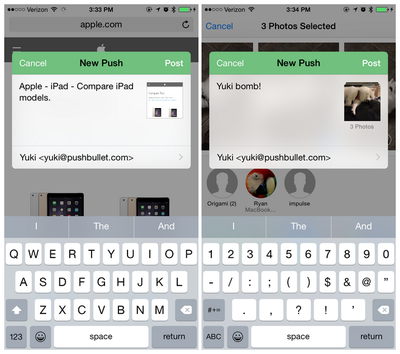
Pushbullet iPhone App
Pushbullet developer Ryan Olzenburg claims that iOS notifications cannot be pushed to Windows yet, but says to stay tuned for further updates. Pushbullet for iOS [Direct Link], Pushbullet for Mac [Direct Link] and the Safari extension are all free to download. If you use a different browser, extensions are available for Chrome, Firefox and Opera as well. We'll be going hands-on with Pushbullet soon.
Top Rated Comments

148 months ago
Here's the relevant portion of the Privacy Policy that most people would be interested in (emphasis added):

Do we disclose any information to outside parties?

We do not sell, trade, or otherwise transfer to outside parties your personally identifiable information. This does not include trusted third parties who assist us in operating our website, conducting our business, or servicing you, so long as those parties agree to keep this information confidential. We may also release your information when we believe release is appropriate to comply with the law, enforce our site policies, or protect ours or others rights, property, or safety. However, non-personally identifiable visitor information may be provided to other parties for marketing, advertising, or other uses.
Score: 5 Votes (Like | Disagree)
PowerBook-G5 Avatar
148 months ago
They wanted to, but never did it. If I remember correctly they presented it at WWDC 2013 with iOS 7.
Yeah, I do remember them mentioning Notification Sync r something like that back at WWDC 2013. Unfortunately, it has not been implemented yet (or if it has, it certainly does not work for me!)
Score: 4 Votes (Like | Disagree)
148 months ago
How are they making their money? Asking for a friend.

Edit: Google or Facebook login required? No thanks.
Score: 4 Votes (Like | Disagree)
148 months ago
Whats the name of the keyboard on the last picture?

Isn't thst just the regular Apple iOS keyboard?
Score: 2 Votes (Like | Disagree)
148 months ago
How are they making their money? Asking for a friend.

Edit: Google or Facebook login required? No thanks.
And, I read their not-so-private Privacy Policy. Marketing, marketing, and whoring out who its users are.

Pass.
Score: 2 Votes (Like | Disagree)
marvz Avatar
148 months ago
Didn't apple already do this a few months ago?

They wanted to, but never did it. If I remember correctly they presented it at WWDC 2013 with iOS 7.
Score: 2 Votes (Like | Disagree)

Popular Stories

macOS 27 on MacBook Pro

Apple Says macOS 27 Won't Be Compatible With These Macs

Wednesday June 3, 2026 8:29 am PDT by
During WWDC 2025, Apple revealed that macOS 26 Tahoe would be the final major macOS version for Intel-based Macs. macOS 27 will be compatible with Apple silicon Macs only, meaning that you will need a Mac with an M-series chip or a MacBook Neo with an A18 Pro chip in order to install the software update. Apple will unveil macOS 27 during its WWDC 2026 keynote this Monday, June 8, and the...
MacBook Neo on Yellow Feature

MacBook Neo is So Popular That Apple Reportedly Doubled Production

Wednesday June 3, 2026 9:24 am PDT by
On an earnings call in late April, Apple's CEO Tim Cook said that customer response to the MacBook Neo was "off the charts," and the popularity of the laptop has reportedly led the company to significantly boost production. Apple supply chain analyst Ming-Chi Kuo this week said he believes that MacBook Neo shipments to Apple were doubled from an initial target of 5 million units to 10...
iphone 18 pro blue%402x

iPhone 18 Pro: Dark Cherry, Light Blue, and Dark Gray Chassis Leaked [Update]

Thursday June 4, 2026 5:18 am PDT by
Update: Since publication, new information has come to light suggesting the images have been AI-manipulated and are not in fact iPhone 18 Pro chassis parts. The original article follows. The color options Apple is reportedly planning for the upcoming iPhone 18 Pro and ‌iPhone 18 Pro‌ Max have appeared online today in the form of images of chassis parts of unknown authenticity....