'Continuity Activation Tool' for Adding Handoff to Older Macs Now Supports Bluetooth 4.0 Dongles

A new update to the community-built "Continuity Activation Tool" for OS X Yosemite brings Bluetooth 4.0 USB dongle support, allowing users of some older model Macs to enable Handoff and other Bluetooth-related Continuity features on their machines without upgrading internal hardware. The tool does, however, come with some caveats users should be aware of before attempting to activate these features.

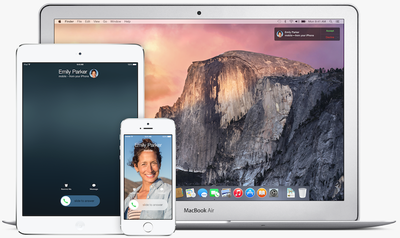
Apple's introduction of Continuity alongside OS X Yosemite promised a suite of features that interweave Mac and iOS devices without any hassle. Unfortunately for Macs old enough to not include Bluetooth 4.0 (and even a few older models that do include it), several of the features are officially unsupported on their machines and these users haven't been able to experience Continuity in its full form.
continuity
Addressing this issue, enterprising members of the MacRumors forums banded together to discuss the issue, leading to the creation of a "Continuity Activation Tool." Users with Apple devices unable to directly access the new feature could follow a set of instructions that would enable Bluetooth-linked Continuity features such as Handoff and Instant Hotspot to work on Macs previously unable to support the features.

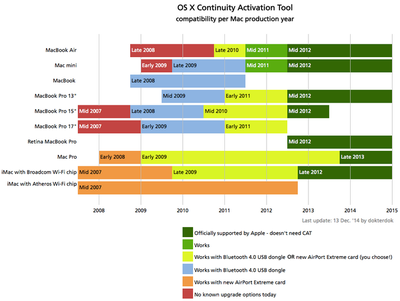
While only the software patch was required for the mid-2011 MacBook Air and Mac mini, other older Macs that didn't have Bluetooth 4.0, required a more difficult and set-up process involving the installation of completely new wireless cards.

This week, however, Continuity Activation Tool 2.0 has launched, bringing support for Bluetooth 4.0 USB dongles and thus allowing many of these older Macs without Bluetooth 4.0 to be more easily upgraded to support full Continuity. The update makes the process not only much easier, but far cheaper for the average user.
Screenshot (35)
Creator dokterdok makes a few important notes regarding Bluetooth 4.0 dongles and the Continuity Activation Tool, mainly remarking on dongles best used for the tool and those to steer clear of completely.

A few important notes about using CAT with USB Bluetooth 4.0 dongles:

-Bluetooth 4.0 dongles based on the Cambridge Silicon Radio CSR8510 A10 chip (e.g. Inatek Nano) are not compatible with CAT.
-The recommendation is to look for dongles based on the Broadcom BCM20702 chip, which are similar to the ones used by Apple in their Continuity compatible Macs. A few examples: Asus BT400, IOGEAR GBU521, GMYLE, and many others.
-Instant Hotspot currently doesn't work reliably when using a dongle. This is a known issue, no workarounds have been identified yet.
-Atheros Wi-Fi AirPort cards will prevent Continuity from working even when adding a Bluetooth 4.0 dongle. The System Diagnostic feature of CAT tells which Wi-Fi brand is active. There are no workarounds and no patch is expected to change this, an AirPort card upgrade is required.

As previously reported, most MacRumors forum users have found the tool to work successfully on Macs released circa-2011, but not much has been tested yet on the new Bluetooth 4.0 dongle update. MacRumors has successfully enabled Handoff on a 2010 MacBook Air using the tool and an IOGEAR Bluetooth 4.0 dongle, although it did require several reboots and logouts/logins from iCloud on both the Mac and iOS devices before it began working.

Due to the fact the Continuity Activation Tool requires the disabling of certain security protections like kext signing, and that it needs to sift and move through low-level files in your computer, users should be aware of what they are downloading and exercise caution in doing so. If still interested, users can download the updated Continuity Activation Tool from Github and, after opening the downloaded app, follow the on-screen instructions to get the feature up and running on an older model Mac.

Future Apple software updates may also replace the patches applied by Continuity Activation Tool, thereby breaking Handoff after updating. Reapplying the patch using the tool after updates will, however, restore the functionality.

Popular Stories

Touchscreen MacBook Feature

Apple Is Expected to Launch These Four MacBooks in 2026

Friday January 9, 2026 8:17 am PST by
2026 could be a bumper year for Apple's Mac lineup, with the company expected to announce as many as four separate MacBook launches. Rumors suggest Apple will court both ends of the consumer spectrum, with more affordable options for students and feature-rich premium lines for users that seek the highest specifications from a laptop. Below is a breakdown of what we're expecting over the next ...
iPhone Top Left Hole Punch Face ID Feature Purple

10 Reasons to Wait for This Year's iPhone 18 Pro

Thursday January 8, 2026 2:56 am PST by
Apple's iPhone development roadmap runs several years into the future and the company is continually working with suppliers on several successive iPhone models at the same time, which is why we often get rumored features months ahead of launch. The iPhone 18 series is no different, and we already have a good idea of what to expect for the iPhone 18 Pro and iPhone 18 Pro Max. One thing worth...
proposed unicode emoji 18%402x

Squinting Face, Pickle, and Lighthouse Among New Emoji Coming to iOS

Friday January 9, 2026 4:24 am PST by
The Unicode Consortium has published a draft list of emoji that could come to smartphones and other devices in the future. The list shared by Emojipedia outlines 19 emoji candidates under consideration for Emoji 18.0, which is expected to be finalized in September 2026. Among the proposed additions are a squinting face emoji, left- and right-pointing thumb gestures, a pickle, a lighthouse, a ...
apple homekit ios 18 5

Apple Reminding Users of Pending Home App Upgrade Requirement

Friday January 9, 2026 10:08 am PST by
Back in late 2022 and early 2023, Apple rolled out a new architecture for its Apple Home platform to deliver improved performance and compatibility, although the rollout came with some hiccups that forced Apple to pull and later re-release the upgrade. Three years later, Apple is now on the verge of ending support for the old version of the Home architecture, which may result in access to...
iOS 18 Siri Personal Context

Apple Confirms Google Gemini Will Power Next-Generation Siri This Year

Monday January 12, 2026 7:38 am PST by
In a statement shared with CNBC today, Apple confirmed that Google Gemini will power the next-generation version of Siri that is slated to launch later this year. "After careful evaluation, we determined that Google's technology provides the most capable foundation for Apple Foundation Models and we're excited about the innovative new experiences it will unlock for our users," the statement...
grok logo purple gradient

U.S. Senators Ask Apple and Google to Remove X and Grok Apps Over Sexualized Image Generation

Friday January 9, 2026 9:43 am PST by
In a letter to Apple CEO Tim Cook and Google CEO Sundar Pichai, U.S. Senators Ron Wyden, Ben Ray Lujan, and Edward Markey have requested that Apple and Google remove X Corp's X and Grok apps from their app stores over recent incidents of "mass generation of nonconsensual sexualized images of women and children." X has come under fire over the past week amid reports of Grok's AI image...
iOS 26 Glass Feature

iOS 26 Shows Unusually Slow Adoption Months After Release

Thursday January 8, 2026 3:44 pm PST by
iOS 26 is showing unusually slow adoption among iPhone users months after release, according to third-party analytics. Usage data published by StatCounter (via Cult of Mac) for January 2026 indicates that only around 15 to 16% of active iPhones worldwide are running any version of iOS 26. The breakdown shows iOS 26.1 accounting for approximately 10.6% of devices, iOS 26.2 for about 4.6%, and ...

Top Rated Comments

cobbyco Avatar
145 months ago
Really nice to see Apple trying to keep older macs up-to-date with new features when they could have just as easily not have. Well done!
This isn't Apple though...

...enterprising members of the MacRumors forums banded together to discuss the issue, leading to the creation of a "Continuity Activation Tool."...
Score: 15 Votes (Like | Disagree)
bennibeef Avatar
145 months ago
Continuity seems like a *HUGE* Personal Security risk to me.
What's to stop devices you don't own from receiving calls and messages and other private communications intended for you.

It's really strange that this feature is so celebrated.

It's not a customer benefitting feature at all but a really easy way to surveil.

You'd see it in movies all the time, when the bad guys clones someone's phone and theirs rings when his rings. They pick up and hear the entire conversation unbeknownst to the phone owner.

This seems to enable that.

You need to be logged into the same AppleID with the devices.
Score: 11 Votes (Like | Disagree)
appleguy123 Avatar
145 months ago
User ID's and Passwords are really easy to get with the right tools.
Besides with a *Backdoor* all they probably need is the Apple ID.

If someone hacked your Apple ID, they'd have access to all the information without even needing a Bluetooth connection.
Score: 10 Votes (Like | Disagree)
Patriot24 Avatar
145 months ago
Remember how all those Celebs had (private) pictures of themselves spread all over the web from their iDevices. Apple IDs can be acquired. Passwords can be brute forced.

You're conflating different issues here.

The celebrities that had their data exposed were not "hacked", they simply had weak, easily-guessable passwords and security questions. They also did not have two-factor authentication enabled. These issues have nothing to do with Continuity.
Score: 8 Votes (Like | Disagree)
Eweie Avatar
145 months ago
User ID's and Passwords are really easy to get with the right tools.
Besides with a *Backdoor* all they probably need is the Apple ID.

You're assuming a lot.
Score: 8 Votes (Like | Disagree)
jthompson666 Avatar
145 months ago
Continuity seems like a *HUGE* Personal Security risk to me.
What's to stop devices you don't own from receiving calls and messages and other private communications intended for you.

It's really strange that this feature is so celebrated.

It's not a customer benefitting feature at all but a really easy way to surveil.

You'd see it in movies all the time, when the bad guys clones someone's phone and theirs rings when his rings. They pick up and hear the entire conversation unbeknownst to the phone owner.

This seems to enable that.

It's tied to your iCloud account. All devices have to be logged in with exactly the same Apple ID in the systems iCloud preferences. It's not a matter of walking up to someone's iThing with my iThing and grabbing all their texts, calls etc
Score: 7 Votes (Like | Disagree)