

Following the launch of Parallels Desktop 10 last month, VMware has launched its new VMWare Fusion 7 virtualization software, bringing support for OS X Yosemite and improving compatibility with Windows 8.1. The release also adds a number of new features, including a new look, improved performance, enhanced connectivity, and optimization for Macs with Retina displays.
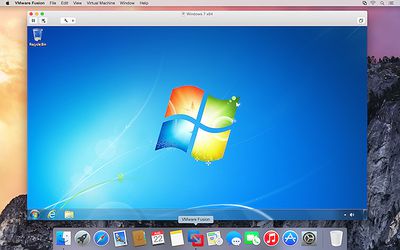
- Designed for OS X Yosemite Get a more Mac-like experience when running Windows applications on a Mac. The Fusion 7 updated Yosemite look and feel makes working with your Windows applications feel cleaner and more refined.
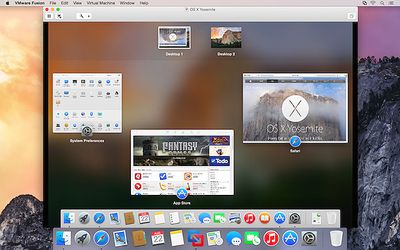
- Conquer Yosemite Discover OS X Yosemite by running it in a virtual machine with Fusion 7. Get more from your Mac by running OS X Yosemite and OS X Yosemite Server in virtual machines. Leveraging decades of innovation in leading the virtualization revolution, Fusion 7 is the most reliable way to develop and test new applications for the Mac and iOS.
- Ready for Windows 8.1 Get the most out of Windows 8.1 new features directly on your Mac and run Windows Store apps side-by-side with your Mac applications. With Fusion 7, view Windows Store applications in Launchpad and the Applications folder or put Windows Store Apps in the dock in Unity mode.
- Near-Native Performance With a highly optimized 64-bit engine and multicore processing power that makes the most effective use of the latest Intel Haswell processors, Fusion 7 runs Windows and Mac applications side-by-side faster than ever.
- Retina Display Optimization Windows never looked so good with Retina Display optimization for a crisp and detailed experience of your Windows applications. If your Mac has a native Retina display or is connected to one, Fusion 7 ensures you get a seamless experience when running Windows across Retina and non-Retina displays.
The more advanced VMware Fusion 7 Pro has also been launched, bringing the same features along with dual GPU optimization, virtual network management, enhanced support for cloned virtual machines, and more.
VMware Fusion 7 is available now for $69.99 while VMware Fusion 7 Pro is priced at $149.99. Those upgrading from VMWare Fusion 5 or 6 are also eligible for discounted pricing of $49.99 for VMWare Fusion 7 or $79.99 for VMWare Fusion 7 Pro.

Thursday December 11, 2025 8:49 am PST by Joe Rossignol
Apple seeded the second iOS 26.2 Release Candidate to developers earlier this week, meaning the update will be released to the general public very soon.
Apple confirmed iOS 26.2 would be released in December, but it did not provide a specific date. We expect the update to be released by early next week.
iOS 26.2 includes a handful of new features and changes on the iPhone, such as a new...
Friday December 12, 2025 10:56 am PST by Joe Rossignol
Macworld's Filipe Espósito today revealed a handful of features that Apple is allegedly planning for iOS 26.4, iOS 27, and even iOS 28.
The report said the features are referenced within the code for a leaked internal build of iOS 26 that is not meant to be seen by the public. However, it appears that Espósito and/or his sources managed to gain access to it, providing us with a sneak peek...
Thursday December 11, 2025 11:28 am PST by Juli Clover
Apple today released new firmware designed for the AirPods Pro 3 and the prior-generation AirPods Pro 2. The AirPods Pro 3 firmware is 8B30, up from 8B25, while the AirPods Pro 2 firmware is 8B28, up from 8B21.
There's no word on what's include in the updated firmware, but the AirPods Pro 2 and AirPods Pro 3 are getting expanded support for Live Translation in the European Union in iOS...
Friday December 12, 2025 10:10 am PST by Juli Clover
Apple today released iOS 26.2, the second major update to the iOS 26 operating system that came out in September, iOS 26.2 comes a little over a month after iOS 26.1 launched. iOS 26.2 is compatible with the iPhone 11 series and later, as well as the second-generation iPhone SE.
The new software can be downloaded on eligible iPhones over-the-air by going to Settings >...
Wednesday December 10, 2025 2:52 am PST by Tim Hardwick
Google Maps on iOS quietly gained a new feature recently that automatically recognizes where you've parked your vehicle and saves the location for you.
Announced on LinkedIn by Rio Akasaka, Google Maps' senior product manager, the new feature auto-detects your parked location even if you don't use the parking pin function, saves it for up to 48 hours, and then automatically removes it once...
Thursday December 11, 2025 10:31 am PST by Juli Clover
The AirTag 2 will include a handful of new features that will improve tracking capabilities, according to a new report from Macworld. The site says that it was able to access an internal build of iOS 26, which includes references to multiple unreleased products.
Here's what's supposedly coming:
An improved pairing process, though no details were provided. AirTag pairing is already...
Friday December 12, 2025 10:08 am PST by Juli Clover
Apple today released macOS Tahoe 26.2, the second major update to the macOS Tahoe operating system that came out in September. macOS Tahoe 26.2 comes five weeks after Apple released macOS Tahoe 26.1.
Mac users can download the macOS Tahoe update by using the Software Update section of System Settings.
macOS Tahoe 26.2 includes Edge Light, a feature that illuminates your face with soft...
Friday December 5, 2025 9:40 am PST by Tim Hardwick
Apple is about to release iOS 26.2, the second major point update for iPhones since iOS 26 was rolled out in September, and there are at least 15 notable changes and improvements worth checking out. We've rounded them up below.
Apple is expected to roll out iOS 26.2 to compatible devices sometime between December 8 and December 16. When the update drops, you can check Apple's servers for the ...
Can anyone give me just one reason, why to buy this if you want to run Windows on your Mac? We have Bootcamp and it's free - With VMware you have to pay for both Windows and VMware.
VMware must be slower than running a real install. And it costs you more.
You want to do something totally insane, like not reboot your Mac and run Windows apps right next to your Mac apps.
I know. But with VMware you have to purchase Windows AND WMware. I still see no reason.
But thx for the answers :-)
When your work requires to use just one application that only runs on Windows, you will see how shelling out $80 (by your boss) is a world changing shift from rebooting every thirty minutes.
Can anyone give me just one reason, why to buy this if you want to run Windows on your Mac? We have Bootcamp and it's free - With VMware you have to pay for both Windows and VMware.
VMware must be slower than running a real install. And it costs you more.
you can run windows within mac. among other things.
Where are all the comments like "annual subscription", "these upgrades should be free", "I will never buy from that company again" like we say in the Parallels thread? There is even less innovation warranting the upgrade prices in Fusion 7 than there is in Parallels 10.
All that being said - if you NEED to run Windows on a Mac - or a PC that is supposed to run Linux as its main operating system - you have chosen the wrong main platform for your daily work. You should have stayed with Windows, period.
I NEED to run windows on a mac (visual studio), but I also NEED to run xcode. I don't want 2 machines, and I want to easily share data between the 2 platforms.
There are use cases for parallels/vmware, otherwise why would people buy it (Also its a lot cheaper in hardware cost and support/backups/restore time to have a couple of virtual machines on one set of hardware, regardless of what operating systems are actually in play).
















