Apple Once Again Blocks Java 7 Web Plug-in

Earlier this month, Apple took the unusual step of remotely blocking Oracle's Java 7 browser plug-in due to a major security vulnerability, using the "Xprotect" anti-malware system built into OS X to enforce a minimum version number that had yet to be released. Within days, Oracle updated Java to address the issue, with the new version number making the Java plug-in usable on OS X systems once more.

As noted by French site MacGeneration [Google translation] and the Apple discussion forums, Apple has once again blocked the Java 7 plug-in using Xprotect.
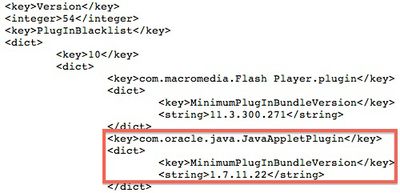
java_7_11_blacklist
The updated blacklist enforces a minimum Java plug-in version of 1.7.0_11-b22, while the latest version of the plug-in is 1.7.0_11-b21.

The exact reason for Apple's renewed block on the Java plug-in is unknown although reports immediately following the release of Update 11 earlier this month indicated that it fixed only one of the two bugs that contributed to the security vulnerability. In the wake of that news, cybersecurity officials recommended that most users disable Java even with the up-to-date plug-in installed.

Oracle Security Alert CVE-2013-0422 states that Java 7 Update 11 addresses this (CVE-2013-0422) and an equally severe, but distinct vulnerability (CVE-2012-3174). Immunity has indicated that only the reflection vulnerability has been fixed and that the JMX MBean vulnerability remains. Java 7u11 sets the default Java security settings to "High" so that users will be prompted before running unsigned or self-signed Java applets.

Unless it is absolutely necessary to run Java in web browsers, disable it as described below, even after updating to 7u11. This will help mitigate other Java vulnerabilities that may be discovered in the future.

If this continued issue is indeed the reason for the new block by Apple, it is unclear why the company waited several weeks to update its plug-in blacklist.


Popular Stories

iOS 26

iOS 26.4 and iOS 27 Features Revealed in New Leak

Friday December 12, 2025 10:56 am PST by
Macworld's Filipe Espósito today revealed a handful of features that Apple is allegedly planning for iOS 26.4, iOS 27, and even iOS 28. The report said the features are referenced within the code for a leaked internal build of iOS 26 that is not meant to be seen by the public. However, it appears that Espósito and/or his sources managed to gain access to it, providing us with a sneak peek...
iOS 26

iOS 26.2 Coming Soon With These 8 New Features on Your iPhone

Thursday December 11, 2025 8:49 am PST by
Apple seeded the second iOS 26.2 Release Candidate to developers earlier this week, meaning the update will be released to the general public very soon. Apple confirmed iOS 26.2 would be released in December, but it did not provide a specific date. We expect the update to be released by early next week. iOS 26.2 includes a handful of new features and changes on the iPhone, such as a new...
iOS 26

Apple Releases iOS 26.2 With Alarms for Reminders, Lock Screen Changes, Enhanced Safety Alerts and More

Friday December 12, 2025 10:10 am PST by
Apple today released iOS 26.2, the second major update to the iOS 26 operating system that came out in September, iOS 26.2 comes a little over a month after iOS 26.1 launched. ‌iOS 26‌.2 is compatible with the ‌iPhone‌ 11 series and later, as well as the second-generation ‌iPhone‌ SE. The new software can be downloaded on eligible iPhones over-the-air by going to Settings >...
AirPods Pro Firmware Feature

Apple Releases New Firmware for AirPods Pro 2 and AirPods Pro 3

Thursday December 11, 2025 11:28 am PST by
Apple today released new firmware designed for the AirPods Pro 3 and the prior-generation AirPods Pro 2. The AirPods Pro 3 firmware is 8B30, up from 8B25, while the AirPods Pro 2 firmware is 8B28, up from 8B21. There's no word on what's include in the updated firmware, but the AirPods Pro 2 and AirPods Pro 3 are getting expanded support for Live Translation in the European Union in iOS...
macOS Tahoe 26 Thumb

Apple Releases macOS Tahoe 26.2 With Edge Light

Friday December 12, 2025 10:08 am PST by
Apple today released macOS Tahoe 26.2, the second major update to the macOS Tahoe operating system that came out in September. macOS Tahoe 26.2 comes five weeks after Apple released macOS Tahoe 26.1. Mac users can download the macOS Tahoe update by using the Software Update section of System Settings. macOS Tahoe 26.2 includes Edge Light, a feature that illuminates your face with soft...
AirTag 2 Mock Feature

Apple AirTag 2: Four New Features Found in iOS 26 Code

Thursday December 11, 2025 10:31 am PST by
The AirTag 2 will include a handful of new features that will improve tracking capabilities, according to a new report from Macworld. The site says that it was able to access an internal build of iOS 26, which includes references to multiple unreleased products. Here's what's supposedly coming: An improved pairing process, though no details were provided. AirTag pairing is already...
ipados 26 1 slide over

Apple Releases iPadOS 26.2 With Multitasking Improvements

Friday December 12, 2025 10:09 am PST by
Apple today released iPadOS 26.2, the second major update to the iPadOS 26 operating system released in September. iPadOS 26.2 comes a month after iPadOS 26.1. The new software can be downloaded on eligible iPads over-the-air by going to Settings > General > Software Update. iPadOS 26.2 continues with the multitasking improvements that were added with iPadOS 26.1. You can now drag and...
bug security vulnerability issue fix larry

Update Now: iOS 26.2 Fixes 20+ Security Vulnerabilities

Friday December 12, 2025 11:11 am PST by
Apple today released iOS 26.2, iPadOS 26.2, and macOS 26.2, all of which introduce new features, bug fixes, and security improvements. Apple says that the updates address over 20 vulnerabilities, including two bugs that are known to have been actively exploited. There are a pair of WebKit vulnerabilities that could allow maliciously crafted web content to execute code or cause memory...

Top Rated Comments

jonatron Avatar
168 months ago
I've had Java disabled in my browser for the last several years, and I don't miss it at all. I think in all that time I have re-enabled it maybe once because there was an applet I actually wanted to run.

Just leave it turned off.

Classic if it doesnt affect me its not important.

This has stopped by company from using its finance system and staff are currently sat around twiddling their thumbs. Plus it took me an entire morning to work out what the issue was as there was no notification from Apple.

Thanks for your really useful advice!

I re-iterate what some others have said. THIS IS NOT ACCEPTABLE BEHAVIOUR from Apple and they need to sort this out pronto.
Score: 15 Votes (Like | Disagree)
ConCat Avatar
168 months ago
I've had Java disabled in my browser for the last several years, and I don't miss it at all. I think in all that time I have re-enabled it maybe once because there was an applet I actually wanted to run.

Just leave it turned off.
Some people actually need it in certain business environments. Apple really should quit doing this, and I mean now. If we want it disabled, we can disable it ourselves. How hard would it be to push the update to computers after Oracle updates Java with the security patch, not before?
Score: 12 Votes (Like | Disagree)
AppleScruff1 Avatar
168 months ago
Flash, Java, what's next? Internet access to Apple approved sites only?
Score: 9 Votes (Like | Disagree)
jwkay Avatar
168 months ago
Java is essential for the joint Norwegian bank login system BankID. If Apple has disabled this without a way of switching it back on, we are all locked out of our bank accounts!
Score: 8 Votes (Like | Disagree)
sonynair Avatar
168 months ago
They are also blocking Apple Java 1.6! Don't know where XProtect.meta.plist screenshot is from, but that is not what Apple pushed out this morning.

Here's what it really is!

<?xml version="1.0" encoding="UTF-8"?>
<!DOCTYPE plist PUBLIC "-//Apple//DTD PLIST 1.0//EN" "http://www.apple.com/DTDs/PropertyList-1.0.dtd">
<plist version="1.0">
<dict>
<key>JavaWebComponentVersionMinimum</key>
<string>1.6.0_37-b06-435</string>
<key>LastModification</key>
<string>Thu, 31 Jan 2013 04:41:14 GMT</string>
<key>PlugInBlacklist</key>
<dict>
<key>10</key>
<dict>
<key>com.macromedia.Flash Player.plugin</key>
<dict>
<key>MinimumPlugInBundleVersion</key>
<string>11.3.300.271</string>
</dict>
<key>com.oracle.java.JavaAppletPlugin</key>
<dict>
<key>MinimumPlugInBundleVersion</key>
<string>1.7.11.22</string>
</dict>
</dict>
</dict>
<key>Version</key>
<integer>2028</integer>
</dict>
</plist>


To re-enable Apple Java 1.6:

sudo /usr/libexec/PlistBuddy -c "Delete :JavaWebComponentVersionMinimum" /System/Library/CoreServices/CoreTypes.bundle/Contents/Resources/XProtect.meta.plist

or

sudo defaults write /System/Library/CoreServices/CoreTypes.bundle/Contents/Resources/XProtect.meta.plist JavaWebComponentVersionMinimum \"1.6.0_37-b06-434\"


To re-enable Oracle Java 1.7u11 edit the "/System/Library/CoreServices/CoreTypes.bundle/Contents/Resources/XProtect.meta.plist" using vi in Terminal and change:

<string>1.7.11.22</string>
to:
<string>1.7.11.19</string>

I posted the block on Twitter when I noticed it this morning.
https://twitter.com/sonynair/status/296935103383347201

Hope that helps someone!
Score: 7 Votes (Like | Disagree)
sseaton1971 Avatar
168 months ago
Exactly None.
Apple should NOT BE BLOCKING HTTPS web sites that use Java Plugins.
Especially as Java 7 now has Java FX, with better Table handling and Charts.
It looks like Apple Envy, attempt to Force People to HTML5,
vs. a superior Technology: Java 7.

Since Java is not installed by default on the latest version of OS X, I don't think Apple should be blocking it at all. If a user wants to use Java, he or she should be able to do so. If a user wants to be protected, perhaps he or she can install some sort of malware app that also checks for possible Java exploits. I can see why Apple would use Xprotect for their own in-house version of Java, but this is not their baby anymore.

----------

Simple logic that you don't want to follow maybe?

The police "as prevention" may say do not go down that dark alley in this neighborhood, you may be robbed.

You can then decide if you go or not. You may want to go there , because your stuff is in a shed down there and you have not had any incidents.

The police will not block the access to that dark alley, so you can't go down there and get your stuff.

A pop up saying:

WARNING using JAVA is insecure to use or so

with an

I understand the risks (not that people do) continue

or

Cancel

This notification can be turned off in the preferences file.

Nobody here says that we do not appreciate actions by Apple to make our user experiences as safe as possible.

But, when somebody switches something off in my computer, I'd like to know.

Al Franken will get on this very shortly and the government will get involved.
Not necessarily a good thing, just wait and see:-)

Thank you... I agree wholeheartedly! I don't need Apple babysitting me. I hope this all gets resolved very soon.
Score: 6 Votes (Like | Disagree)