Google Adds Street View to Web-Based Google Maps for Mobile Devices
As noted by iPhoneinCanada.ca, Google today added its Street View functionality to the web-based version of its Google Maps product available to iOS and other mobile device users. With Apple's transition to its own Maps app in iOS 6, users still wishing to use Google Maps have been able to do so through the maps.google.com web app, but the web version has been missing some features compared to the native iOS app that was previously available on Apple's devices.
Our own tests with Google Street View via the Google Maps web app were very straightforward. Just load up the maps.google.com web app in mobile Safari, tap on a location and a new bottom bar emerges with an icon of a person. Tap that and voila–you have Street View, which opens up in a new tab displaying the URL maps.gstatic.com.
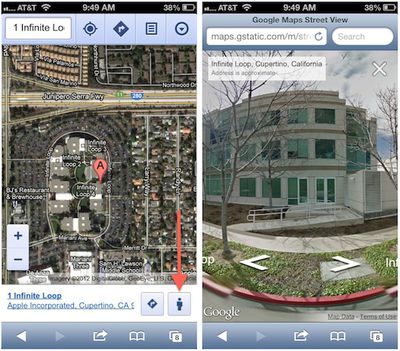
Access to the feature appears to require that users allow the web-based Google Maps app to access their locations.
Google is reportedly working on its own native iOS maps app for submission to the App Store, but that app is not expected to be ready for several more months. In the meantime, Google appears to be beefing up its web-based maps to help bridge the gap while also enhancing functionality for other mobile devices.
Popular Stories
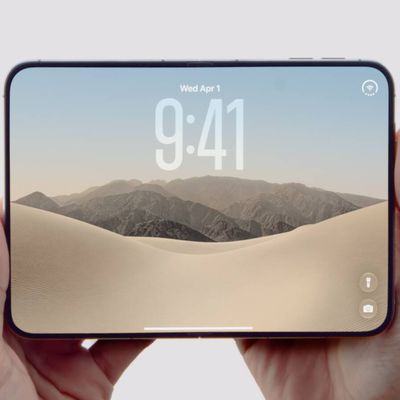
Apple today announced the "iPhone Duo," a new kind of iPhone featuring two screens and a foldable inner display.
The two halves of the iPhone Duo connect into a single continuous frame with the same aspect ratio across both displays, and Apple said the transition between open and closed is designed to feel fluid. When fully open, Apple says it is the thinnest iPhone ever made, with an...
Apple's "Surprise and Shine" event kicks off today at 10:00 a.m. Pacific Time, where we're expecting to see the foldable iPhone Duo, the iPhone 18 Pro and Pro Max, Apple Watch Series 12 and Ultra 4 models, new AirPods 5 earphones, and perhaps some other announcements.
Apple is providing a live video stream on its website, on YouTube, and in the company's TV app across various platforms. We...
At its event today unveiling the iPhone 18 Pro, AirPods 5, Apple Watch Series 12, and more, Apple announced that iOS 27 will be released later this month.
iOS 27 has already been available as a developer beta since June and as a public beta since July, and Apple today said that the update will be released for all users with a compatible iPhone model on Monday, September 14.
iOS 27 is...