

A few of the hundreds of "new" features in iOS 5 were "appropriated" from other developers. One, the ability to trip the iPhone camera shutter by pressing the Volume Up button instead of pressing a soft-button on-screen, came from a hidden feature that iOS developer tap tap tap included in a version of Camera+, an iPhone camera replacement app.


As an added bonus, if you press the Volume Up button on the Apple Earphones with Remote and Mic that comes with every iPhone that will trip the shutter as well.

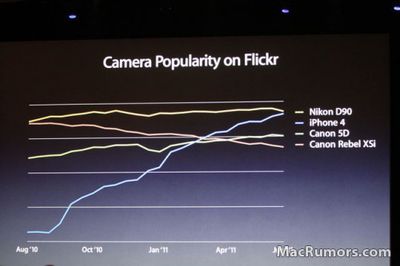
It's a pretty clever trick, and for those who use the iPhone to take pictures -- of which there are many (see below) -- it might come in handy. Combine the iPhone and headphone remote with a simple tripod/stand like the Glif, and you've got a cheap-and-functional camera rig.
camerapopularityflickr

Hat tip to Cult of Mac, and Charles for the video.

Related Forum: iPhone

Top Rated Comments

Westacular Avatar
189 months ago
A few of the hundreds of "new" features in iOS 5 were "appropriated (http://www.9to5mac.com/71850/ios-features-apple-borrowed-from-jailbreakers/)" from other developers. One, the ability to trip the iPhone camera shutter by pressing the Volume Up button instead of pressing a soft-button on-screen, came from a hidden feature (http://www.tuaw.com/2010/08/10/how-to-use-your-iphones-volume-buttons-for-shutter-control-in-c/) that iOS developer tap tap tap (http://taptaptap.com/) included in a version of Camera+ (http://itunes.apple.com/us/app/id329670577), an iPhone camera replacement app.

What's with the attitude from MacRumors all of a sudden regarding iOS 5 features? Both this and the Wi-Fi sync article had very unprofessional tones, and the accusations that Apple plagiarized from developers seems particularly unjustified in both these cases.

Phones have been using volume buttons as shutter releases for a decade. It was never really that novel; tap tap tap was just the only developer ballsy enough to sneak it into an app, and they were punished for it.


So why did Apple ban the functionality in the first place?

With iOS devices, the rationale has always been that an app gets full and exclusive control of what's happening on the screen, and any touch events, while hardware buttons are the sole domain of the operating system. Any app that tried to use a hardware button for a non-standard purpose was rejected on principle -- Apple didn't want to allow for the consequential possibility of user confusion, etc. Home button is for home, Volume buttons control volume, period, no exceptions.

Generally, it seemed like a sound policy, but taking photos is one of the few exceptions where a physical button would be really handy, and the volume buttons are in just the right spot to do it.

In July or August of 2010, tap tap tap proudly talked about adding that feature, and submitted a new version of Camera+ which included it (among other things). It was rejected by reviewers, based on the above policy.

So, tap tap tap said "ok" and resubmitted a version with that 'removed'. But what they'd really done is disabled the feature and added a hidden cheat code that would turn it feature. Knowledge of this went viral. Apple was not pleased at being tricked, and the banhammer came down: Camera+ was pulled from the app store, and tap tap tap went almost entirely silent for 4 months -- no blog posts, no updates to other apps, nothing. One might speculate Apple put them in the time out corner to think about what they did.

Then, in December, tap tap tap suddenly came back to life and released a brand new 2.0 version of Camera+, with lots of new features (and no presence or mention of the ill-fated volume-button-shutter feature, or discussion of the long absence).


Now, as to why Apple seems to have had a change of heart on this issue, there's a couple things to note:

-As mentioned in the keynote, over the past year since the iPhone 4's release, it's become abundantly clear how much serious photography is being done using iPhones. And tapping the on-screen button to take the photo is extremely awkward/clumsy in a wide variety of scenarios. Apple finally realized this point. (Or rather, the people inside Apple who were probably arguing for something like this all along were finally able to garner enough support or evidence to justify the change.)

-The boundaries of that split between "apps own the screen" and "iOS owns the buttons" are visibly eroding from the other side, especially in light of other iOS 5 features: Notification Center is adding a system-wide gesture, and frequent little notes on the top of the screen, and the 4-5 finger multitasking gestures are finally becoming an official preference option on the iPad. This is on top of the growing rainbow of multitasking items that add another line to the status bar (and steal taps to the area), such as phone calls, voice recording, VoIP calls, and Wi-Fi tethering.

Clearly, Apple is less beholden to that principle now than it was a year ago. I've not yet heard if they intend to allow 3rd party camera apps to also use the volume as a shutter button, but I don't see why they wouldn't. *Not* allowing it would *reduce* platform consistency.
Score: 5 Votes (Like | Disagree)
3rdparty Avatar
189 months ago
A little known existing feature of iOS4 is that the remote button starts/stops video recording...
Score: 2 Votes (Like | Disagree)
AdeFowler Avatar
189 months ago
What's with the attitude from MacRumors all of a sudden regarding iOS 5 features?

I sensed the same attitude during MacRumor's WWDC Live Feed; at times it bordered on immature.
Score: 1 Votes (Like | Disagree)
houdinize Avatar
189 months ago
I wonder if this means that other apps (like Camera+) will be able to access this and use the volume button and remote as the shutter within their app? I would think and hope so.
Score: 1 Votes (Like | Disagree)
Compile 'em all Avatar
189 months ago
So why did Apple ban the functionality in the first place?

They didn't ban anything. They simply felt that an "app" that "some might have and some might not" shouldn't define hardware behavior. And well, a new feature should be released in an all new feature release.
Score: 1 Votes (Like | Disagree)
spillproof Avatar
189 months ago
A little known existing feature of iOS4 is that the remote button starts/stops video recording...
And I was always annoyed that it didn't work for photos. Now I don't have to be!
Score: 1 Votes (Like | Disagree)

Popular Stories

iOS 26

iOS 26.2 Coming Soon With These 8 New Features on Your iPhone

Thursday December 11, 2025 8:49 am PST by
Apple seeded the second iOS 26.2 Release Candidate to developers earlier this week, meaning the update will be released to the general public very soon. Apple confirmed iOS 26.2 would be released in December, but it did not provide a specific date. We expect the update to be released by early next week. iOS 26.2 includes a handful of new features and changes on the iPhone, such as a new...
AirPods Pro Firmware Feature

Apple Releases New Firmware for AirPods Pro 2 and AirPods Pro 3

Thursday December 11, 2025 11:28 am PST by
Apple today released new firmware designed for the AirPods Pro 3 and the prior-generation AirPods Pro 2. The AirPods Pro 3 firmware is 8B30, up from 8B25, while the AirPods Pro 2 firmware is 8B28, up from 8B21. There's no word on what's include in the updated firmware, but the AirPods Pro 2 and AirPods Pro 3 are getting expanded support for Live Translation in the European Union in iOS...
iOS 26

iOS 26.4 and iOS 27 Features Revealed in New Leak

Friday December 12, 2025 10:56 am PST by
Macworld's Filipe Espósito today revealed a handful of features that Apple is allegedly planning for iOS 26.4, iOS 27, and even iOS 28. The report said the features are referenced within the code for a leaked internal build of iOS 26 that is not meant to be seen by the public. However, it appears that Espósito and/or his sources managed to gain access to it, providing us with a sneak peek...
iOS 26

Apple Releases iOS 26.2 With Alarms for Reminders, Lock Screen Changes, Enhanced Safety Alerts and More

Friday December 12, 2025 10:10 am PST by
Apple today released iOS 26.2, the second major update to the iOS 26 operating system that came out in September, iOS 26.2 comes a little over a month after iOS 26.1 launched. ‌iOS 26‌.2 is compatible with the ‌iPhone‌ 11 series and later, as well as the second-generation ‌iPhone‌ SE. The new software can be downloaded on eligible iPhones over-the-air by going to Settings >...
Google maps feaure

Google Maps Quietly Added This Long-Overdue Feature for Drivers

Wednesday December 10, 2025 2:52 am PST by
Google Maps on iOS quietly gained a new feature recently that automatically recognizes where you've parked your vehicle and saves the location for you. Announced on LinkedIn by Rio Akasaka, Google Maps' senior product manager, the new feature auto-detects your parked location even if you don't use the parking pin function, saves it for up to 48 hours, and then automatically removes it once...
AirTag 2 Mock Feature

Apple AirTag 2: Four New Features Found in iOS 26 Code

Thursday December 11, 2025 10:31 am PST by
The AirTag 2 will include a handful of new features that will improve tracking capabilities, according to a new report from Macworld. The site says that it was able to access an internal build of iOS 26, which includes references to multiple unreleased products. Here's what's supposedly coming: An improved pairing process, though no details were provided. AirTag pairing is already...
macOS Tahoe 26 Thumb

Apple Releases macOS Tahoe 26.2 With Edge Light

Friday December 12, 2025 10:08 am PST by
Apple today released macOS Tahoe 26.2, the second major update to the macOS Tahoe operating system that came out in September. macOS Tahoe 26.2 comes five weeks after Apple released macOS Tahoe 26.1. Mac users can download the macOS Tahoe update by using the Software Update section of System Settings. macOS Tahoe 26.2 includes Edge Light, a feature that illuminates your face with soft...
iOS 26

15 New Things Your iPhone Can Do in iOS 26.2

Friday December 5, 2025 9:40 am PST by
Apple is about to release iOS 26.2, the second major point update for iPhones since iOS 26 was rolled out in September, and there are at least 15 notable changes and improvements worth checking out. We've rounded them up below. Apple is expected to roll out iOS 26.2 to compatible devices sometime between December 8 and December 16. When the update drops, you can check Apple's servers for the ...
maxresdefault

iOS 26 Code Leak Reveals Apple Smart Home Hub Details

Thursday December 11, 2025 4:02 pm PST by
Apple is working on a smart home hub that will rely heavily on the more capable version of Siri that's coming next year. We've heard quite a bit about the hub over the last two years, but a recent iOS 26 code leak provides additional insight into what we can expect and confirms rumored features. Subscribe to the MacRumors YouTube channel for more videos. Macworld claims to have access to an ...











