

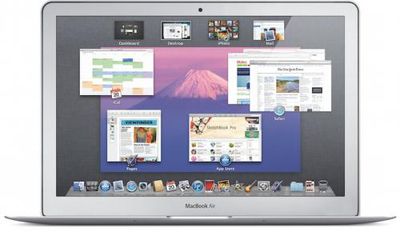
Alongside new MacBook Pros, Apple today announced the release of the first developer preview version of Mac OS X Lion. First demoed last October, Mac OS X Lion is set for a public launch this summer.
Apple today released a developer preview of Mac OS X Lion, which takes some of the best ideas from iPad and brings them back to the Mac for the eighth major release of the world's most advanced operating system. Lion features Mission Control, an innovative new view of everything running on your Mac; Launchpad, a new home for all your Mac apps; full screen apps that use the entire Mac display; and new Multi-Touch gestures. Lion also includes the Mac App Store, the best place to discover, install and automatically update Mac apps. The Lion preview is available to Mac Developer Program members through the Mac App Store today, and the final version of Lion will ship to customers this summer.
Apple also outlines a number of other features to be found in Lion:
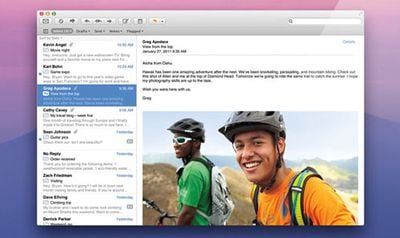
- Mail, a new version of Mail, with an elegant, widescreen layout inspired by the iPad; Conversations, which automatically groups related messages into one easy to read timeline; more powerful search; and support for Microsoft Exchange 2010;
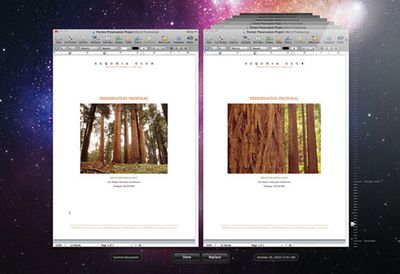
- Versions, which automatically saves successive versions of your document as you create it, and gives you an easy way to browse, edit and even revert to previous versions;

- AirDrop, a remarkably simple way to copy files wirelessly from one Mac to another with no setup;
- Resume, which conveniently brings your apps back exactly how you left them when you restart your Mac or quit and relaunch an app;
- Auto Save, which automatically saves your documents as you work;
- the all new FileVault, that provides high performance full disk encryption for local and external drives, and the ability to wipe data from your Mac instantaneously; and
- Mac OS X Lion Server, which makes setting up a server easier than ever and adds support for managing Mac OS X Lion, iPhone, iPad and iPod touch devices.
An updated overview of Mac OS X Lion is available on Apple's feature page for the forthcoming update.
Update: Here are some additional features we've learned:
- In 10.7, windows may be resized from all edges and corners, and the resize indicator has been removed.
- Support for OpenGL 3.2 on capable hardware.
- Application persistance. Apps and their states are saved when you logout and back in. Background apps may be terminated by Mac OS X and will restore if the user picks them again. Basically the concept of open and closed apps is gone.
















































