

In just over a month, we will finally have the long-awaited Apple Watch in our hands, or technically, on our wrists. The first thing you'll need to do once you get a hold of the new gadget is pair it with your iPhone and prepare to install apps for it.
To make sure you are ready for the big day, we have a how-to guide for pairing your iPhone with your Apple Watch. It won’t be hard, but it will use technology to pair the two devices in a way we’ve never seen before on an Apple product.
Apple Watch will require connection to an iPhone 5, 5s, 5c, 6, or 6 Plus running iOS 8.2. With varying methods of connectivity between the devices, Apple has developed a interesting system to pair the two devices using a camera feature.
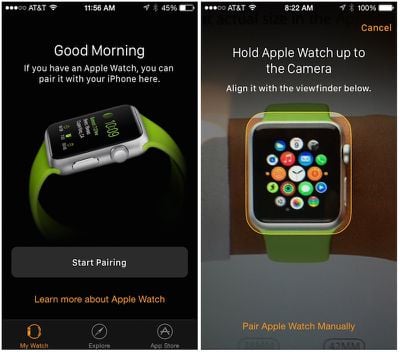
Steps for Pairing Apple Watch with iPhone
- Launch the Apple Watch App on your iPhone
- Tap "Start Pairing" on the main screen
- Hold Apple Watch up to your iPhone's camera so the screen is in alignment with the yellow outlined box on your iPhone's screen
- Follow the on-screen instructions provided in the Apple Watch app
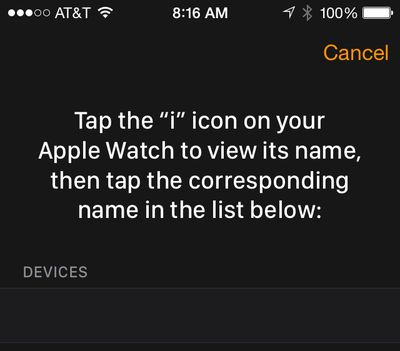
Alternate Method for Pairing Apple Watch Manually
If you do not wish to use the camera feature, you can alternatively pair Apple Watch with your iPhone manually.
- Launch the Apple Watch App on your iPhone
- Tap "Start Pairing" on the main screen
- Tap "Pair Apple Watch Manually" at the bottom of the camera viewfinder screen
- Tap the "i" icon on Apple Watch to see its name
- Select that name on the Apple Watch iPhone app from the list that appears on the screen
- Follow the on-screen instructions provided in the Apple Watch app
Download Apple Watch Apps
For the time being, third-party Apple Watch apps are actually hosted on the iPhone, with the apps able to serve various types of extensions to the Apple Watch for notifications and interactivity. Later this year, Apple will allow developers to begin developing apps that will run natively on the Apple Watch.
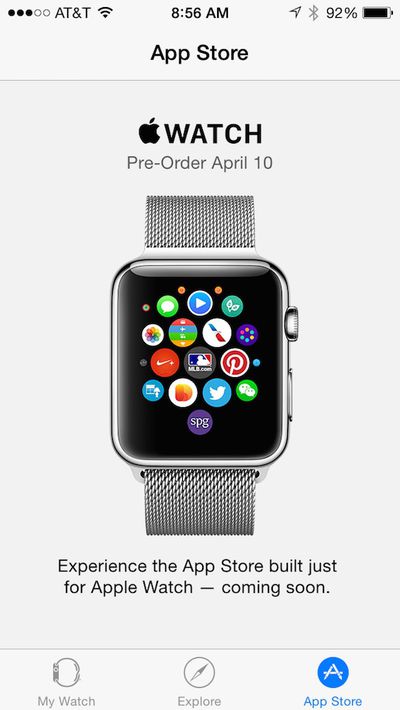
Once your Apple Watch is paired with your iPhone, you will have access to a host of settings to configure and personalize your Apple Watch. You will also be able to download apps from a special Apple Watch App Store, which will be updated regularly with new content from developers. An App Store for Apple Watch is built right into the Apple Watch companion app for iPhone, where Apple is expected to present a variety of Apple Watch-compatible apps in a manner similar to that seen for the regular App Store, which will presumably also include Apple Watch content.
Apple Watch will be available for pre-order in the first wave of nine launch countries on April 10, both online and in Apple retail stores, and will the device will launch in those countries on Friday, April 24. Prices start at $349 for the aluminum Apple Watch Sport model, $549 for the stainless steel Apple Watch model, and $10,000 for the gold Apple Watch Edition model. Starting April 10, you will be able to make a reservation or stop by to try on Apple Watch at an Apple retail store and pre-order your selection at that time.




















Top Rated Comments
They won't :apple: Watch requires a iPhone.
Well, look at the big brain on Brad!
So, was your test successful? Did the photo of the Apple Watch have enough verisimilitude to fool the companion app? I'm guessing you didn't get very far in your test.
Here's the test I want to see: Once you have an actual Apple Watch in hand, try the pairing process. However, instead of showing it your new watch, you show it the photo. If it still pairs, I'll be convinced.
Just curious: what your level of technical expertise is to say this?
The camera likely just picks up the numbers from the pin code for Bluetooth off of the watch screen similar to how it picks up the numbers on the credit card for Apple pay. Basically it's just Bluetooth pairing without having to manually enter the pin
Stop making sense.