The iPhone has quite a few built-in safety features that are designed to help keep you safe, and with New Year's Eve parties approaching, it may be worth a refresher on what your iPhone can do and the options you can enable to protect yourself.

Stolen Device Protection
Stolen Device Protection keeps your data safe in case someone steals your iPhone and also happens to know your passcode. Earlier this year, there were reports about thieves spying on a victim's passcode before stealing an iPhone, giving them access to Find My, iCloud Keychain passwords, banking accounts, and more.
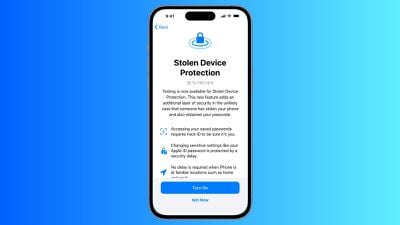
With Stolen Device Protection, Face ID or Touch ID authentication is required to view passwords in iCloud Keychain, turn off Lost Mode, erase content and settings, use saved Safari payment methods, and apply for or view an Apple Card. Authentication and an hour-long waiting period is required for changing an Apple ID password, changing an iPhone passcode, removing Face ID/Touch ID, and turning off Find My.
Stolen Device Protection is actually an iOS 17.3 feature, so there are some extra steps to use it. You'll need to download and install the iOS 17.3 public beta from Apple's beta software website and follow the instructions. It's a little bit of a hassle, but if you're going to be out in public and drinking, Stolen Device Protection is worth the effort just in case.
Note: Apple does not recommend installing beta software on a primary device, and there is a chance that the install could cause issues with your iPhone. We have not seen reports of iOS 17.3 causing problems, but it is worth weighing the benefits and downsides before opting for a beta.
Messages Check In
If you're going out somewhere, you can use the Check In feature in Messages to let a trusted friend or family member know where you're going and when you should arrive.
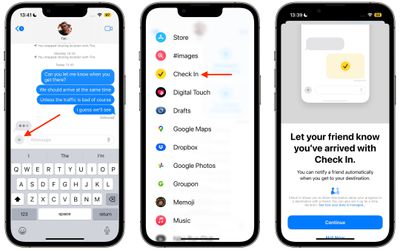
When you head out, turn on Check In, and it will keep track of your progress. If you stop along the way, Messages will ping you to see what's going on, and if you do not respond, helpful information like your battery level, location, route traveled, location of last iPhone unlock, and cellular status will be shared with the trusted person.
Check In is a feature that ensures someone is keeping an eye on you from afar, and if you're in an accident, accosted, or otherwise in trouble, it gives detailed information that can be used to find you.
Use Find My
You can also give a trusted friend or family member access to your location through the Find My app. Go to Find My, choose the People tab, and tap Share My Location.
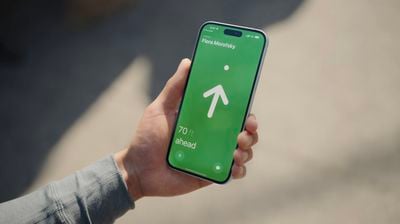
With the iPhone 15 and the second-generation Ultra Wideband chip, Find My can be used to track down your friends in a crowd if you're in a place like a concert venue. Note that both people need to have an iPhone 15 model.
Medical ID
Make sure your medical information is up to date in the Health app. Tap on your profile and then go to Medical ID to update your information.
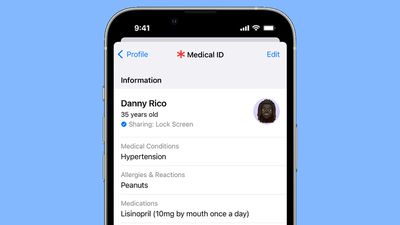
This is a quick way for someone to see your name, age, allergies, and emergency contacts, and it's data that can be viewed when your iPhone is locked.
Safety Check
It's a good idea to use the iPhone's Safety Check feature every now and then to see who you're sharing data with and who can track you. Open up the Settings app, go to Privacy and Security, scroll down, and tap on Safety Check.
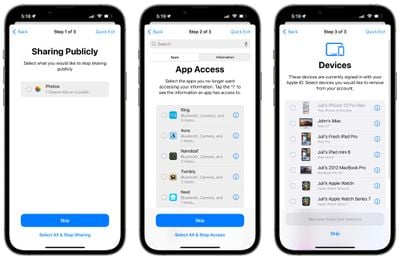
In an emergency, you can use the Emergency Reset option, but for a check up, you'll want to tap on Manage Sharing & Access. It will show you who can see your location, which apps have access to your location data, who you share photo albums with, who you share notes with, all devices logged in to your Apple ID, and more.
Features to Know About
- Emergency SOS - If you press and hold on the side button and either volume button on the iPhone, you can call emergency services surreptitiously. There's also an option to press five times on the side button to call, which is an even easier method. Adjust your SOS settings by going to Settings > Emergency SOS.
- Emergency SOS on Apple Watch - To contact emergency services on the Apple Watch, hold down the side button until the emergency call slider appears, and then drag it to make the call.
- Crash Detection - Crash Detection contacts local emergency services if a crash is detected. It's on by default, but double check that it's enabled under Settings > Emergency SOS > Call After Severe Crash.
- Satellite SOS - In a remote area where you don't have signal, you can use satellite connectivity to get help in an emergency. It's a feature available on the iPhone 14 and 15 models, and note that you will need to be outside and have a line of sight to the sky for the best connectivity.
- Use Siri - You can ask Siri to call 911 (or your local emergency number).
- Text 911 - Need to get help while staying quiet? You can text 911 in the United States by opening up the Messages app and typing 911 in the "To" field. This works on Apple Watch too.
Other Safety Tips
Know of other safety tips iPhone users should be aware of? Share them in the comments below.