Everything New in iOS 13.2 Beta 2: Delete Apps From Home Screen, Emoji, Siri Privacy and More - MacRumors
Skip to Content

Everything New in iOS 13.2 Beta 2: Delete Apps From Home Screen, Emoji, Siri Privacy and More

The first beta of iOS 13.2 brought a handful of changes like Deep Fusion support, Announce Messages With Siri and HomePod handoff options, but iOS 13.2 beta 2 introduces even more significant changes.

There are new emoji and new Siri privacy settings as we outlined earlier today, but there are also some other smaller changes worth highlighting.

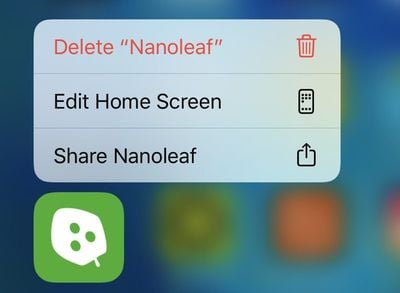
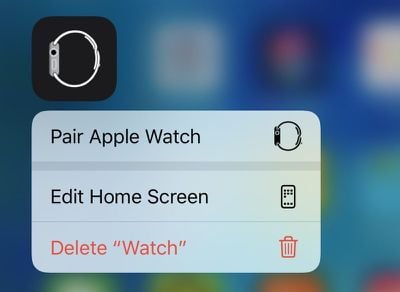
- Rearrange Apps - The "Rearrange Apps" option that pops up when 3D Touching or using a Haptic Touch on an app icon is now "Edit Home Screen."
deleteappsios132
- Delete Apps From Home Screen - There's a new option to delete apps right from the Home screen when pressing on them with a ‌Haptic Touch‌ or 3D Touch.

deleteappshomescreenios132
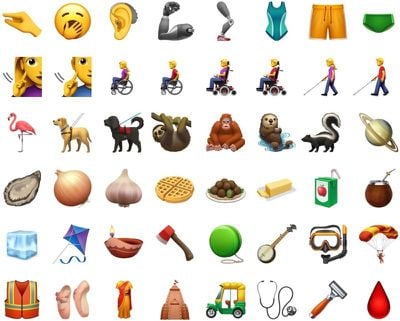
- New Emoji - iOS 13.2 beta 2 includes support for the Unicode 12 emoji with characters like yawning face, sloth, waffle, falafel, otter, and tons more.
newemojis

Image via Emojipedia

- New Emoji Picker - When using a multi-person emoji, there's a new skin tone picker that lets you select a different skin tone for each person.


- Siri Privacy Splash Screen - When you first install iOS 13.2, there's a new splash screen that lets you opt out of sharing ‌Siri‌ and Dictation audio recordings with Apple.

- Delete Siri History - In the ‌Siri‌ section of the Settings app, there's a new ‌Siri‌ and Dictation option that lets you delete all of the ‌Siri‌ and Dictation history associated with your iPhone from Apple's servers.
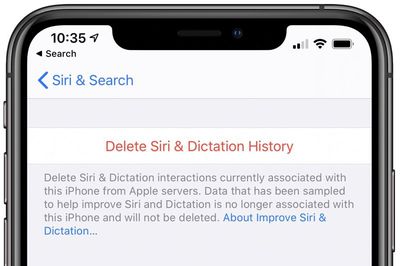
deletesirihistoryios132
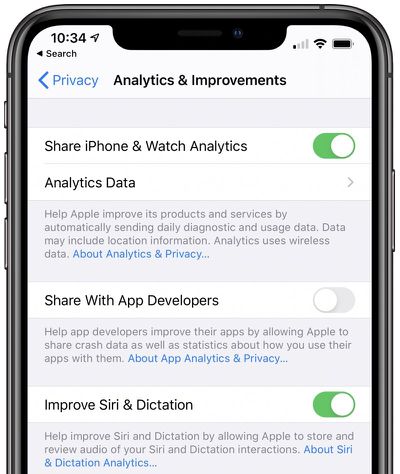
- Audio Recordings - In the Analytics and Improvements section of the Privacy portion of the Settings app, there is a new toggle to opt out of sharing your audio recordings with Apple for the purpose of improving ‌Siri‌.

optoutsiriios132
- AirPods Animation - In the last beta, we found images that reveal the design of the third-generation AirPods. This beta includes an animation that will walk users through changing the noise cancelation options on the new AirPods. Noise cancelation is one of the features expected to be included with the new earbuds.


- Video Recording - When capturing video on the new iPhone 11 and 11 Pro models, you can change the resolution and the frames per seconds settings of the video directly in the Camera app. To do so, tap on the small icons that are located at the top left of the interface. Resolution and FPS can be changed independently depending on where you tap.

cameracontrolsios132
Know of a feature that's new in iOS 13.2 beta 2 that we left out? Make sure to let us know in the comments and we'll update this article.


Related Forum: iOS 13

Popular Stories

Apple iCloud Plus expansion hero

iCloud+ Now Includes Apple TV, Apple Arcade, and Curated Apple Music Stations in Over 100 Countries

Tuesday September 15, 2026 1:43 am PDT by
Apple today announced a new subscription initiative that turns paid iCloud+ subscriptions into a broader services bundle in more than 100 countries. In select countries, Apple says every paid iCloud+ plan, including the cheapest 50GB tier, now includes Apple TV and Apple Arcade "at no additional cost," while family sharing extends the storage, TV and Arcade access to up to five people....
Everything New Your iPhone Can Do on iOS 27 Feature 1

50 New Things Your iPhone Can Do in iOS 27 - Out Now!

Monday September 14, 2026 10:48 pm PDT by
Apple released iOS 27 this week, and despite the company's focus this year on refining its flagship operating system and nixing bugs, there are still many additional features to explore, not least of which is Apple's new context-aware Siri, re-tooled for the generative AI era. Which iPhones Support Every iOS 27 Feature? This year's major iPhone software update isn't all about AI, though,...
iOS 27 Icon iPhone

iOS 27 Available Now With These 8 New Features

Monday September 14, 2026 9:00 am PDT by
Update — 10 a.m. Pacific Time: Apple has released iOS 27. During its iPhone 18 Pro and iPhone Duo event last week, Apple announced that iOS 27 will be released widely on Monday, September 14. iOS 27 should be available around 10 a.m. Pacific Time / 1 p.m. Eastern Time today via the Settings app, under General → Software Update. Below, we have highlighted eight new features and...

Top Rated Comments

techsantos Avatar
91 months ago
I've been waiting 84 years to be able to change recording settings within the camera app. What am I going to complain about now?
Score: 51 Votes (Like | Disagree)
shanson27 Avatar
91 months ago
you can now change the resolution and the frames per seconds settings of the video directly in the Camera app ('https://www.reddit.com/r/iOSBeta/comments/dg1nfc/feature_ios_132_developer_beta_2_introduces/').


Attachment Image
Score: 24 Votes (Like | Disagree)
alpi123 Avatar
91 months ago
The new delete app feature and being able to change the video settings within the camera app are nice touches.
Score: 11 Votes (Like | Disagree)
alexandr Avatar
91 months ago
see, i hate when they limit a purely software function (such as changing the resolution and the frames per second settings of the video in this case), to specific hardware in an attempt to steer more people towards buying new phones. so lame.
Score: 9 Votes (Like | Disagree)
91 months ago

I've been waiting 84 years to be able to change recording settings within the camera app. What am I going to complain about now?
you can complain that it's only on iPhone 11 models, even though there are a large number of models that have multiple recording options. I'm not on the beta, but that's what the post makes it sound like. It's incredibly frustrating to have to go so out of my way to change such a simple setting.
Score: 9 Votes (Like | Disagree)
StellarVixen Avatar
91 months ago
Unnecessary complication of Home Screen menu.
Score: 9 Votes (Like | Disagree)