iPhone 18 Pro Camera Controls: Adjusting Shutter Speed - MacRumors
Skip to Content

iPhone 18 Pro Camera Controls: Adjusting Shutter Speed

by

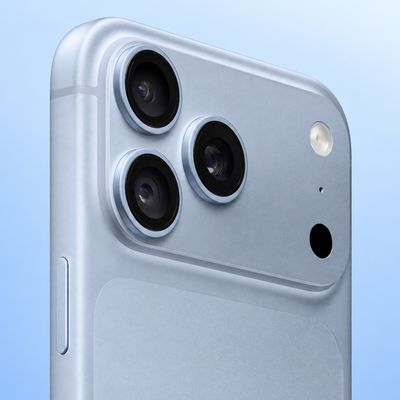
On iPhone 18 Pro and ‌iPhone 18 Pro‌ Max, Apple's new Pro controls in the Camera app allow you to adjust various aspects of the camera's settings, turning the app into a much more flexible photography tool. Here we explain how to adjust the shutter speed on the new ‌iPhone 18 Pro‌ models, and why you might want to do so.
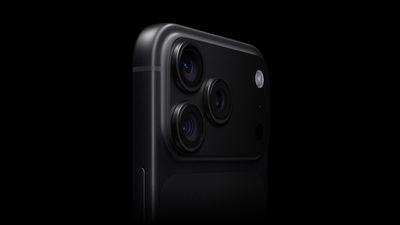
Black iPhone 18 Pro
On ‌iPhone 18 Pro‌, the new Pro Controls expand what you can adjust in the Camera app. They allow you to take greater control over aperture, shutter speed, and white balance, and even adjust the distribution of brightness via a histogram so that you can judge exposure, rather than you relying entirely on automatic decisions.

The new shutter speed control ranges from 1/1600 of a second to a full second. At 1/1600 second, the exposure is extremely brief. This freezes motion well and reduces blur from camera shake, but it lets in much less light. It's useful for moving subjects, bright scenes, or when you want a very crisp frame.

At the other end of the scale (1 second) the sensor gathers light for a full second. This lets in far more light, but anything moving during that second can blur. Bear in mind that hand movement can also soften the image, so a tripod or very steady support becomes more important at this setting.

In summary, faster speeds freeze motion but let in less light, while slower speeds gather more light at the expense of increased motion blur. Here's a general rule of thumb:

  • 1/1600s: Allows in less light ➝ less motion blur.
  • 1/250s: fairly fast ➝ useful for everyday movement.
  • 1/60s: slower, more light ➝ some risk of blur.
  • 1/4s: much more light ➝ obvious motion blur possible.
  • 1s: very bright exposure in low light ➝ strong blur if anything moves.

Follow these steps to adjust the shutter speed on ‌iPhone 18 Pro‌ and ‌iPhone 18 Pro‌ Max:

  1. In the Camera app, tap the button with six dots at the bottom-right of the interface.
  2. Select Shutter Speed from the control pane.
  3. Drag the shutter speed slider to adjust, from 1/1600 to 1 second. (Tap the A button at any point to return to Auto mode.)
  4. When you're happy with the white balance setting, tap the shutter button to take your photo.
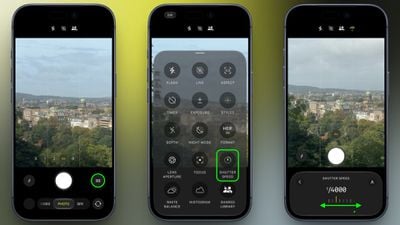
iphone 18 pro adjust shutter speed

Don't forget: the big upgrade this year is the new variable aperture on the Main camera. To learn how to manually adjust the aperture on ‌iPhone 18 Pro‌, check out our dedicated how-to guide.
Related Roundup: iPhone 18 Pro
Related Forum: iPhone

Popular Stories

iPhone 18 Pro Max Glacier Camera

Apple Says iPhone 18 Pro Max Users With AT&T Cellular Issue Need to Have Device Replaced

Friday October 2, 2026 8:21 pm PDT by
Apple today confirmed that a "small number" of iPhone 18 Pro Max users on the AT&T network have experienced an issue that causes the device to lose cellular service, thereby preventing phone calls, text messages, and data from working. Thousands of users complained about the issue across the Apple Support Community and other platforms. Apple said it released iOS 27.0.1 earlier this week and...

iphone 18 pro blue

Apple Reportedly Cuts iPhone 18 Pro Orders After Price Hike Dampens Demand

Friday October 9, 2026 5:23 am PDT by
Apple has asked some of its suppliers to cut production of iPhone 18 Pro components due to lower-than-expected demand, according to Nikkei Asia ($). Citing its own sources, the report claims that Apple has been more cautious about shipments since early September because of the rising cost of memory chips, leading to higher prices. Component orders for October were said to have been cut by...
iPhone 18 Pro Max ATT

AT&T and Apple Just Took Steps Toward Fixing iPhone 18 Pro Max Issue

Friday October 2, 2026 12:29 pm PDT by
AT&T and Apple are taking action today as they try to resolve iPhone 18 Pro Max cellular issues, according to MacRumors contributor Aaron Perris. Thousands of iPhone 18 Pro Max users have been unable to connect to the AT&T network for phone calls, text messages, and data. The underlying cause has yet to be disclosed, but AT&T and Apple continue to work toward a resolution. First, Apple...
Latest Stories
Nearly Every M5 MacBook Air Now $200 Off on Amazon
1 hour ago
Apple's HomeView Ships With Six-Month-Old Software
3 hours ago
Three New iPads Rumored to Launch in First Half of 2027
3 hours ago
Apple Offers Steps to Fix Daylight Saving Time Bug on Apple Watch
7 hours ago
Apple Watch Ultra 4 Hits All-Time Low Price With Amazon's $99 Discount
1 day ago
Reminder: Apple's Big Discount on Beats 360 Ear Cushions Ends Today
1 day ago
Here's a New Tour of Apple's HomeView Software
1 day ago
Apple Reveals New iPad Mini's Battery Capacity
1 day ago
Top Stories: Apple's Big MacBook Pro, iPad mini and iMac Updates
1 day ago
'Pluribus' Season 2 Reportedly Starts Production Today
1 day ago
iPhone 18 Pro Sales Surge in China, Offsetting Decline in U.S. and Japan
2 days ago
HomeView Software 27.2: Wallpapers, Control Center, and More
2 days ago
Apple Alerts Stores to iPhone Duo's Display Cracking Issue
2 days ago
iOS 27.3 Will Enable These Apple Intelligence Features in China
2 days ago
Apple Says iOS 27.3 Beta Coming Next Week
2 days ago
Apple's Flash Storage Suppliers Are Finally 'Getting Their Revenge'
2 days ago
14 New Things Your iPhone Can Do in iOS 27.2
2 days ago
iPhone Duo Review: One Week Later
2 days ago
Samsung Mocks iPhone Duo Display Cracks in New Ad Campaign
2 days ago
The MacRumors Show: OLED MacBook Pro, iPad Mini 8, and More
2 days ago
MacBook Pro With Touch Display: 15 More Details Revealed
2 days ago
Russia Places Apple on State Surveillance Registry
2 days ago
Halloween Weekend Brings Discounts on Apple Accessories and Pre-Orders
2 days ago
Apple Has Released More Than 25 New Products in the Past Two Months
2 days ago
Local Code Launches as Free, Private AI Assistant Tool for Mac
2 days ago
Apple Acquires Ascend.io
2 days ago
HomePod Mini 2 Launches Today: All the New Features
2 days ago
AirTag 2 4-Pack Drops to New Low Price of $69.99
2 days ago
Rian Johnson's iPhone Camera App Goes Viral
2 days ago
Where Did All the iPhone Duos Go? Mostly to Apple's Stores
2 days ago