

The first thing many iTunes Match users will want to do upon purchasing the service is to upgrade all their matched music to the 256Kbps. Unfortunately, there is no push-button ability to do this, but it is possible with a few simple steps -- but make sure you've already turned iTunes Match on and it has finished running its initial match.
From Macworld:
Make a Smart Playlist Create a Smart Playlist with the following attributes:
- Bit Rate is less than 256kbps
- Media Kind is Music
- Any of the following are true: (to create this conditional, option-click on the plus button in the Smart Playlist window) iCloud status is Matched, iCloud status is Purchased.
This creates a list of all your low-bit-rate files that are upgradeable—namely, ones iTunes Match has deemed Matched or Purchased.
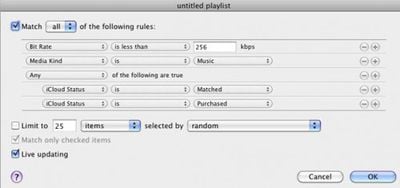
Once the smart playlist is created, select all the files by pressing Command-A or going to the Edit Menu and choosing "Select All." Then, press Option-Delete to remove all the songs from iTunes -- however, make sure not to select the box that removes the songs from iCloud. We only want to remove the local, lower quality sound files. When iTunes asks, select to move the files to the trash.
Finally, make sure that all the songs remain selected and right- or control-click any song and choose Download. This will start the long (depending on how many songs there are, possibly very long) downloading process. iTunes only downloads 3 items at one time, but Apple's iTunes servers are generally very responsive.
















Top Rated Comments
You should NOT DO THIS unless you have a FULL backup of your library you can go back to if you suddenly find you have the wrong version of a song you like!
When in doubt, backup. Then make a backup of your backup.
I don't believe that those songs are "matched" and they should not be in the smart playlist to begin with.
GL
I hope that Apple will allow us to try to match the unmatched songs in our libraries again as the matching algorithm improves. As it is I've got a number of albums which partially matched depute having been ripped from CD together.
No, the tracks should stay on all your playlists with cloud download links which will go away once you've re-downloaded everything. At least that's what happened on mine.
dude you should search and read, this has been covered.....relentlessly