

Apple's updated Mac Studio with M2 Max and M2 Ultra chips will launch in stores and begin arriving to customers this Tuesday. Ahead of time, the first reviews of the desktop computer have been shared by select media outlets and YouTube channels.
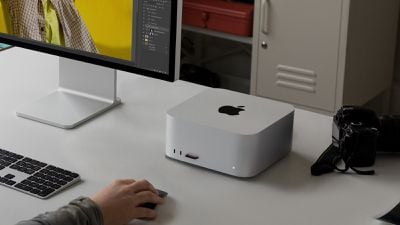
The new Mac Studio features the same overall design as the 2022 model, but now features Apple's latest M2 Max and M2 Ultra chips, faster Wi-Fi 6E and Bluetooth 5.3 connectivity, and support for high-impedance headphones. Pricing remains unchanged, with the M2 Max model starting at $1,999 and the M2 Ultra model starting at $3,999.
Apple has also updated the Mac Studio with an HDMI 2.1 port, enabling 8K external display support. Other ports remain unchanged.
Benchmarks
As expected, the M2 Ultra chip is a doubled-up M2 Max chip. It features a 24-core CPU, up to a 76-core GPU, a 32-core Neural Engine, and support for up to 192GB of unified memory. Apple says the M2 Ultra has a 20% faster CPU than the M1 Ultra, as confirmed by Geekbench 6 benchmark results that have already surfaced.
Jason Snell shared a wider set of benchmark results in his Mac Studio review at Six Colors: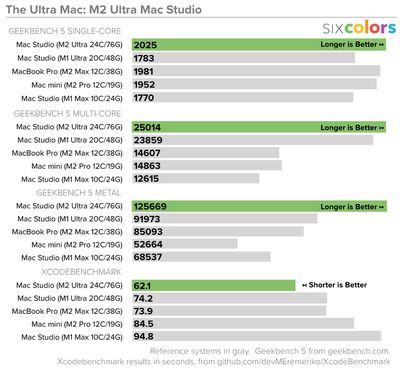
Written Reviews
PCMag's Joe Osborne explained the Mac Studio's expanded display support:
All of this helps widen the breadth of display support for the Mac Studio using M2 Ultra, increasing the maximum number of displays that can be connected at one time from five to eight—all at 4K resolution and a 60Hz refresh rate over DisplayPort via Thunderbolt 4. If you bring the display count down to six, then the panels can go up to 6K resolution at 60Hz. If you halve the connected displays from there, to three, they can all output up to 8K resolution at 60Hz.
If you need a faster refresh rate, you’ll need to use the included HDMI port, which can support up to 240Hz at 4K resolution. This connection also supports variable refresh rate, HDR, and multichannel audio.
Ars Technica's Andrew Cunningham said the Mac Studio remains silent:
I liked the Mac Studio a lot last year, and I still like it a lot. It performs well, it's dead silent, it will fit just about anywhere, and it's the rare Apple computer to put ports on the front, where they can actually be accessed. If you're eyeing an upgrade from an Intel Mac, the M2 Max version is a great step (at least performance-wise) for anyone used to a 27-inch iMac's performance level. The M2 Ultra can run circles around the Intel Mac Pro and should perfectly match the Apple Silicon Mac Pro, as it uses the same chip.
Engadget's Devindra Hardawar said the Mac Studio is the "ideal machine" for power users:
That leaves the $1,999 Mac Studio as the ideal machine for Apple power users. It'll be enough for video editing work, and it also comes standard with 32GB of RAM (it could use more than 512GB of storage, though). Step up to the $3,999 model with an M2 Ultra chip, and you've got a system that can destroy just about any task you put in front of it. The few professional users who need PCIe expansion can now opt for the M2 Ultra-equipped Mac Pro, which starts at an eye-watering $6,999.
More reviews were shared by CNET, TechCrunch, Macworld, and others.

















Top Rated Comments
(b) For CPU we knew that going in! The A15 is essentially the same IPC as the A14. And was designed as such; it was designed to be basically the same design as the A14 but everything optimized for significantly lower power while still achieving slightly higher frequency on the same process. This was valuable (battery life on A15 phones is noticeably longer) and part of the plan.
(There are a few very specific tweaks in A15 that help some specialized code, most notably javascript in Safari; but they are very specific.)
Same transfers to M2. It's basically M1 IPC, but a slightly boosted frequency.
None of this is catastrophic or an indication that Apple is running out of steam. The A15 should have been just an energy-saving tick to be followed by a performing-enhancing tock. It's quit possible that it was never supposed to even be in the M2; the next core would have done that job. But as I keep saying, covid screwed up the timelines and Apple was forced to scramble with what was available.