MacTigr Review - MacRumors
Skip to Content

Review: Das Keyboard's New 'MacTigr' is a Mechanical Keyboard for Mac Users

by

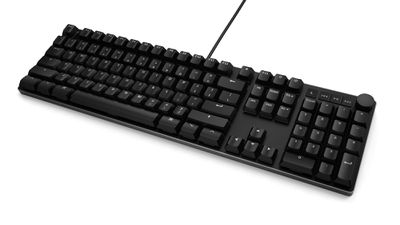
Das Keyboard today launched the MacTigr, a mechanical keyboard that's designed specifically for Mac users. The full-sized keyboard is made from a high-quality black metal that has a clean, modern look, and it features Cherry MX Low Profile linear switches.
das keyboard mactigr 1
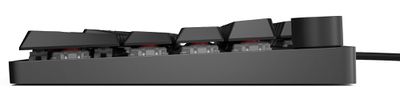
Design wise, the MacTigr is slim, more so than the average mechanical keyboard. It measures in at just over an inch tall (27mm), so it is classed as low profile for those who prefer that feel, though it is not the slimmest mechanical keyboard on the market.

For Mac users who are coming from a Magic Keyboard or the built-in keyboard of a Mac, even the 27mm height is a significant adjustment from what you might be used to if you're not familiar with mechanical keyboards. With a taller keyboard, your wrists need to be held in a different position, and it's definitely the kind of keyboard that benefits from a wrist rest.

As someone used to the key travel of a MacBook Pro, it took me a few hours to adjust to the MacTigr in my limited time testing it out. Comparatively, the keys have a somewhat mushy feel rather than a clicky feel, with 3.2mm of total travel (1.2mm pre-travel). Mechanical keyboards are designed to have high travel, and the key feel here will likely be satisfying to those who prefer full travel and more cushion when typing.
das keyboard mactigr 2
The MacTigr has a short bounce time so combined with the 3.2mm travel, I can type as fast as I can on any Mac keyboard. The keys will take a light touch, and as far as noise, this is a mechanical keyboard that's on the quieter side. There's definitely still a noticeable typing sound and this is far from a silent keyboard, but it's unlikely to annoy someone sitting nearby. Das Keyboard says it's meant to mimic "typing on a cloud," which is an apt description for the key feel.

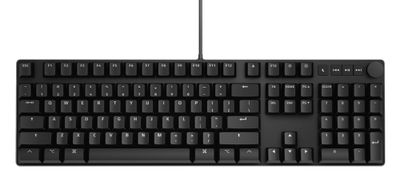
As with any mechanical keyboard, keycaps can be swapped, but by default it's using low-profile PBT keycaps. There are 105 total keys, including a full row of function keys, a number pad, arrows, and more, so it's ideal for those who are looking for a full keyboard.

There's a dedicated sleep key that I appreciated, along with media control buttons, dedicated keys for adjusting screen brightness, and a useful volume adjustment knob. The volume knob is a particularly nice touch because it has a soft feel to it, and it's in an easy-access spot on the right side of the keyboard. There are no other bells and whistles, such as backlighting, so that's something to be aware of. If you want RGB lighting and other fun features, this isn't the keyboard to get.

The MacTigr connects to a Mac via USB-C, and there are also two USB-C ports built in so you can attach accessories. NKRO or N-key rollover is available on the MacTigr and can be enabled with a keypress. With NKRO, all of the keys can be pressed at one time for faster typing, gaming, and other purposes.
das keyboard mactigr 3

Bottom Line

For Mac users looking for a slim, practical mechanical keyboard designed for the Mac, the MacTigr is worth checking out. It has Mac-specific keys for adjusting volume and activating the sleep feature, it's of a quality that aligns well with Apple products, and it provides a satisfying typing experience that allows for speed and accuracy.

How to Buy

The MacTigr can be purchased from the Das Keyboard website for $219.

Note: Das Keyboard provided MacRumors with a MacTigr keyboard purpose of this review. No other compensation was received, and the keyboard was returned at the end of the testing period.


Top Rated Comments

53 months ago
I've had a Das Keyboard for about 10 years or so now. Still works as well as when I bought it. They're expensive, but they're built like tanks. I'm not affiliated with them in any way, but just a happy customer.
Score: 6 Votes (Like | Disagree)
Rychiar Avatar
53 months ago
I can't even type on old keyboards anymore. or even basic PC keyboards. my fingers like trips on the keys after all these years of iMac keyboards
Score: 6 Votes (Like | Disagree)
tedwill Avatar
53 months ago
I'm having flashbacks to floppy disks, dial up network access and x86 desktop computers.
Score: 5 Votes (Like | Disagree)
cateye Avatar
53 months ago

$219?????

Bruh, I used to buy genuine Apple ADB II keyboards for like twenty quid in the mid-90's.

You can get a mechanical Logitech wireless mechanical for like, $25.

Miss me paying over fifty clams for a keyboard...
You can also get perfectly functional and well-built Android phones and PC laptops for far less than the equivalent Apple devices. Yet, we choose to buy the more expensive devices with specific design or functional advantages for us. That's great that you've drawn a line in the sand based on price for your keyboards. Perfectly reasonable decision for you and I'm not trying to tell you otherwise. But, don't be surprised if in a thread about a boutique-y keyboard others don't feel similarly—I spend all day typing. I'm sure as hell not going to do it on the default, one-size-fits-all keyboard my computer came with (especially not Apple keyboards which, to me, are garbage) or the cheapest option available (in every sense of the word).
Score: 4 Votes (Like | Disagree)
martinlk Avatar
52 months ago

Serious question: Whats the difference between a "Mac Compatible" keyboard and the thousands of windows ones out there, apart from the Command key having a Windows logo?

I've been using a Dell keyboard for years on my macs and haven't noticed anything missing, more to my surprise all the FN functions (spotlight etc.) work exactly as they do on a mac.
The fn key on a Mac keyboard registers its own separate key press whereas on any other keyboard it's simply a modifier key that does nothing except when pressed along with a limited selection of other keys. MacOS uses the fn key for a bunch of things that become lost on a Windows keyboard unless you use software, such as Karabiner Elements, to emulate a native fn key.

Examples:

* Pressing or holding the fn key to start dictation.
* Using the fn key along with the arrow keys instead of Page Up, Page Down, Home, End.

Note that many keyboards that claim to be "Mac compatible" don't have the correct fn key behavior -- instead they often just seem to naively swap the Windows and Alt keys.
Score: 3 Votes (Like | Disagree)
53 months ago
A must have for serious writers such as myself. The keyboards Apple are shipping with their computers are barely above toy-level imo.
Score: 3 Votes (Like | Disagree)

Popular Stories

Dynamic Island iPhone 18 Pro Feature

iPhone 18 Pro Prices Estimated Ahead of Apple Event Next Week

Thursday September 3, 2026 3:41 am PDT by
Less than a week before Apple debuts new iPhone 18 Pro models, research firm TrendForce has estimated the prices of the devices based on the latest hardware cost environment. TrendForce's price estimates compared to last year's models look like this: Model Starting Price Model Starting Price Change iPhone 17 Pro $1,099 iPhone 18 Pro $...
iPhone Handoff Feature

iOS 27 Introduces New 'iPhone Handoff' Feature

Wednesday September 2, 2026 12:35 pm PDT by
Apple has added a new "iPhone Handoff" feature to iOS 27 that will allow you to switch between two iPhones while using the same phone number on each device. This functionality was briefly mentioned during the WWDC 2026 keynote in June, on a slide that listed hundreds of new features coming in iOS 27 and corresponding software updates, but Apple never shared any further details at the time. ...
Apple Foldable Thumb

iPhone Ultra's Very High Price and Features Revealed in New Report

Thursday September 3, 2026 7:33 am PDT by
Ahead of Apple's event on Wednesday, September 9, where it is expected to unveil its first-ever foldable iPhone, Taiwanese research firm TrendForce today outlined the device's estimated price range, features, and some other key details. In the U.S., TrendForce estimated that the foldable iPhone will have a starting price of $2,099 to $2,299 and said the highest-end configurations could...