Video Doorbell G4 Review - MacRumors
Skip to Content

Review: Aqara's Video Doorbell G4 Offers HomeKit Secure Video in a Sleek Design

by

The Aqara Video Doorbell G4 is the first HomeKit Secure Video smart doorbell that can operate via battery power alone, and comes as the first full-featured ‌HomeKit Secure Video‌ smart doorbell in many regions around the world.
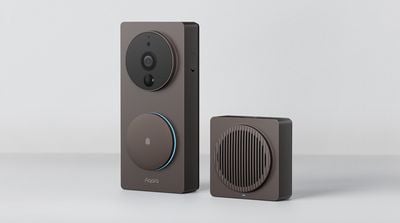
aqara G4 launch
Beyond ‌HomeKit Secure Video‌, the Doorbell G4 offers a wide range of features and capabilities, including 1080p video recording, a 162-degree wide-angle lens, two-way audio communication, motion detection, night vision capabilities, weather resistance, support for microSD cards up to 512GB, and more.
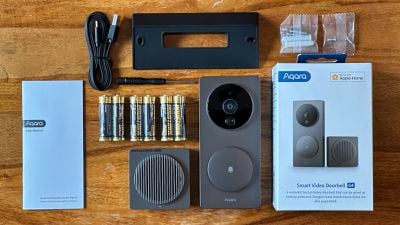
aqara doorbell g4 box contents
Priced at $119.99, the Doorbell G4 comes with a chime repeater speaker, USB-A to USB-C cable, 20-degree wedge, Philips head screwdriver, six AA batteries, two wall screws and anchors, and two wedge screws.

Design

The Aqara Video Doorbell G4 has a sleek and modern design with a Black or Space Gray-like "Shadow" finish. The large circle at the top of the doorbell contains the 1080p camera, an LED status light, a motion sensor that can detect movement within a five-meter range, and a microphone for two-way audio communication. The button at the bottom is illuminated by an LED around its edge and satisfyingly clicks when pressed. A small speaker for audio output and a sprung screw that releases the backplate are located on the sides.
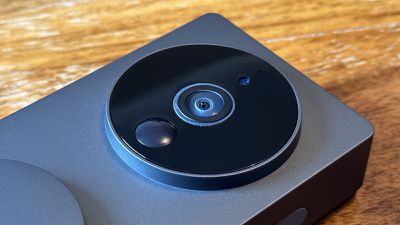
aqara doorbell g4 lens
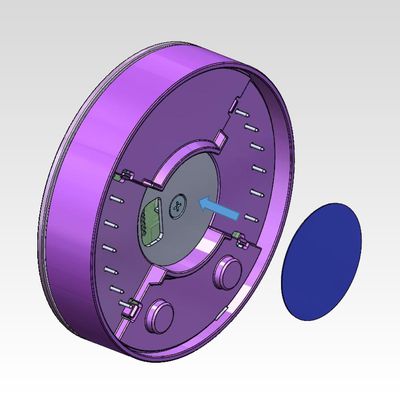
Inside, there is space for six AA batteries, wires for continuous direct power, and a small button that triggers the anti-tamper alarm. The back of the doorbell is adhesive, meaning you can avoid damaging walls with screws if you are happy to rely on it, and has two screw holes for more secure attachment. You can also use the optional angled mounting bracket if you want to get a better framed image of anyone standing directly in front of your door.
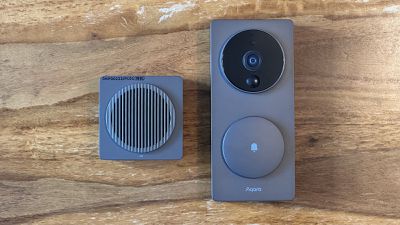
aqara doorbell g4 and chime repeater
The chime repeater module's design matches the Doorbell G4, adding an LED indicator, a microSD card slot, a USB-C port for charging, and a Menu bottom. Pressing this button toggles the bell noise on and off, while holding it down for longer can reset network settings, or reset to factory settings.

The doorbell is made of durable plastic and Aqara says that it has an IPX3 rating, which should mean that it can stand up to all but the most extreme weather conditions. That being said, I am not sure that the device would be able to withstand significant external force. While this isn't an issue for most installations, if it fell, I would not be surprised if it broke entirely. This lightweight construction is also evident with the chime, which lacks substantial internal components.
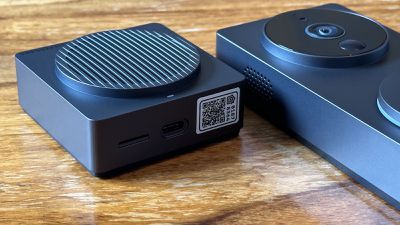
aqara doorbell g4 chime repeater
Moreover, if the chime did break and become unusable, purchasing a new one is not an option because the G4 and the chime are pre-paired. The chime links to HomeKit and the 2.4GHz frequency of your home Wi-Fi network, rather than the doorbell itself. The doorbell connects to a unique Wi-Fi frequency generated by the repeater, which can improve overall reliability.

Set Up

The process of adding the Doorbell G4 to the Aqara app and ‌HomeKit‌ is essentially the same as with any other Aqara device. Since it's a WiFi device rather than a Zigbee child device, you do not need to connect it to a hub, meaning that the process is effectively the same as adding an Aqara hub or camera accessory.

After installing the six AA batteries and ensuring that the chime repeater is powered, you need to open the Aqara app and tap "Add Accessory." The app then guides you through the setup process, which is relatively straightforward. It will also update the device's firmware if necessary during this process.

You have the option of adding the Doorbell G4 to Apple's Home app and using ‌HomeKit‌ Secure video either by scanning the ‌HomeKit‌ code on the repeater or by following the setup process within the Aqara app. While the Home app has basic video recording options, the Aqara app provides a wide range of options. You can customize settings such as motion sensing, video resolution, the LED indicator, and more to meet your specific needs. Once the setup process is complete, you can use the Aqara Video Doorbell G4 with Apple ‌HomeKit‌ to monitor your door, receive notifications, and create automations.

Functionality

The Doorbell G4 has a 16:9 field of view, so it may not capture things like packages left on a porch unless the it can be set back quite a bit. This may be an issue for some users who need a square view similar to many other video doorbell cameras. Even so, the 16:9 view is still good for capturing a wider view.

Notifications and integration with the Apple TV and HomePod work perfectly, sounding off a chime when pressed and immediately showing the video feed on a TV. Native Apple Home features like facial recognition, activity zones, automations, and motion detection also work very well, but Aqara discourages use of the motion sensor for an extended period if you plan to use battery power alone.

The doorbell's speaker is not particularly clear, but it serves its purpose and this is normal for products in this category. The repeater can get very loud and you can set your preferred volume in the Aqara app.

‌HomeKit Secure Video‌ does not record all of the time, so if this is your planned use-case, you will need to use Aqara's app, which also enables additional facial recognition and local storage options. The Doorbell G4 will also support Matter when the specification for cameras is released.

Bottom Line

Overall, the Aqara Smart Video Doorbell G4 is a richly featured smart doorbell with excellent ‌HomeKit‌ integration. The Home app, automations, facial recognition, and notifications work flawlessly with the doorbell. For those who want a smart doorbell but are hesitant to set up a wired connection, the G4 is also an ideal solution, especially as it is the only battery-operated ‌HomeKit‌ Security Video smart doorbell on the market.
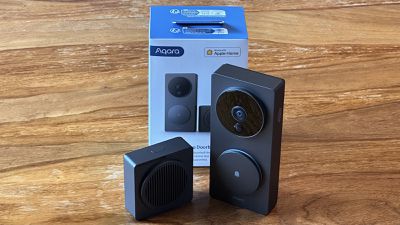
aqara doorbell g4
Personally, I would have preferred the doorbell to have a more square field-of-view so that it can more easily capture deliveries that are left outside, rather than its 16:9 framing that can sometimes cut off the bottom of the frame compared to other smart doorbells. I also would have appreciated it if the doorbell was rechargeable via USB-C rather than using AA batteries, especially since the six AA batteries only last around four months.

With options for battery operations or wired power, multiple mounting possibilities, and dozens of software settings, the Aqara Video Doorbell G4 is surprisingly versatile. Its sleek design, seamless ‌HomeKit Secure Video‌ support, and reliable operation make the doorbell a great choice for anyone in the Apple ecosystem looking to monitor their front door.

How to Buy

Priced at $119.99, the Aqara Smart Video Doorbell G4 is available from Amazon in both North America and Europe, as well as via selected Aqara retailers worldwide.

Note: Aqara provided MacRumors with a Video Doorbell G4 for the purpose of this review. No other compensation was received.

Top Rated Comments

diamornte Avatar
47 months ago
Another doorbell/outdoor camera that is only 1080p? We are living in the era of 4k, what gives with all these companies not offering a 4k camera?
Score: 7 Votes (Like | Disagree)
47 months ago

I also would have appreciated it if the doorbell was rechargeable via USB-C rather than using AA batteries....

Why this? It seems that trying to recharge a screwed-to-the-outdoor-wall camera device would be a huge PITA. Am I missing something?
Score: 5 Votes (Like | Disagree)
tobefirst ⚽️ Avatar
47 months ago
I wouldn't call that design "sleek." Maybe that's just me. 🤷🏼‍♂️
Score: 5 Votes (Like | Disagree)
47 months ago

Another doorbell/outdoor camera that is only 1080p? We are living in the era of 4k, what gives with all these companies not offering a 4k camera?
Homekit only supports 1080p
Score: 5 Votes (Like | Disagree)
tothemoonsands Avatar
47 months ago
Personally I avoid Aqara since they have been known in the past to phone home. Google to find more information. While some report successfully blocking access to Chinese/Xiaomi servers via DNS filtering, others have contradicted that report and found unidentified traffic leaking out in other ways.
Score: 5 Votes (Like | Disagree)
sammo123321 Avatar
47 months ago
Using this now, one downside to using batteries only is it requires 2900mah+ to function best. Otherwise I was getting "low battery" warnings. Purchased 3000mah rechargeables and it's been solid since.
Score: 4 Votes (Like | Disagree)

Popular Stories

Smart Thermostat Perspective Feature

First Look at LG's Smart Home Products Made With Apple

Wednesday October 7, 2026 6:26 am PDT by
FCC filings reveal the designs of three upcoming LG smart home accessories that Apple reportedly helped develop, including a thermostat, a temperature sensor, and a deadbolt lock. Yesterday, Bloomberg reported that Apple is working with LG Electronics on accessories for its upcoming home hub and other home products, citing regulatory documents without sharing the filings. FCC records MacRumor...
iOS 26 Home Feature

Apple Working to Expand HomeKit

Wednesday September 30, 2026 4:46 am PDT by
Apple is working to revamp HomeKit amid a new push into the smart home market, according to Bloomberg's Mark Gurman. In a report that detailed the impending launch of next-generation Apple TV and HomePod mini models, as well as Apple's all-new smart home hub, Gurman said that the company is developing broader smart-home ecosystem software for its devices. Apple apparently plans to expand ...
iOS 26 Home Feature

Leak Details iPhone Features for Apple's LG Home Accessories

Friday October 9, 2026 7:50 am PDT by
Smart home accessories that Apple reportedly helped LG develop could offer iPhone proximity controls and a way to begin setup before the devices have power, according to findings shared by the leaker known as "pdfu." The findings concern the upcoming LG-branded accessory range that Bloomberg revealed earlier this week. The lineup reportedly includes a thermostat, temperature sensor, deadbolt ...
Latest Stories
Best Buy Opens Pre-Orders for PROLED XDR MacBook Pro With $100 Bonus Gift Cards
4 hours ago
Here's Everything Apple Announced This Week
5 hours ago
Here's a Real-World Look at the New MacBook Pro's Glowing Apple Logo
5 hours ago
How Accurate Were Rumors About Apple's OLED Touchscreen MacBook Pro?
5 hours ago
Apple Has 8 New Products Available for Pre-Order
7 hours ago
iPhone Duo: Turn the Hinge Into an App Launcher
7 hours ago
OLED MacBook Pro vs. Mini-LED MacBook Pro: Size and Weight Compared
8 hours ago
Best Buy Offering Up to $100 Gift Cards With iPad Mini 8 and M6 MacBook Pro Pre-Orders
8 hours ago
Adding Touch Didn't Cost the MacBook Pro Any Battery Life
9 hours ago
Apple Releases Redesigned Mac Chargers and 'World Travel Adapter Kit'
9 hours ago
Apple Executives Explain Why the MacBook Pro Finally Has a Touch Screen
9 hours ago
New MacBook Pro Features Deeper Bass and Improved Closed-Lid Audio
9 hours ago
New MacBook Pro Offers Up to 16TB of Storage, Double Previous Limit
10 hours ago
Apple's New Touchscreen MacBook Pro Costs Up to $14,549
10 hours ago
Apple Brings Dynamic Island to Mac for the First Time
10 hours ago
Mac Studio With M5 Ultra Now Available With 512GB RAM for $22,299
10 hours ago
Illuminated Apple Logo Returns to MacBook Pro After 10 Years
10 hours ago
Apple Announces OLED MacBook Pro With Touch Display
10 hours ago
Apple Store Down Ahead of 'Pro and Tell' Launch Today
11 hours ago
South Korea Rules Against Apple Over App Store Payment Rules
11 hours ago
iOS 27.2 Adds Selfie-Based Age Verification
13 hours ago
Beats 360 Get First Price Drop Alongside Return of Record Low for AirPods 4
13 hours ago
Apple Raises MacBook Neo's Starting Price to $649 on Education Store
13 hours ago
MacBook Studio?
MacBook Studio?
14 hours ago
Apple CEO John Ternus Teases Touchscreen MacBook Pro: 12 Final Rumors
14 hours ago
Touchscreen MacBook Pro's New Hinge Linked to iPhone Duo 2
15 hours ago
macOS 27 Assets Hint at Dynamic Island for MacBook Pro
16 hours ago
Touchscreen MacBook Pro to Debut Today With These 5 Features
17 hours ago
Apple to Open Pre-Orders for Five New Products Today
18 hours ago
MacPaw Launches 'Eney' AI Assistant for Mac and iPhone
20 hours ago