

While Anker is known for a broad array of charging accessories, the Anker Prime family features some of the company's most advanced technology and feature sets to deliver a premium experience.
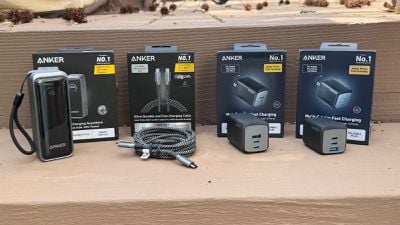
I've been testing out a few Anker Prime travel accessories over the past few months, including some of Anker's most compact yet powerful multi-port wall chargers, a multi-port power bank, and a high-end USB-C charging cable to help keep even Apple's most power-hungry products charged up.
Anker Prime Wall Chargers
First up are a pair of triple USB wall chargers in 67-watt and 100-watt varieties optimized for travel with folding prongs and GaN technology to ensure the most compact size possible. And while these chargers are surprisingly hefty for their size due to the density of the GaN technology packed inside, they definitely slip easily into a bag or even a large pocket.
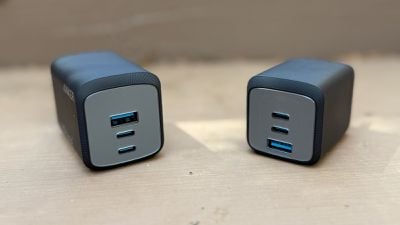
Each of these chargers offers a pair of USB-C ports and a USB-A port to help keep all of your devices charged up, and they have nearly identical designs, with the main differences being their output power and thus their overall sizes.
The 67W version is 51% smaller than Apple's 67-watt adapter that has come with some MacBook Air and MacBook Pro models in recent years, measuring in at around 1.5 inches (~40 mm) square by 1.9 inches (50 mm) deep and weighing 4.78 ounces (135.7 grams).
It can deliver up to 67 watts of charging power when either of its two USB-C ports is used alone, while the USB-A port can deliver up to 22.5 watts on its own. When using two ports simultaneously in any combination, the charger will intelligently divide up to 65 watts of power between the two ports, and if all three ports are in use it will divide up to 64.5 watts accordingly. Of the two USB-C ports, the upper one is labeled with a computer icon while the lower one is labeled with a phone icon, indicating that the upper port will be prioritized for heavier loads when multiple ports are in use.
While 67 watts is enough for most Apple laptops other than the 16-inch MacBook Pro, the fact that this is a multi-port charger means you're probably buying it to charge multiple devices at the same time. That works if you're only trying to charge something like an iPad, iPhone, and Apple Watch, but anything more and you may start to bump up against the charger's wattage ceiling.
A MacBook Air drawing up to 35 watts is fine if you want to also charge an iPhone, for example, but if you're trying to charge a MacBook Pro and other devices simultaneously, you're going to need more power and that's where Anker's 100W model comes in.
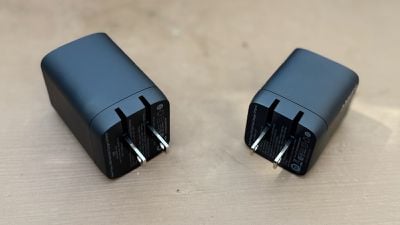
The 100W model is unsurprisingly a bit larger and heavier than its sibling, measuring about 1.5 inches (39 mm) by 1.7 inches (44 mm) and about 2.3 inches (60 mm) deep and weighing 6.4 ounces (183.3 grams).
As with the 67W model, the 100W model includes two USB-C ports that are each capable of delivering the full wattage to a connected device if used in solo mode. The USB-A port can similarly deliver up to 22.5 watts on its own. In a two-device charging configuration involving both USB-C ports, the upper one will deliver up to 65 watts, while the lower one will deliver up to 35 watts, ideal for charging something like a MacBook and an iPad or iPhone simultaneously. Using either of the USB-C ports with the USB-A port will split the power 76 watts and 22.5 watts respectively.
If you need to charge three devices simultaneously, the upper USB-C port will provide up to 46 watts and the lower USB-C port will support up to 30 watts, with the USB-A port offering up to 22.5 watts.
None of these configurations will allow you to fast charge a 16-inch MacBook Pro, even if it's being charged on its own, but it should be largely sufficient for most users. Only if you're looking to charge multiple power-hungry devices will you likely want to look for something a bit more powerful, and therefore bulkier and probably more expensive. With the wide variety of chargers available on the market, it's always a balance of size/weight, power, and cost, so it's important to carefully weigh your priorities when considering a purchase.
The 67W model is normally priced at $59.99, but a $20 on-page coupon on Anker's site currently brings it down to $39.99, a deal that is also available at Amazon. The beefier 100W version is currently priced at $84.99 with no discounts available either on Anker's site or at Amazon, so you may want to keep your eye out for a sale if that's the one you're interested in.
Anker Prime 9.6K Power Bank
As a lower-power and cheaper alternative to the Alogic Ark Pro I recently reviewed, Anker's 9.6K Prime Power Bank is a handy multi-device charging solution for on the go. Its 9,600 mAh internal battery is only about a third the size of the Ark Pro's, so you won't be able to come close to fully charging something like a MacBook Pro and it can only deliver 65 watts of total charging power, but for smaller devices it could be a solid option for many users.
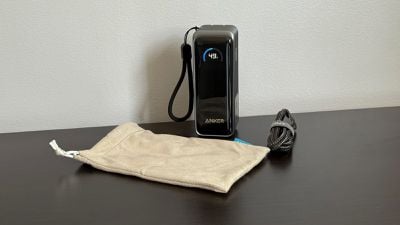
While the power bank is rated for 9,600 mAh of capacity, Anker notes that users should only expect about 65% of that to end up in the device being charged, due to various battery and circuitry inefficiencies. As a result, Anker says users should expect about 5,200 to 6,700 mAh to be delivered to a connected device, and that's about what I found in my testing. The power bank was able to fully charge an iPhone 16 Pro Max equipped with a 4,685 mAh battery and still have around 20% of the power bank's capacity remaining.
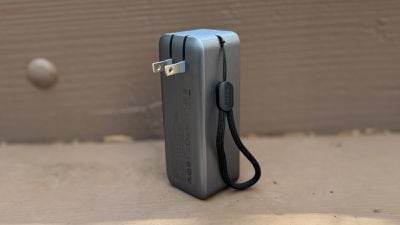
One of the most notable features of the Anker Prime 9.6K Power Bank is its folding prongs, allowing it to be plugged directly into a wall to recharge its internal battery, act as a wall charger by providing passthrough power to devices connected to its USB ports, or both. It's a simpler, travel-friendly solution than having to use one of the power bank's USB ports, a separate cable, and potentially another power adapter to charge up the power bank.
The Anker Prime 9.6K Power Bank features two USB-C ports, with either of them able to deliver up to 65 watts when used on its own. If both ports are used, the lower port will deliver up to 45 watts while the upper port will deliver up to 20 watts.
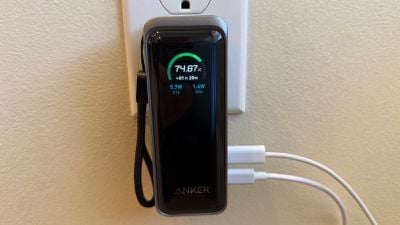
The power bank includes a handy display to keep an eye on charging state with a button on the side to activate the display only when you need it, thus saving power. When charging up the power bank, the display reports the current battery level and the estimated time remaining until it's fully charged, and if it's being used to charge other devices either while plugged in or not, it reports the output currently going to each of the USB-C ports.
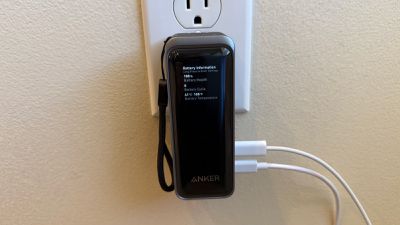
The display also lets you access a stats page with information like battery health, the number of charge cycles, and current battery temperature. A long press on the side button lets you cycle through several settings for the power bank including how long the display should stay on for once activated with the button (30 seconds, 1 minute, 5 minutes, or 30 minutes), low and high options for the display brightness, and whether the lower C1 USB-C port can be used solely for output or if you can also recharge the power bank through it in addition to through the folding prongs.
Measuring around 1.7 inches (43 mm) square by 4.5 in chess (115 mm) high and weighing 10.76 ounces (305 grams), the Anker Prime 9.6K Power Bank is plenty small and light enough to toss in a bag for travel, and it gives you peace of mind to be able to charge up your devices either from a wall outlet or while on the go. A small lanyard gives you a little something extra to grip or the ability to hang it on a carabiner or clip to keep it accessible in or on a larger bag, but it's not large enough to fit around a wrist. The power bank also comes with a 1-meter Anker 333 USB-C to USB-C cable and a soft carrying pouch with a drawstring closure.
The brick-like profile of the power bank means it won't fit easily in a pocket unless you have a bulky coat, so that's something worth considering if you're planning on carrying it on your body. If all you're looking for is something to charge up a phone, you might look to another option like the much slimmer and lighter Anker MagGo Power Bank (10K, Slim) that can easily slide into even a pants or shirt pocket. Or for a similar but slightly thicker and heavier form factor but with a display, Qi2 support, and a kickstand, there's Anker's latest 10K MagGo Power Bank. But if you need something with a little more versatility and dual USB-C ports, the Anker Prime 9.6K Power Bank is a solid option.
The Anker Prime 9.6K Power Bank is normally priced at $89.99, but a $15 on-page coupon at Anker currently brings the price down to $74.99. It's also available at Amazon for the same discounted price.
Anker Prime 240W Braided USB-C to USB-C Cable
As a companion to these various charging options, I've also been testing out Anker's 3-foot Prime USB-C to USB-C braided cable with support for 240-watt charging, which offers premium specs to ensure you're charging at the fastest possible speeds. With devices like the last couple of generations of the 16-inch MacBook Pro now supporting fast charging over USB-C, you'll need to make sure you have a 240-watt cable if you want to take advantage of those speeds, and this Anker cable fits the bill.
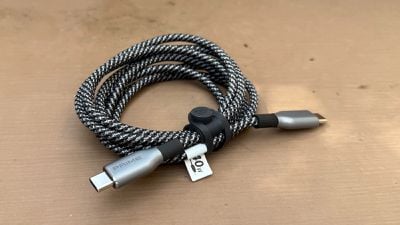
The cable has a premium feel with an attractive braided design that offers excellent durability. Anker says it's tested the cable to survive over 300,000 bends and stand up to 220 pounds of force, while being made of recycled nylon. Anker also includes a handy silicone cable wrap to keep things tidy when you're not using the cable.
Importantly, this cable prioritizes charging speed with its ability to deliver up to 240 watts of power for supported devices, and thus it only supports 480 Mbps USB 2.0 speeds for data transfer. That's enough for lower-end needs, but if you're looking to move large amounts of data quickly such as for backups or screen mirroring/video output, you'll need to look at other options supporting flavors of USB 3, USB 4, or Thunderbolt.
The 240W Anker Prime USB-C to USB-C cable is available in a 3-foot length for $29.99 or a 6-foot length for $34.99, although an on-page coupon currently available on Anker's site brings those prices down to $25.99 and $29.99 respectively. Amazon also currently has them available at the discounted prices.
Note: Anker provided MacRumors with the Anker Prime charging accessories for the purposes of this review. No other compensation was received. MacRumors is an affiliate partner with Anker and Amazon. When you click a link and make a purchase, we may receive a small payment, which helps us keep the site running.















































Top Rated Comments
Perhaps one day, you’ll realize that wealth is built on substance, not on shallow tech snobbery. Until then, enjoy the illusion that your port preferences somehow elevate you beyond the mundane realities of personal achievement.
USBC Charging Issues ('https://plugable.com/blogs/news/understanding-usb-c-charging-issues#:~:text=This%20is%20likely%20because%20the,power%20over%20the%20CC%20pins.')
"Deary me! Ask the butler to buy another Mac Studio, Beatrice"