

In iOS 17 and tvOS 17, you can view up to 30 days of recorded activity for security-related HomeKit accessories like door locks, alarm systems, and more. Keep reading to learn how it's done.
Thanks to the latest version of Apple's Home architecture, you can now use the Home app on iPhone, iPad, and Mac to view activity history for smart home accessories including door locks, garage doors, alarm systems, contact sensors, smoke detectors, doors, and windows.
For example, if you have a smart door lock, activities like locking and unlocking your front door are recorded and available for you to view in the Home app.
Everyone in the home, including shared home users, can view Activity History, which is turned on automatically when an Apple TV or HomePod in your home is updated to tvOS 17. Note that Activity History is end-to-end encrypted, meaning Apple cannot read its contents.
How to View Activity History
- Select the Security category.
- Select Activity History.
- Tap Done when you're finished.
Open the Home app on your iPhone, iPad, or Mac.
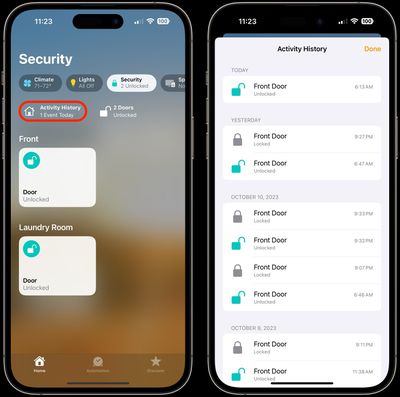
Bear in mind that recorded activity is permanently deleted after 30 days.
How to Turn Activity History On and Off
When you turn off Activity History, all previously recorded activity for the home is permanently deleted. Note that only the home owner or a shared home user with permission to add and edit accessories can turn Activity History on and off.
- Open the Home app on your iPhone, iPad, or Mac.
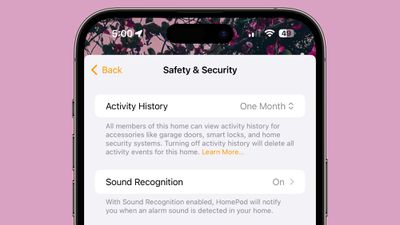
- Select the More button (three dots in a circle), select Home Settings, then select Safety & Security.
- Choose One Month to turn Activity History on, or choose Off.
Note that if you have a network or power outage at home, some events may not be successfully captured and logged.













































