Skip to Content

How to Share Your Screen Using Messages on Mac

by

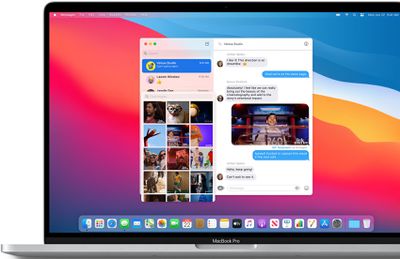
When you're chatting in Messages, you can share your Mac's screen with the person you're messaging, or they can share theirs with you. You can also let someone control your screen, and vice versa. It's a great way to give a friend or family member some remote tech support, or you can use it to work collaboratively on a project. Here's how it works.
messagesimages

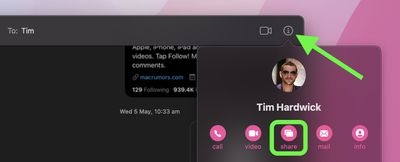
  1. In the Messages app on your Mac, select a conversation thread, then click the info (i) button.

  2. Click the Share button. (If the option is grayed out, make sure the other person is signed in to iCloud using the same Apple ID they used to sign into Messages.)
    messages

  3. Select Invite to Share My Screen or Ask to Share Screen. When the screen-sharing request is accepted, an audio call will be initiated so you can chat while you share screens.
  4. To stop screen sharing, click the screen-sharing icon in the menu bar, then choose End Screen Sharing. If you're viewing your friend's screen, choose Screen Sharing -> Quit Screen Sharing.
Let Someone Control Your Screen

When you're sharing your screen with someone, you can also let them control your screen, which gives them total access to your Mac.

If you trust the other person to do this, click the screen-sharing icon in the menu bar, then choose Allow [name] to control my screen. If you receive a message asking if you want to let the other person control your screen, select Control my screen, then click Accept.


Popular Stories

macbook air blue

What's Coming in the M5 MacBook Air

Thursday February 26, 2026 3:57 pm PST by
Along with the low-cost MacBook, Apple could introduce a refreshed version of the MacBook Air next week. Most of the focus will be on the new machine, but the MacBook Air is expected to get some useful internal updates. M5 Chip The next-generation MacBook Air will adopt the M5 chip, which Apple already introduced in the iPad Pro and MacBook Pro models that came out last year. Apple's M5...
Apple Announces Special Event in New York Feature 1

Apple Teases 'A Big Week Ahead' With Announcements Starting Monday

Thursday February 26, 2026 6:06 am PST by
Apple CEO Tim Cook today teased "a big week ahead," with announcements starting Monday. His post included an #AppleLaunch hashtag with a colorful Apple logo, along with a short video that ultimately shows an Apple logo on the lid of a Mac. Apple is reportedly planning a three-day stretch of product announcements from Monday, March 2 through Wednesday, March 4, with up to five new products...
ipad mini 7 1

Could Apple's OLED iPad Mini Finally Be a Kindle Killer?

Friday February 27, 2026 12:08 pm PST by
With a similar screen size and easy, one-handed grip, the iPad mini has always been the Apple device that overlaps most with dedicated e-readers. Now, amid rumors pointing to an OLED display for the next generation, could the iPad mini finally replace devices such as the Kindle and Kobo? The shift from LCD to OLED could make the iPad mini far more appealing as a reading device. OLED panels...