In watchOS 7, Apple introduced Family Setup, a new feature that allows users to pair additional watches to their iPhone for children or older members of their household who don't have their own iPhones.
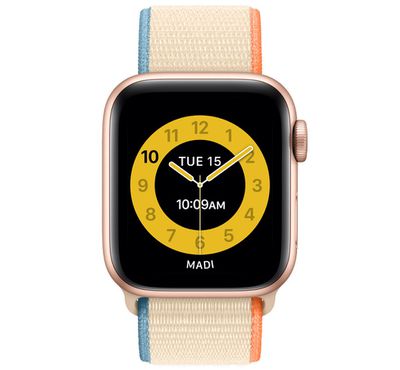
An associated feature of Family Setup, called "Schooltime," allows parents and guardians to remotely turn on Do Not Disturb on kids' watches and display a special watch face with restricted interaction. In other words, it lets you lock down an Apple Watch during school hours to encourage kids to focus on their schoolwork.
Schooltime can be activated when you first initialize Family Setup, but you can also access and edit Schooltime features in the Apple Watch app on iPhone. As with Family Setup, using Schooltime requires watchOS 7 or later. Here's how it works.
How to set a Schooltime schedule
- Launch the Watch app on your iPhone.
- Tap All Watches, then tap your child's watch.
- Tap Done, then tap Schooltime.

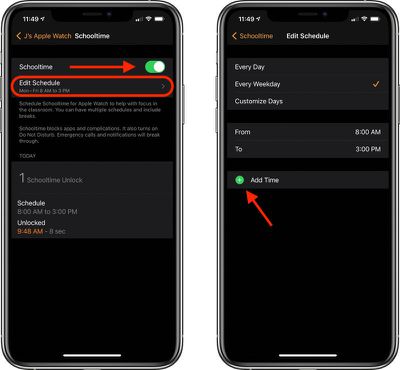
- Make sure the Schooltime switch is in the green ON position. If not, tap the switch to activate it.
- Tap Edit Schedule.
- Chose the days and times when you want Schooltime to be active.
- Tap Add Time if you want to set up more than one schedule in a day. You could set up one schedule for morning classes and another for after lunch, for instance.
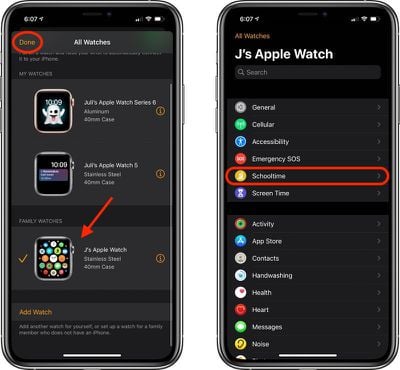
To change your child's Schooltime schedule at a later time, simply launch the Watch app on your iPhone, then tap the info ("i") button next to the managed watch. Tap Schooltime, then tap Edit Schedule.
How to Exit Schooltime Temporarily
Note that Schooltime is different from Screen Time, in that a child can exit Schooltime temporarily to do things like check messages. To exit Schooltime, they can turn the Digital Crown, then tap Exit to confirm. If a Schooltime schedule is active, Schooltime mode will resume automatically.