

iOS 17: How to Set a Different Default Search Engine When Private Browsing in Safari - MacRumors
Skip to Content

iOS 17: How to Set a Different Default Search Engine When Private Browsing in Safari

by

In iOS 17 and iPadOS 17, currently in beta, Apple has made some privacy and security improvements to Safari, including Locked Private Browsing, and Advanced Tracking and Fingerprint Protection. Another change that may have gone under your radar is the ability to set a separate default search engine for Private Browsing sessions.
iOS 17 Privacy and Security Improvements Feature
In previous versions of iOS, Safari uses the default search engine in both normal and Private Browsing modes, so if you have Google set as your default engine, that's just what you'll use in a Private tab, when searching via the address bar or from the context menu for the selected text.

In iOS 17, if you want to set different search engines for normal and Private Browsing modes in Safari, now you can. For example, you may want to set Google as the default search engine in regular browsing mode and a different search engine such as DuckDuckGo in Private Browsing mode for privacy reasons.

  1. Open the Settings app.
  2. Scroll down and tap Safari.
  3. In the "Search" section, tap Private Search Engine.
  4. Choose your preferred default search engine. Options include Use Default Search Engine, Google, Yahoo, Bing, DuckDuckGo, and Ecosia.
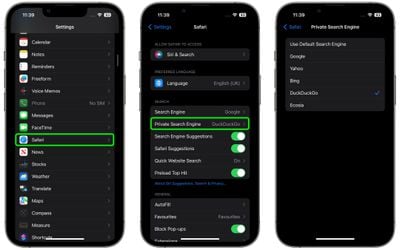
set default private browsing search engine

It's worth mentioning that DuckDuckGo doesn't build user profiles, so it always shows the same search results to all users. It also prevents online tracking of searches or clicks. However, it relies on Yahoo! and Microsoft Bing for its search results, so if you find them lacking, that could be why.

For more information on the privacy and security improvements coming in Apple's next major software update, be sure to check out our guide.


Tag: Safari
Related Forums: iOS 17, iPadOS 17

Popular Stories

Apple TV Thumb 3

Here's What's Coming in the 2026 Apple TV

Thursday April 23, 2026 12:08 pm PDT by
There are a lot of folks waiting for a new version of the Apple TV because the set-top box hasn't been updated since 2022. There is an update coming this year, but people will need to wait a bit longer because Apple is holding the next Apple TV until the new version of Siri comes out this fall. Design Apple TV design updates don't happen often, and that's not changing in 2026. The next...
Four iPhone 18 Pro Colors Mock Feature

iPhone 18 Pro Launching in September With These 10 New Features

Monday April 20, 2026 7:13 am PDT by
While the iPhone 18 Pro and iPhone 18 Pro Max are not launching until September, there are already plenty of rumors about the devices. It was initially reported that the iPhone 18 Pro models would have fully under-screen Face ID, with only a front camera visible in the top-left corner of the screen. However, the latest rumors indicate that only one Face ID component will be moved under the...
MacBook Pro Low Angle Wide Lens

Apple to Launch 'MacBook Ultra' With These Six New Features

Friday April 24, 2026 10:32 am PDT by
While the 14-inch and 16-inch MacBook Pro were just updated with M5 Pro and M5 Max chips last month, bigger changes are reportedly around the corner. According to Bloomberg's Mark Gurman, the higher-end MacBook Pro models will be receiving a major redesign by early 2027, and he said that Apple might use "MacBook Ultra" branding for them. If so, the MacBook Ultra would likely be a...













