How to Send High Resolution Photos and Videos in WhatsApp - MacRumors
Skip to Content

How to Send High Resolution Photos and Videos in WhatsApp

by

WhatsApp has rolled out a new option that lets users send photos and video over the messaging platform in high resolution. Keep reading to learn how it's done.

Whatsapp Feature
WhatsApp has released an update allowing iPhone and Android users to send photos and videos in high resolution, finally addressing the service's low quality media sharing limitation.

Called "HD quality," the option means users can send photos and videos that are clearer with minimal compression. Images captured on iPhone, for example, can now be sent in 3024 x 4032 resolution, rather than the previous maximum 920 x 1280 resolution, while video can be sent in 1280 × 718 resolution, rather than 848 × 476.

Recipients of HD photos/videos will see a HD label in the corner of the image, indicating that they have received a higher quality version, and all high resolution media is protected under WhatsApp's end-to-end encryption.

To get access to the feature, first update WhatsApp to the latest version, then follow these steps. (Note: If you don't see the HD option described below, the feature rollout has not yet gone live in your region.)

  1. In a chat thread, tap the Camera button.
  2. Select an image or video from your media library to send.
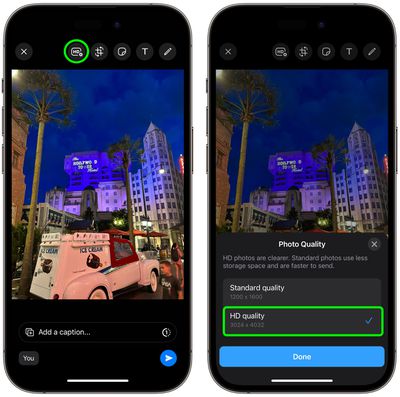
  3. Tap the HD button located at the top of the screen, left of the other image/video editing tools.
  4. Choose HD quality in the popup that appears, then tap Done.
  5. Tap the Send button.

whatsapp hd photos 1

According to Meta, if a user's internet connection is low bandwidth, they will receive photos and videos in Standard Quality, and will be able to choose to keep the standard version or upgrade it to HD where available.


Popular Stories

Whatsapp Feature

WhatsApp Beta Reveals iCloud Backup Alternative for iPhone

Tuesday July 14, 2026 3:06 am PDT by
WhatsApp is developing a first-party cloud storage option for chat backups on iPhone, providing users with an alternative to iCloud for the first time, according to app tinkerer WABetaInfo. Code found in the WhatsApp beta for iOS (version 26.28.10.16), available through TestFlight, suggests that users will eventually be able to pick their preferred backup destination directly from the app's...

Whatsapp Feature

WhatsApp Begins Rolling Out New Username Feature

Friday July 17, 2026 5:32 am PDT by
WhatsApp has started rolling out its new username feature, reports WABetaInfo. Some users who reserved their username have started receiving a notification that their username is active, and that they can now use it to send and receive messages to other users without revealing their phone number. When someone creates a username, WhatsApp will notify people who already have an active chat with...
Whatsapp Feature

WhatsApp Announces New CarPlay Experience, iPad Sign-Up, and More

Wednesday July 22, 2026 6:00 am PDT by
WhatsApp just announced a raft of new features spanning CarPlay, iPad, and iPhone that are "designed to work wherever you do, across your devices and the other apps you use." First up, WhatsApp for CarPlay and Android Auto has been completely refreshed. Now you can hear and respond to messages, make calls, see your call history, and reach your favorites, all hands-free directly from your...