In iOS 14, Apple pared down the Siri interface so that it no longer takes over the whole of your iPhone's screen when you issue a voice command or query. Instead, a small ‌Siri‌ orb pops up at the bottom of the screen without obscuring what you're looking at.
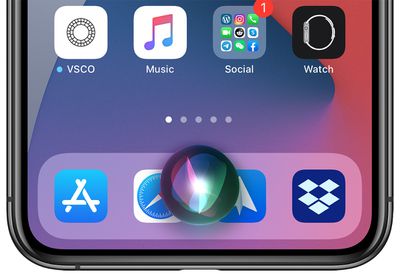
ios14compactsiri
It's not just the interface that's been improved, though. ‌Siri‌ also picked up several new features, one of which is the ability to record and send audio messages to contacts.

When you send an audio message using the audio interface in the Messages app, the record audio option only appears when the intended recipient is an iMessage user. But ‌Siri‌ can also send audio messages to Android phones. The following steps show you how it's done.

  1. Invoke ‌Siri‌ on your ‌iPhone‌ or iPad with the usual "Hey Siri" voice command or through a physical button.
  2. Now say "Send an audio message to [contact's name]." (If ‌Siri‌ is unsure which contact you're referring to, it will ask you to choose one from a selection displayed on the screen.)
  3. After ‌Siri‌ responds with "OK, recording," say whatever it is you want to include in the audio message. ‌Siri‌ will transcribe your speech in real time at the bottom of the screen to show that it can hear you clearly, and there doesn't appear to be a limit to how long you can record for.
  4. To end the audio message, simply stop speaking for a few seconds, and ‌Siri‌ will recognize that you're finished.
  5. When you're done, ‌Siri‌ displays the waveform of the recording on the screen along with options to Send, Cancel, and a play button to play it back to yourself. At this point, ‌Siri‌ is still activated, so if you want you can just ask to play it back, re-record the message, cancel, or send.
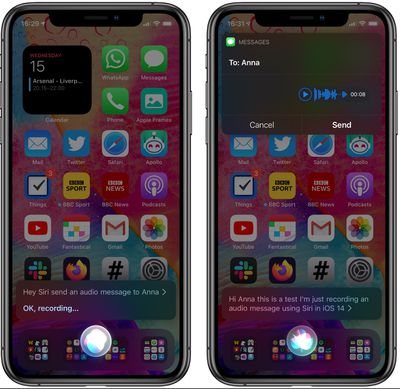
siri

If you open the Messages app, you should see the recording show up in a conversation thread, indicating it's been sent.

Note that audio messages are automatically deleted after a couple of minutes unless they're saved, but you can change this default behavior and keep them permanently: In the Settings app, select Messages -> Expire -> Never.

For more details on iOS 14's new compact interface and communication features, be sure to check out our iOS 14 roundup.


Related Forum: iOS 14

Top Rated Comments

Threbus Avatar
72 months ago
I wish that when you describe something that's coming up in an as yet unreleased version of the OS, you wouldn't use the past tense when describing it, as if it's available to everyone. Yes, it's done for people with the betas, but for the rest of us, just say something like, "In the upcoming release, Apple is reducing the size of…" and then go on to describe the feature.
Score: 4 Votes (Like | Disagree)
Vanilla35 Avatar
72 months ago

I was too until I realized you can’t use anything underneath the Siri UI when it’s up.
Absolutely terrible terrible decision. Why would they make it transparent and out of the way, but then still require you to dismiss or interact with it?
Score: 4 Votes (Like | Disagree)
AngerDanger Avatar
72 months ago

I'm still really glad that Siri isn't so obtrusive now. All of the tweaks I tried that attempted to fix it while jailbroken never worked well.
I was too until I realized you can’t use anything underneath the Siri UI when it’s up.
Score: 3 Votes (Like | Disagree)
benshive Avatar
72 months ago
I'm still really glad that Siri isn't so obtrusive now. All of the tweaks I tried that attempted to fix it while jailbroken never worked well.
Score: 2 Votes (Like | Disagree)
alexandr Avatar
72 months ago

Of course in typical apple fashion, they went from too much to not enough. Now its too small.
really? i think it's about perfect.
Score: 1 Votes (Like | Disagree)
S G Avatar
72 months ago
"4. To end the audio message, simply stop speaking for a few seconds, and Siri will recognize that you're finished."

That's an issue in general with Siri when dictating something that requires thought and pauses are needed...
Score: 1 Votes (Like | Disagree)

Popular Stories

Apple Creator Studio

Apple Introduces New 'Creator Studio' Bundle of Apps for $129 Per Year

Tuesday January 13, 2026 6:11 am PST by
Apple today introduced a new Apple Creator Studio bundle that offers access to six creative apps, as well as exclusive AI features and content, as part of a single subscription. In the U.S., pricing is set at $12.99 per month or $129 per year. Here are the six apps included with an Apple Creator Studio subscription:Final Cut Pro on the Mac and iPad Logic Pro on the Mac and iPad Pixelmator...
Verizon New

Verizon is Down: iPhones Show 'SOS' Mode Due to Network Outage [Resolved]

Wednesday January 14, 2026 10:18 am PST by
Verizon is experiencing a major outage across the U.S. today, with hundreds of thousands of customers reporting issues with the network on the website Downdetector. There are also complaints across Reddit and other social media platforms. iPhone users and others with Verizon service are generally unable to make phone calls, send text messages, or use data over 5G or LTE due to the outage....
iPhone Top Left Hole Punch Face ID Feature Purple

New Leak Reveals iPhone 18 Pro Display Sizes, Under-Screen Face ID, and More

Wednesday January 14, 2026 7:09 am PST by
While the iPhone 18 Pro models are still around eight months away, a leaker has shared some alleged details about the devices. In a post on Chinese social media platform Weibo this week, the account Digital Chat Station said the iPhone 18 Pro and iPhone 18 Pro Max will have the same 6.3-inch and 6.9-inch display sizes as the iPhone 17 Pro and iPhone 17 Pro Max. Consistent with previous...
iOS 26

Here's What's New in iOS 26.3 So Far

Monday January 12, 2026 1:15 pm PST by
Apple today seeded the second beta of iOS 26.3, nearly a month after the first beta. So far, the update includes a couple of new features for iPhones. iOS 15.3 through iOS 18.3 were all released in late January over the years, so it is thereby likely that iOS 26.3 will be released towards the end of this month as well. The update is compatible with the iPhone 11 series and newer. Below,...
airpods pro 3 design

Apple Releases New AirPods Pro 3 Firmware Update

Tuesday January 13, 2026 11:29 am PST by
Apple today released a firmware update for the AirPods Pro 3. The latest firmware has a version number of 8B34, up from the previous version 8B30. Apple has a support document for AirPods firmware updates, and it indicates that the 8B34 update contains unspecified "bug fixes and other improvements." No other AirPods models received firmware updates today. How to install AirPods Pro...