Skip to Content

How to Reinstall Deleted Apps on iPhone and iPad

by

If you've deleted an app on your iPhone and iPad to save space or because you didn't find the app useful at the time, it's not a one-way street – you can always re-install said app on your device in a few short steps.

app store blue banner
While there's no section in iOS that exclusively lists "recently deleted" apps as such, you can still find the apps that you've purchased in the past but are no longer downloaded to your ‌iPhone‌, which amounts to the same thing in practice.

  1. Launch the App Store app on your ‌iPhone‌ or ‌iPad‌.
  2. Tap the Today tab if it isn't selected already.
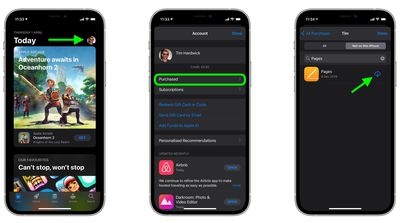
  3. Tap your circular profile photo at the top-right of the Today screen to access the account settings screen.
  4. Tap Purchased.
  5. Tap My Purchases.
  6. In the "Purchased" screen, tap the Not on this iPhone/iPad tab.
  7. Scroll through the list of purchased apps to find the one that you want to reinstate, and tap the cloud download icon next to it to re-download and install. (If you have a big purchase history, you may find it easier to use the search field at the top of the list to find the app you're looking for.)
    settings

Your chosen app will now start downloading from Apple's servers. This could take a few seconds or several minutes, depending on the size of the app and your connection, but you can exit the App Store app and continue doing other things on your device while it downloads in the background.

Popular Stories

MacBook Neo Feature Pastel 1

First MacBook Neo Benchmarks Are In: Here's How It Compares to the M1 MacBook Air

Thursday March 5, 2026 4:07 pm PST by
Benchmarks for the new MacBook Neo surfaced today, and unsurprisingly, CPU performance is almost identical to the iPhone 16 Pro. The MacBook Neo uses the same 6-core A18 Pro chip that was first introduced in the iPhone 16 Pro, but it has one fewer GPU core. The MacBook Neo earned a single-core score of 3461 and a multi-core score of 8668, along with a Metal score of 31286. Here's how the...
MacBook Neo Feature Pastel 1

Apple Announces $599 'MacBook Neo' With A18 Pro Chip

Wednesday March 4, 2026 6:15 am PST by
Apple today announced the "MacBook Neo," an all-new kind of low-cost Mac featuring the A18 Pro chip for $599. The MacBook Neo is the first Mac to be powered by an iPhone chip; the A18 Pro debuted in 2024's iPhone 16 Pro models. Apple says it is up to 50% faster for everyday tasks than the bestselling PC with the latest shipping Intel Core Ultra 5, up to 3x faster for on-device AI workloads,...
Multicolored Low Cost A18 Pro MacBook Feature

Apple Accidentally Leaks 'MacBook Neo'

Tuesday March 3, 2026 7:00 am PST by
Apple appears to have prematurely revealed the name of its rumored lower-cost MacBook model, which is expected to be announced this Wednesday. A regulatory document for a "MacBook Neo" (Model A3404) has appeared on Apple's website. Unfortunately, there are no further details or images available yet. While the PDF file does not contain the "MacBook Neo" name, it briefly appeared in a link...