How to Pair Powerbeats Pro to Your Apple Watch - MacRumors
Skip to Content

How to Pair Powerbeats Pro to Your Apple Watch

by

Once you've paired a new set of Powerbeats Pro earphones with an iPhone running iOS 12 or later, they should automatically pair with your Apple Watch as long as your watch's software is up to date.

‌Powerbeats Pro‌ require watchOS 5.2 or later. To check which version of watchOS your watch is running, open the Watch app on the iPhone and select My Watch -> General -> About and check the Version entry. If your watch needs updating, you can download and install the new software by selecting My Watch -> General -> Software Update.
powerbeats pro apple watch
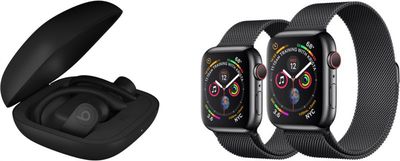
Once your Apple Watch software is up to date, your connected ‌Powerbeats Pro‌ earphones will automatically switch their connection between iPhone and Apple Watch, depending on which one is playing audio.

However, you can also manually connect ‌Powerbeats Pro‌ to your Apple Watch whenever you like. Here's how it's done.

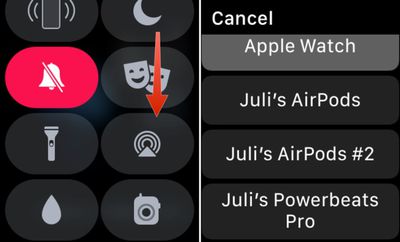
  1. On your Apple Watch, swipe up from the bottom of the screen to bring up the Control Center. (If you're in an app, touch and hold the bottom edge of the screen, then drag up the Control Center pane with your finger.)
  2. Tap the AirPlay icon (the small triangle with concentric circles on top). pairing Powerbeats Pro to Apple Watch
  3. Tap ‌Powerbeats Pro‌ in the list of devices.

You can also open up the Settings app on the Apple Watch, go to the Bluetooth section, and choose your ‌Powerbeats Pro‌ earphones from the list of available devices. Tap to connect.

Popular Stories

iOS 27 on iPhone 17 1

iOS 27 Will Add These New Features to Your iPhone

Saturday May 2, 2026 8:43 am PDT by
Apple is expected to unveil iOS 27 during its WWDC 2026 keynote on June 8, and there are already many rumored features and changes for iPhones. The first developer beta of iOS 27 will likely be available immediately following the keynote, and a public beta typically follows in July. Following beta testing, the software update should be released to all users with a compatible iPhone in...
Apple MacBook Pro M4 hero

Why You Might Want to Wait to Buy a MacBook Pro

Friday May 1, 2026 3:43 pm PDT by
Apple refreshed the 14-inch and 16-inch MacBook Pro with M5 Pro and M5 Max models in March 2026, but depending on your needs and interests, you might want to skip this generation because there's something better in the works. The M5 Pro and M5 Max MacBook Pro models have faster chips, but the same design that Apple has used since 2021. An updated design with new display technology and faster ...
Apple Announces 2026 Pride Band Watch Face and iPhone Wallpaper Article 2

iOS 26.5 Coming Soon With These New Features

Monday May 4, 2026 8:40 am PDT by
iOS 26.5 is expected to be released next week, following more than a month of beta testing. The update is relatively minor, but there are a couple of new features and changes across the operating system that we have recapped below. iOS 26.5 lays the groundwork for end-to-end encryption for RCS in the Messages app and ads in the Apple Maps app, and it will include a new Pride wallpaper and a...