

How to Opt-in to Apple Developer Beta Software on iPhone and iPad - MacRumors
Skip to Content

How to Opt-in to Apple Developer Beta Software on iPhone and iPad

by

In iOS 16.4 and iPadOS 16.4, Apple has changed the way users opt-in to developer and public beta updates on iPhone and iPad. Keep reading to learn why the change was made and how to turn it on.
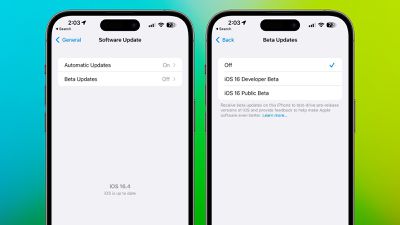
iOS 16 4 Beta Updates Menu
Going forward, Apple is changing things up so that developers no longer need to install a profile from the Developer Center in order to get developer betas.

Instead, users who are enrolled in Apple's developer program are able to turn on developer betas directly from the Software Update section in the Settings app.

The presence of a toggle in Settings makes it quicker and easier to install betas. The only downside from a user perspective is that the change prevents non-developers from being able to install the developer beta, since each installation needs to be linked to an Apple ID associated with a developer profile.

This effectively puts an end to the public sharing of developer beta configuration profiles because they will no longer grant access. On the other hand, now developers and public beta testers can select a different ‌Apple ID‌ than their main ‌‌Apple ID‌‌ to download beta software.

The following steps show you how to turn on iOS beta updates in iOS 16.4 and later and iPadOS 16.4 and later.

  1. Open the Settings app on your iPhone or ‌iPad‌.
  2. Tap General -> Software Update.
  3. Tap the new Beta Updates button when it appears.
  4. Choose the Developer Beta or Public Beta.
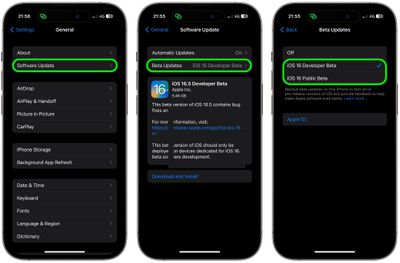
settings

Note that you can change the ‌Apple ID‌ associated with the beta by tapping the Apple ID field at the bottom of the last screen.

Popular Stories

WWDC26 Stickers Feature

Apple Developer App Gets Liquid Glass Makeover and New WWDC 2026 Stickers

Monday May 11, 2026 10:47 am PDT by
Apple today updated its Apple Developer app, introducing a Liquid Glass redesign and giving developers some WWDC-themed stickers that can be used in the Messages app. The Apple Developer app has a revamped Liquid Glass icon that reintroduces some older design elements while adopting the translucent Liquid Glass aesthetic. The icon has a pencil, paintbrush, and ruler that form the "A" shape,...
WWDC26 MR Live Coverage Article

WWDC 2026 Apple Event Live Keynote Coverage: iOS 27, Revamped Siri, and More

Monday June 8, 2026 9:15 am PDT by
Apple's Worldwide Developers Conference (WWDC) starts today with the traditional keynote kicking things off at 10:00 a.m. Pacific Time. MacRumors is on hand for the event and we'll be sharing details and our thoughts throughout the day. We're expecting to see a number of software-related announcements today, headlined by a reset on Apple's push into AI that should see a significant overhaul...
Aston Martin CarPlay Ultra Screen

Apple Says CarPlay Ultra is Coming to These Vehicle Brands

Thursday May 21, 2026 11:53 am PDT by
Last year, Apple launched CarPlay Ultra, the long-awaited next-generation version of its CarPlay software system for vehicles. Nearly a year later, CarPlay Ultra is still limited to Aston Martin's latest luxury vehicles, but that should change fairly soon. In May 2025, Apple said many other vehicle brands planned to offer CarPlay Ultra, including Hyundai, Kia, and Genesis. CarPlay Ultra...











































