If you want to give your children or other people access to your Mac, then it's worth familiarizing yourself with the user account restrictions available to you as administrator when you enable parental controls.

In macOS, Apple includes the ability to manage various levels of restrictions for individual user accounts. So if for example your children use your Mac, it's easy to control individual access based on their age.

how to manage parental controls
But while many of these settings are aimed at restricting what children can do, there are several options that may come in handy for limiting users of any age.

For example, you can create a whitelist of allowed apps and websites, set time limits based on a schedule, and even prevent users from changing the settings of peripherals like printers and scanners.

Follow the links to learn how to set up a guest account or set up a user account with parental controls enabled, and then meet us back here to learn how to manage the restrictions available to you.

How to Manage Restrictions in Parental Controls

  1. Click the Apple () symbol in the top left corner of your Mac's screen and select System Preferences....
    parental controls macos

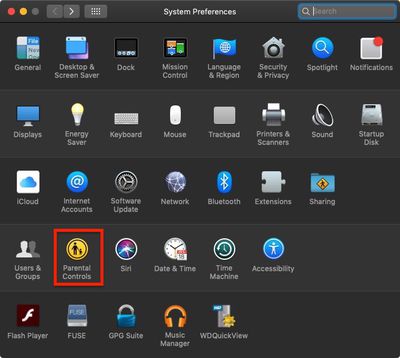
  2. Select the Parental Controls preferences pane.
    parental controls macos 1

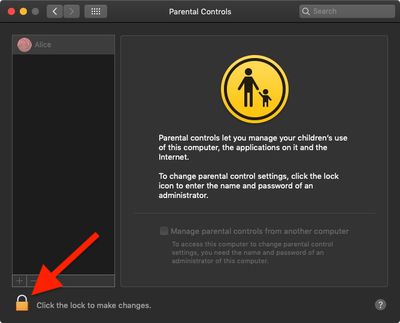
  3. Click the lock in the lower left corner of the window.
  4. Enter your admin password if prompted and click Unlock.
    parental controls macos 2

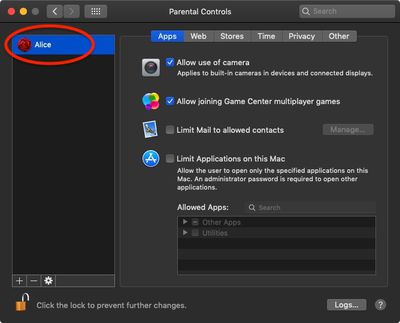
  5. Select the user account that you want to set restrictions for from the column on the left.
Following the above steps brings you to a number of restriction options that you can manage by clicking the associated tab. A summary of the various options follows.

  • Apps: This menu lets you control access to your Mac's built-in camera, restrict the ability to join multiplayer games in Game Center, restrict use of Mail to known contacts, and limit access to installed apps.

  • Web: This tab lets you limit access to websites via any browser.

  • Stores: Here you can manage use of the iTunes Store, and limit access to music, movies, TV shows, apps, and books.

  • Time: Schedule time limits so the account can only be used on weekdays, weekends, and bedtime, for example.

  • Privacy: This menu lets you control which apps and services can access user data.

  • Other: Options in this menu include disabling use of Siri and Dictation, preventing access to printer and scanner settings, burning discs, hiding profanity in dictionaries and wikis, and preventing the Dock from being modified. You can also opt from here to present a simplified view of the Mac desktop.

To learn how to turn off parental controls for a specific user account, click here.

Popular Stories

m5 macbook pro deal

Why You Shouldn't Buy the Next MacBook Pro

Tuesday February 10, 2026 4:27 pm PST by
Apple is planning to launch new MacBook Pro models as soon as early March, but if you can, this is one generation you should skip because there's something much better in the works. We're waiting on 14-inch and 16-inch MacBook Pro models with M5 Pro and M5 Max chips, with few changes other than the processor upgrade. There won't be any tweaks to the design or the display, but later this...
iOS 26

Apple Releases iOS 26.3 and iPadOS 26.3

Wednesday February 11, 2026 10:07 am PST by
Apple today released iOS 26.3 and iPadOS 26.3, the latest updates to the iOS 26 and iPadOS 26 operating systems that came out in September. The new software comes almost two months after Apple released iOS 26.2 and iPadOS 26.2. The new software can be downloaded on eligible iPhones and iPads over-the-air by going to Settings > General > Software Update. According to Apple's release notes, ...
Apple Logo Zoomed

Apple Expected to Launch These 10+ Products Over the Coming Months

Tuesday February 10, 2026 6:33 am PST by
It has been a slow start to 2026 for Apple product launches, with only a new AirTag and a special Apple Watch band released so far. We are still waiting for MacBook Pro models with M5 Pro and M5 Max chips, the iPhone 17e, a lower-cost MacBook with an iPhone chip, long-rumored updates to the Apple TV and HomePod mini, and much more. Apple is expected to release/update the following products...
iPhone 16e Bottom Crop

Apple Reportedly Unveiling a New iPhone Next Week

Tuesday February 10, 2026 1:51 pm PST by
Apple plans to announce the iPhone 17e on Thursday, February 19, according to Macwelt, the German equivalent of Macworld. The report said the iPhone 17e will be announced in a press release on the Apple Newsroom website, so do not expect an event for this device specifically. The iPhone 17e will be a spec-bumped successor to the iPhone 16e. Rumors claim the device will have four key...
Apple Logo Black

Apple Acquires New Database App

Wednesday February 11, 2026 6:44 am PST by
Apple acquired Canadian graph database company Kuzu last year, it has emerged. The acquisition, spotted by AppleInsider, was completed in October 2025 for an undisclosed sum. The company's website was subsequently taken down and its Github repository was archived, as is commonplace for Apple acquisitions. Kuzu was "an embedded graph database built for query speed, scalability, and easy of ...