iOS 16: How to Invite Someone to Your iCloud Shared Photo Library - MacRumors
Skip to Content

iOS 16: How to Invite Someone to Your iCloud Shared Photo Library

by

In iOS 16, it's possible to create a shared iCloud Photo Library and then invite up to five other friends with Apple products to view photos, contribute photos, and edit photos.

iOS 16 iCloud Photos Guide Feature
If you've already created an iCloud Shared Photo Library and still have space for more friends and family to join, you can do so by following the steps below.

Just be aware that as the creator of the shared library, you are considered the "host," and therefore it is your ‌iCloud‌ storage space that will be used when anyone contributes photos to it.

  1. Launch the Settings app on your iPhone.
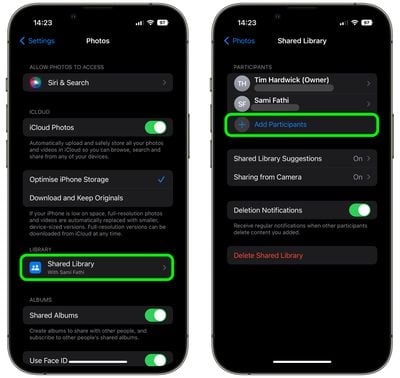
  2. Scroll down and tap Photos.
  3. Under "Library," tap Shared Library.
  4. Tap Add Participants.
    settings

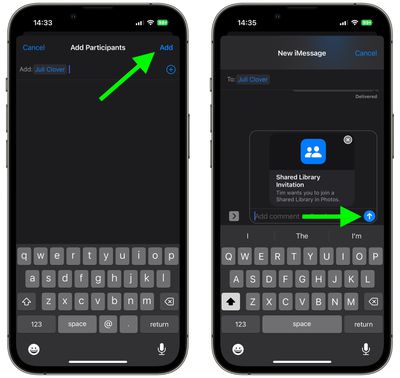
  5. Input the name of the person(s) you'd like to invite, then select their email address or number from the search of your contacts list. Tap the encircled + button if you want to add more people.
  6. Tap Add when you're done.
  7. Include a comment if desired, then tap the arrow in the blue circle to send them a shared library invitation over iMessage.
    settings

That's all there is to it. You will be notified by the Photos app when the invitation is accepted and the person(s) is added to the library as a participant.

Popular Stories

meta ai

Meta's New AI Image Tool Can Use Your Public Instagram Photos by Default

Wednesday July 8, 2026 1:52 pm PDT by
Meta is rolling out a new feature that lets people use public Instagram posts and reels to generate AI content, and it's turned on by default. If you have an Instagram account that's not set to private, there is a setting allowing anyone to generate content on Meta AI using your images and videos. The option was added to support Meta's new image generation model, Muse Image. Muse Image is...
apple wallet drivers license feature iPhone 15 pro

Apple Says iPhone Driver's Licenses Will Expand to These 6 U.S. States

Thursday July 9, 2026 7:29 am PDT by
In select U.S. states, residents can add their driver's license or state ID to the Apple Wallet app on the iPhone and Apple Watch, and then use it to display proof of identity or age at select airports and businesses, and in select apps. To set up the feature, open the Wallet app on the iPhone and tap on the plus sign in the top-right corner. Next, tap on Driver's License and ID Cards,...
apple silicon 1 feature

Apple Silicon is Taking an Unexpected Turn

Friday July 10, 2026 7:24 am PDT by
Ever since the Mac switched from Intel processors to Apple silicon starting in 2020, each generation of M-series chips has included higher-end Pro and Max variants. If a recent report proves to be accurate, though, that streak will be coming to an end. According to Bloomberg's Mark Gurman, Apple will be releasing a regular M6 chip, but it has no plans to offer higher-end M6 Pro and M6 Max...