

With the release of iOS 18.1 beta 2, Apple has apparently opened up access to Apple Intelligence for English speakers located in the European Union, something that was not possible in previous versions.
Apple Intelligence General Feature
One of the reasons Apple limited region access to Apple Intelligence was that it only supports US English. Another reason Apple Intelligence was previously not available in the EU was because Apple geo-locked access within the bloc, likely due to regulatory issues related to the Digital Markets Act. On the face of it, those issues still remain, and it's still not clear whether they will be resolved by the time iOS 18.1 is released in October. But at least for now, there doesn't seem to be anything stopping users in the EU who have a US App Store ID from testing out Apple Intelligence in the beta if their device supports it.

Supported Devices

Apple Intelligence encompasses a range of capabilities, including composing text and emails, automating actions across various apps, generating images, summarizing documents and texts, and more. However, these features require a lot of on-device computing power, so before you do anything, it's worth checking if your device is compatible. iPhone users need either an iPhone 15 Pro or iPhone 15 Pro Max to run Apple Intelligence, while only iPads powered by M1 or later Apple silicon processors are compatible.

Install Beta Software

If your device is supported, the first thing you need to do is install the iOS 18.1 developer beta for your device. Once you've followed the instructions provided in the linked article and your device is up and running with the latest beta, follow these steps on your iPhone or iPad.

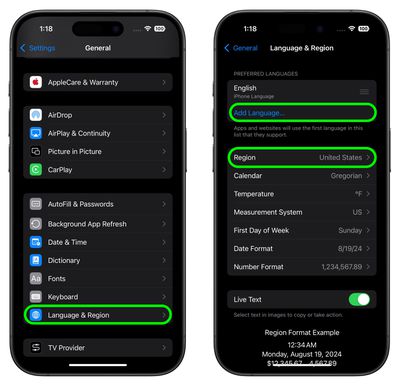
  1. Open Settings, then tap through to General ➝ Language & Region.
  2. Tap Add Language.. and choose English (US).
  3. Tap Region and choose United States. (Note that this won't affect your App Store regions or purchases.)
    settings

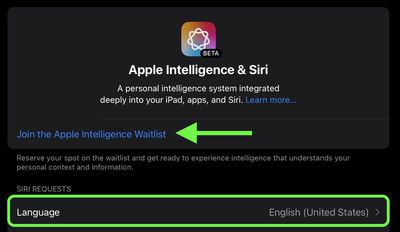
  4. Return to the main Settings menu and tap Apple Intelligence & Siri.
  5. Tap Language and choose English (United States).
  6. You will now be able to join the Apple Intelligence waitlist, which in most cases gets accepted in just a few minutes. Under the Apple Intelligence header text, tap Join Waitlist.
    apple intelligence join waitlist

  7. After what should hopefully be a short wait, the message will change to Turn On Apple Intelligence. Tap it, and a welcome message should appear, indicating you have sucessfully enabled the AI features on your device.
You can learn more here about all of the Apple Intelligence features available in the second iOS 18.1 developer beta. Note that some of the Apple Intelligence additions won't be coming until later next year.

Article revised to add that this method appears to require that the device is signed in with a US App Store ID, according to some user reports.


Top Rated Comments

breather Avatar
19 months ago
No AI in Europe? OK, then I'll skip the next phone upgrade.

Edit
In the EU...
Score: 14 Votes (Like | Disagree)
StevePenny Avatar
19 months ago
Yet another click-bait headline from MacRumours with missing and/or incorrect information. Following the steps provided does not get you Apple intelligence in the EU.

Also, reading comments and Threads, I'm truly amazed at how many people still don't know the difference between "Europe" and the "EU".
Score: 9 Votes (Like | Disagree)
ApostolisApo Avatar
19 months ago
This article is WRONG. Please update it or withdraw it. You are wasting the users’ time. These steps are simply not enough
Score: 5 Votes (Like | Disagree)
vagos Avatar
19 months ago
Why all this fuss when you can simply use ChatGPT ?
Score: 4 Votes (Like | Disagree)
Bobajobbob Avatar
19 months ago
My understanding was that concerns about the EU DMA was the reason that Apple will not bring AI to the EU at first.

The UK not being part of the EU should mean it will be available here at launch. Yay a benefit of Brexit finally!
Score: 3 Votes (Like | Disagree)
0134168 Avatar
19 months ago

Why all this fuss when you can simply use ChatGPT ?
Cause they are completely different tools.
Score: 3 Votes (Like | Disagree)

Popular Stories

iPhone Top Left Hole Punch Face ID Feature Purple

iPhone 18 Pro Launching Later This Year With These 12 New Features

Thursday January 15, 2026 10:56 am PST by
While the iPhone 18 Pro and iPhone 18 Pro Max are not expected to launch for another eight months, there are already plenty of rumors about the devices. Below, we have recapped 12 features rumored for the iPhone 18 Pro models, as of January 2026: The same overall design is expected, with 6.3-inch and 6.9-inch display sizes, and a "plateau" housing three rear cameras Under-screen Face ID...
iPhone Top Left Hole Punch Face ID Feature Purple

New Leak Reveals iPhone 18 Pro Display Sizes, Under-Screen Face ID, and More

Wednesday January 14, 2026 7:09 am PST by
While the iPhone 18 Pro models are still around eight months away, a leaker has shared some alleged details about the devices. In a post on Chinese social media platform Weibo this week, the account Digital Chat Station said the iPhone 18 Pro and iPhone 18 Pro Max will have the same 6.3-inch and 6.9-inch display sizes as the iPhone 17 Pro and iPhone 17 Pro Max. Consistent with previous...
2024 iPhone Boxes Feature

Apple Adjusts Trade-In Values for iPhones, Macs, and More

Thursday January 15, 2026 11:19 am PST by
Apple today updated its trade-in values for select iPhone, iPad, Mac, and Apple Watch models. Trade-ins can be completed on Apple's website, or at an Apple Store. The charts below provide an overview of Apple's current and previous trade-in values in the United States, according to the company's website. Most of the values declined slightly, but some of the Mac values increased. iPhone ...
Apple MacBook Pro M4 hero

These 5 Apple Products Will Reportedly Be Upgraded With OLED Displays

Friday January 16, 2026 7:07 pm PST by
Apple plans to upgrade the iPad mini, MacBook Pro, iPad Air, iMac, and MacBook Air with OLED displays between 2026 and 2028, according to DigiTimes. Bloomberg's Mark Gurman previously reported that the iPad mini and MacBook Pro will receive an OLED display as early as this year, but he does not expect the MacBook Air to adopt the technology until 2028 at the earliest. A new iPad Air is...
Verizon New

Verizon Offering $20 Credit After Major Outage, Here's How to Get It

Thursday January 15, 2026 7:37 am PST by
Verizon today announced it will be offering customers a $20 account credit after a major outage on Wednesday, and action is required to receive it. The carrier said affected customers can accept the credit by logging into the My Verizon app, but it might take some time before this option shows up in the app. Affected customers will receive a text message when the credit is available. On...














