

How to Use Reading View in Apple Pages, Numbers, and Keynote - MacRumors
Skip to Content

How to Use Reading View in Apple Pages, Numbers, and Keynote

by

In Apple's Pages, Numbers, and Keynote apps for iPhone and iPad, you can use the reading view feature to look at a document without accidentally editing it.
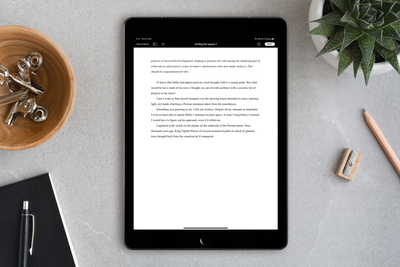
pages
In reading view, you can scroll a document and even interact with text and objects, all while avoiding accidentally moving objects or bringing up the keyboard as you view.

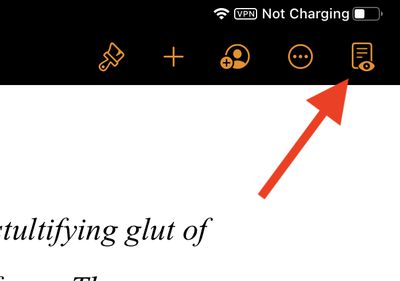
To turn on the reading view, open a document in one of the aforementioned apps, then tap the reading view button in the top-right corner of the screen (the icon looks like a document with an eye in the foreground).
pages reading view
If you don't see the reading view button, tap the More button (the three dots in a circle), then tap Stop Editing.

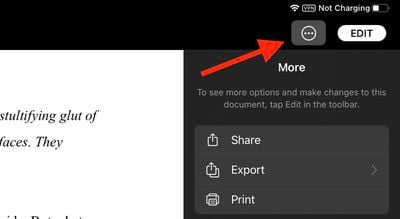
When in reading view, you can use the More button to share, export, or print the document. In Pages specifically, you can also turn the page navigator, two-page view, and word count on or off, as well as show or hide annotations and comments.
pages reading view more
Depending on your device, tap the View Options button or the More button in Pages to access these features.

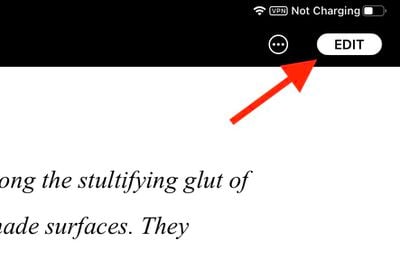
To exit reading view and start editing a document, tap the Edit button in the top-right corner of the toolbar.
pages reading view 2
You can also start editing in reading view if you've selected text, an object, or a table. Simply double-tap text, or touch and hold an object or table, then tap Edit in the pop-up menu.

Popular Stories

MacBook Pro Low Angle Wide Lens

Apple to Launch 'MacBook Ultra' With These Six New Features

Friday April 24, 2026 10:32 am PDT by
While the 14-inch and 16-inch MacBook Pro were just updated with M5 Pro and M5 Max chips last month, bigger changes are reportedly around the corner. According to Bloomberg's Mark Gurman, the higher-end MacBook Pro models will be receiving a major redesign by early 2027, and he said that Apple might use "MacBook Ultra" branding for them. If so, the MacBook Ultra would likely be a...

Apple TV Thumb 3

Here's What's Coming in the 2026 Apple TV

Thursday April 23, 2026 12:08 pm PDT by
There are a lot of folks waiting for a new version of the Apple TV because the set-top box hasn't been updated since 2022. There is an update coming this year, but people will need to wait a bit longer because Apple is holding the next Apple TV until the new version of Siri comes out this fall. Design Apple TV design updates don't happen often, and that's not changing in 2026. The next...
Dynamic Island iPhone 18 Pro Feature

This Is What the iPhone 18 Pro Looks Like

Saturday April 25, 2026 10:00 am PDT by
A recent leak provides our best look yet at the design of Apple's upcoming iPhone 18 Pro and iPhone 18 Pro Max models. Leaker Sonny Dickson recently shared images of the first iPhone 18 Pro, iPhone 18 Pro Max, and foldable iPhone dummy models. The images largely conform with rumors about the designs of the three devices and provide the first real visual confirmation of how they will look. ...









































