How to Enable End-to-End Encryption in Facebook Messenger - MacRumors
Skip to Content

How to Enable End-to-End Encryption in Facebook Messenger

by

Facebook Messenger claims to be a secure platform for private communications, but the truth is that regular conversations conducted through the app are not end-to-end encrypted, which puts your sensitive information at considerable risk.

facebook messenger icon new
End-to-end encryption ensures that only you and the person you're communicating with can read or listen to what is sent, and nobody in between, not even Meta/Facebook, can gain access to this content.

Unfortunately, unlike WhatsApp, end-to-end encryption is not enabled by default, meaning the onus is on you to make sure you turn it on so that third parties cannot eavesdrop on your communications.

On the plus side, enabling it is not difficult once you know how, but it can only be turned on for individual contacts – it is not a global setting. To start an encrypted chat with someone requires entering into a "Secret conversation." The following steps show you how it's done.

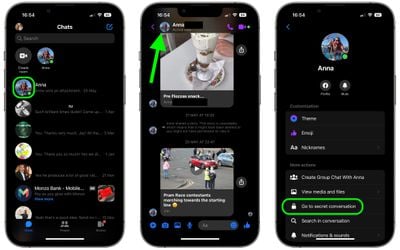
  1. Open the Messenger app, and tap the profile icon of the contact that you want to chat with using end-to-end encryption.
  2. At the top of the conversation window, tap their profile icon again.
  3. Under "More Actions," tap Go to secret conversation.
messenger

You will now be in a conversation window that implements end-to-end encryption. From here, you can also set your messages to disappear from the conversation thread completely (on both your device and the device of the person you're chatting with).

To do so, tap the clock banner at the top of the conversation window. Alternatively, tap the top-left profile of the person you'll be chatting with, then select Disappearing messages and choose an expiration time.

Popular Stories

macOS 27 on MacBook Pro

Apple Says macOS 27 Won't Be Compatible With These Macs

Wednesday June 3, 2026 8:29 am PDT by
During WWDC 2025, Apple revealed that macOS 26 Tahoe would be the final major macOS version for Intel-based Macs. macOS 27 will be compatible with Apple silicon Macs only, meaning that you will need a Mac with an M-series chip or a MacBook Neo with an A18 Pro chip in order to install the software update. Apple will unveil macOS 27 during its WWDC 2026 keynote this Monday, June 8, and the...
MacBook Neo on Yellow Feature

MacBook Neo is So Popular That Apple Reportedly Doubled Production

Wednesday June 3, 2026 9:24 am PDT by
On an earnings call in late April, Apple's CEO Tim Cook said that customer response to the MacBook Neo was "off the charts," and the popularity of the laptop has reportedly led the company to significantly boost production. Apple supply chain analyst Ming-Chi Kuo this week said he believes that MacBook Neo shipments to Apple were doubled from an initial target of 5 million units to 10...
iphone 18 pro blue%402x

iPhone 18 Pro: Dark Cherry, Light Blue, and Dark Gray Chassis Leaked [Update]

Thursday June 4, 2026 5:18 am PDT by
Update: Since publication, new information has come to light suggesting the images have been AI-manipulated and are not in fact iPhone 18 Pro chassis parts. The original article follows. The color options Apple is reportedly planning for the upcoming iPhone 18 Pro and ‌iPhone 18 Pro‌ Max have appeared online today in the form of images of chassis parts of unknown authenticity....