iOS 16: How to Customize Your AirPods Settings - MacRumors
Skip to Content

iOS 16: How to Customize Your AirPods Settings

by

If you've just picked up a pair of AirPods, you'll probably want to customize their settings, and there are several configurable options you should be aware of that can only be accessed when you connect to an iPhone.
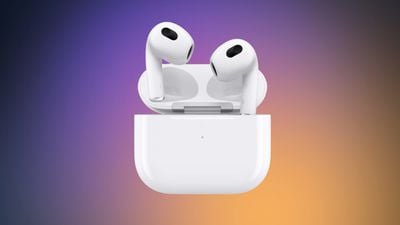
airpodsd 3 purple 4
It's worth noting that the way you get to AirPods settings on iPhone has recently changed slightly after the latest major iOS software update. In iOS 16, whenever you have AirPods connected, a new easily accessible tap-through settings menu appears at the very front of the Settings app, just underneath your Apple ID banner.
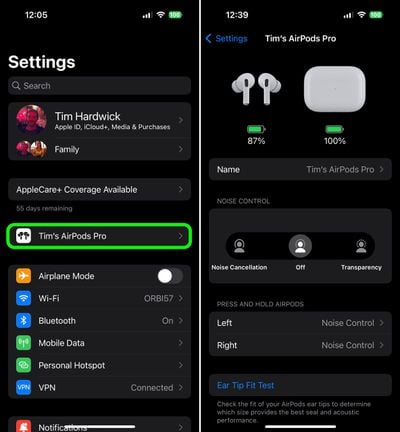
settings
Here you can customize a range of AirPods functions, including the following:

  • Change AirPods name
  • Enable or disable Noise Cancelation
  • Enable or disable Transparency
  • Change AirPods touch controls
  • Perform an Ear Tip Fit Test
  • Enable or disable Automatic Ear Detection
  • Control automatic connections
  • Set up Personalized Spatial Audio
  • Choose between Left and Right Microphone
  • Enable or disable Optimized Battery Charging
  • Enable or disable AirPods on Find My network
  • Accessibility options
  • Disconnect AirPods
  • Forget This Device

In previous versions of iOS, this menu of options was somewhat hidden, and to find it you had to go into Settings -> Bluetooth, then tap the encircled "i" symbol on the right. While this method of navigation still works, thankfully it's no longer the only way to find your AirPods settings.

Related Forum: AirPods

Popular Stories

AirPods Pro Beta Firmware 2

Apple Releases Updated AirPods Beta Firmware With iOS 27 Features

Tuesday June 23, 2026 2:34 pm PDT by
Apple today released updated beta firmware for the AirPods Pro 2, AirPods Pro 3, AirPods 4, and AirPods Max 2. The firmware is limited to developers at the current time, and it has a build number of 9A5304b. In iOS 27, iPadOS 27, and macOS Golden Gate, Apple is adding a new AirPods interface and support for custom EQ. AirPods are also compatible with the new Siri AI. With iOS 26, iPadOS...

iOS 27 Beta Hints at New Apple Product Such as AirPods Ultra Feature

iOS 27 Beta Hints at New Apple Product Such as 'AirPods Ultra'

Friday July 3, 2026 8:44 am PDT by
The second iOS 27 developer beta seemingly hints at a new Apple product, according to code uncovered by app designer and developer Sam Henri Gold. The code mentions a product codenamed B790 that can relay "two images from cameras on either side of [a] user's head." Gold speculated that the code could be referring to Apple's rumored smart glasses, but a more likely possibility is AirPods with ...
AirPods Pro Beta Firmware 2

Apple Releases New AirPods Beta Firmware With iOS 27 Features

Tuesday July 7, 2026 11:19 am PDT by
Apple today released a third version of the beta firmware it is testing for the AirPods Pro 2, AirPods Pro 3, AirPods 4, and AirPods Max 2. The firmware is limited to developers at the current time, and it has a build number of 9A5314b. In iOS 27, iPadOS 27, and macOS Golden Gate, Apple is adding a new AirPods interface, a slider for Adaptive mode, and support for custom EQ, so the firmware...