

In iOS 17, Apple offers much more control over what apps can see in terms of your photos. Keep reading to learn how to manage app access on a per-app basis.
In iOS, Apple's in-app photos picker lets you share specific photos with apps while the rest of your Photo Library stays private. Apps must ask to access your entire photo library, and you can choose to give apps the following access:
- Limited Access - Apps can see only the images that you can select, and you can review the selected images anytime either in the app or by going to Settings > Privacy & Security > Photos.
- Full Access - Apps can see all of the images and videos in your Photo Library, and your device will tell you exactly how many photos and videos you're giving access to.
- None - No access to the Photo Library at all.
- Add Photos Only - The app can add images to your library, but not view them. This setting depends on the app, and is not available for all apps.
In iOS 17, Apple has made managing app access to your photos a lot simpler by adding a settings menu where you can adjust permissions on a per-app basis. Here's how to get to it and manage individual apps.
- Open the Settings app.
- Tap Privacy & Security.
- Tap Photos.

- Tap the app that you want to change access for.
- Choose from None, Add Photos Only (where applicable), Limited Access, and Full Access.
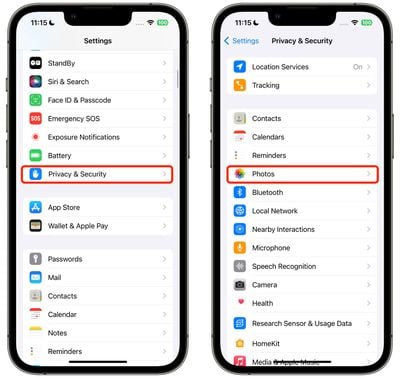
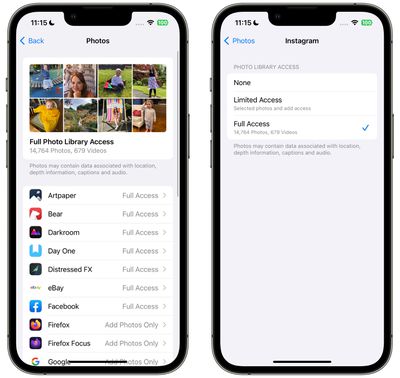
That's all there is to it. When you download a new app that wants Photo Library access, you will be prompted to choose from the same three options, and the app will be added to the same Photos list in Settings, allowing you to change access at any time in the future.
Your iPhone will also periodically remind you about apps that have access to your full Photo Library, offering up the option to change access to limited.






































![Apple Pulls Keynote, Pages and Numbers From App Store [Update: Back]](https://images.macrumors.com/t/Okb7kitB_gNr6qe5Pex9nQIysD8=/112x112/article-new/2026/01/Apple-Creator-Studio-iWork-suite.jpg)






