Like the Apple Pro Display XDR, Apple's 2021 14-inch and 16-inch MacBook Pro models offer professional-level display performance and customization options. This article focuses on how to change the refresh rate of the display on the new MacBook Pro.
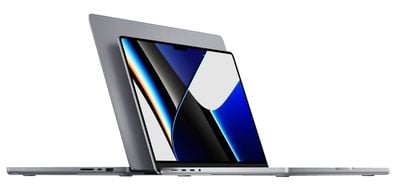
For its redesigned MacBook Pro models, Apple pulled out all the stops to make the new Macs more attractive to professional users. In doing so, not only did it add powerful Apple silicon chips and extra ports for more connectivity options, it also included one of the best displays ever seen in a laptop.
Both the 14-inch and 16-inch models are the first Macs to feature a Liquid Retina XDR display, which offers higher performance modes and more customization options. For example, it's the only Mac display featuring ProMotion, Apple's adaptive refresh rate of 120Hz, which is also found on the latest iPhone 13 and iPad Pro models.
Thanks to the added customization in macOS, ProMotion isn't the only refresh rate option available to new MacBook users. You can also adjust it to 60 Hertz, 59.94 Hertz, 50 Hertz, 48 Hertz, and 47.95 Hertz, which are all useful options if you want to match your screen's refresh rate to video content you are editing.
The following steps show you how to select the optimal refresh rate for your requirements. As a general rule of thumb, choose the rate that is double the frame rate of your video content.
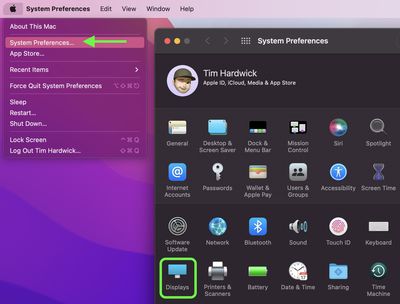
- Click the Apple symbol in the menu bar and select System Preferences....
- Click the Displays icon in the preferences pane.

- Click the Display Settings... button.
- If you're using an external monitor, select your MacBook Pro's built-in Liquid Retina XDR display in the side column.
- Click the dropdown next to Refresh Rate: and choose the rate that you require. If you're only interested in performance, choose ProMotion (variable 120Hz).
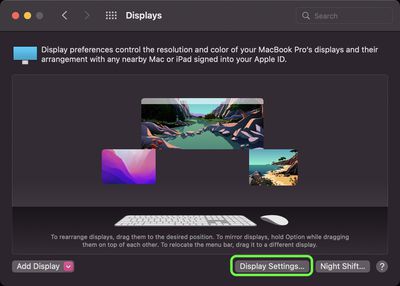
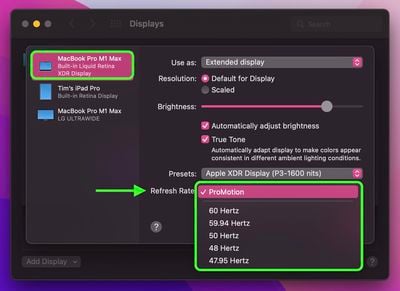
Note the other built-in tools available in macOS that can be used to further adjust the display settings on your MacBook Pro, including resolution, reference modes, and brightness.