Change iPhone's Default Notification Sound - MacRumors
Skip to Content

Change iPhone's Default Notification Sound

by

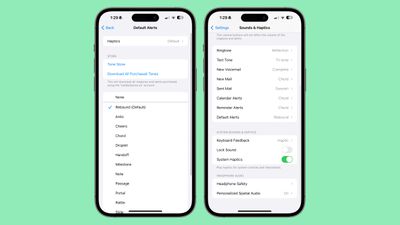
In iOS 17.2 and later, Apple lets you customize the alert tone used by your iPhone for default notifications. This is good news for anyone who does not like the "Rebound" tone that Apple introduced in iOS 17.
ios 17 default alert
In previous versions of iOS, Apple allowed users to choose a ring tone and a text tone, as well as custom alert sounds for email, calendar, and reminder alerts. Anything else that threw up notifications used a default sound, and there was no way to change it.

With iOS 17, Apple then changed the original default alert sound, from "Tri-tone" to "Rebound." Many users disliked the change, with some arguing that the new sound is harder to hear. So the ability in iOS 17.2 and later to change the default sound to whatever you like is a welcome addition.

To change the tone - as well as the haptic vibration – of notifications from apps that use the default sound, follow these steps.

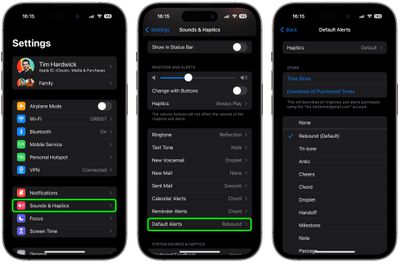
  1. Open the Settings app on your iPhone.
  2. Tap Sounds & Haptics.
  3. Select Default Alerts.
  4. Choose a sound for the alert tone. You can use one from Apple's built-in options, buy a tone from the Tone Store, or opt for no sound (None) instead.
  5. To change the accompanying haptic vibration, tap through to Haptics. There you can choose a vibration from the pre-set options, make your own via Create New Vibration, or opt for None.
settings

After completing the steps above, any notification sound that uses the default alert tone will use the sound you selected. If you're not happy with your changes, you can use the same steps to revert to the original "Rebound" default alert.
Popular Stories

iPhone 18 Pro Deep Red Feature

iPhone 18 Pro Launching Next Month With These 12 New Features

Thursday August 6, 2026 7:03 am PDT by
It is now August, and that means the iPhone 18 Pro and iPhone 18 Pro Max are just a month away. The devices are expected to look similar to the iPhone 17 Pro and iPhone 17 Pro Max, but there will still be many year-over-year changes, with rumored features including a smaller Dynamic Island, 5G via satellite, and more. Apple is expected to unveil the iPhone 18 Pro, iPhone 18 Pro Max, and a...
iPhone 18 Pro Deep Red Feature

iPhone 18 Pro Launching Next Month With These 12 New Features

Sunday August 9, 2026 1:45 pm PDT by
It is now August, and that means the iPhone 18 Pro and iPhone 18 Pro Max are just a month away. The devices are expected to look similar to the iPhone 17 Pro and iPhone 17 Pro Max, but there will still be many year-over-year changes, with rumored features including a smaller Dynamic Island, 5G via satellite, and more. Apple is expected to unveil the iPhone 18 Pro, iPhone 18 Pro Max, and a...
iOS 27 Feature Cool

Everything New in iOS 27 Beta 5

Monday August 10, 2026 3:02 pm PDT by
We're a little over a month away from the launch of iOS 27, and Apple is continuing to make changes. The fifth beta of iOS 27 changes the look of some app icons and adjusts Liquid Glass, plus it adds some smaller features that make the iPhone just a little nicer to use. App Icons There are updated Liquid Glass icons for Safari, Siri, Settings, Remote, App Store, and Preview. Some of the...