Apple in iOS 15 introduced Focus mode, an expansion of Do Not Disturb that allows you to set up different permissions for apps, contacts, and more depending on what you're doing. In iOS 16, Apple has expanded what Focus modes can do with new features, including the ability to activate Dark Mode on your device when a specific Focus in enabled. Here's how it works.
In iOS 16, the Focus options include a completely new feature called Focus Filters, which allow you to customize how you apps and device behave when a particular Focus is on. With Focus Filters, you can, for example, filter out certain content within apps. If you have a work Focus, for instance, you might filter out events from your family calendar.
In addition to filtering out content, however, you can also use System Filters. Filters in this category let you customize system settings when a Focus is enabled. So, for example, you can activate Dark Mode when your Focus mode for winding down in the evening is enabled, making the iOS interface more soothing on your eyes. The following steps show you how it's done.
How to Turn On Dark Mode With a Focus
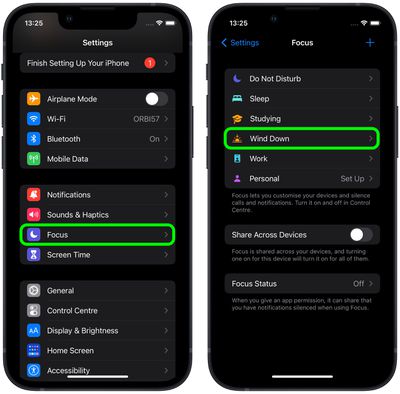
- Launch the Settings app on your iPhone, then tap Focus.
- Select the Focus mode that you want Dark Mode to be enabled by.

- Scroll down, and under "Focus Filters," tap Add Filter.
- Under "System Filters," tap the Dark Mode card.
- Make sure Dark is shown in the "Appearance" selection, then tap Add.
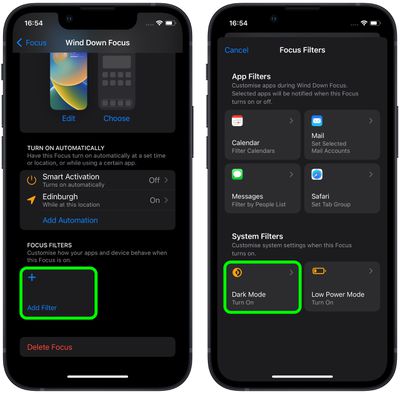
Dark Mode will now be automatically activated the next time you enable the Focus mode.
Apple has made a Focus Filter API for developers so that third-party apps can allow the same specific filtering options within a Focus as Apple's own app. If you use a third-party email app, for example, you'll be able to select a mailbox to show within that app provided the developer adds the Focus Filter API. For more on everything new in Focus with iOS 16, check out our comprehensive guide.