With Apple Intelligence, Apple is aiming to make Siri smarter than ever before. The personal assistant is going to be able to learn more about you, do more in apps, and hand over the reins to a smarter virtual assistant when needed.
Some new Siri features are available now, while some won't be coming until 2025. This guide highlights everything that's new with Siri thanks to Apple Intelligence.
Updated Siri Design
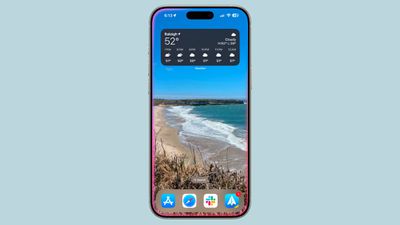
Siri has a refreshed design on devices that support Apple Intelligence. Rather than the small wavelength that used to show when activating Siri, there's now a pink/purple/blue/orange variegated glow that wraps around the entire iPhone, with the colors shifting as Siri listens to a command.
Better Language Understanding
Siri can better understand conversational language and requests, so if you stumble over your words or change your mind mid-sentence, Siri can still follow what you're saying.
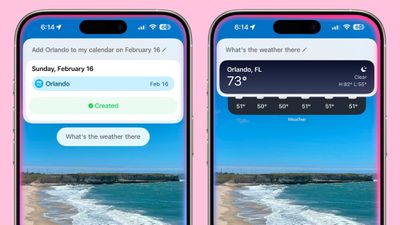
Siri is also able to maintain context between requests, so you can refer to something in a previous request, and Siri will understand what you're talking about. So if you use Siri to create a calendar event, you can then just ask "What will the weather be like there?" and Siri knows where "there" is.
Improved Voice
Siri has a new, more natural sounding voice.
Type to Siri
There is a built-in Type to Siri feature so you don't need to speak to Siri to interact with the personal assistant. To use it, double tap on the bottom of the iPhone or iPad to bring up a text bar, and then from there, just type in your request.
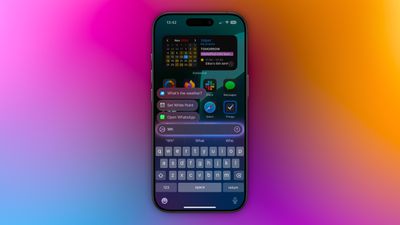
Type to Siri can be used in the same way as speaking to Siri, and Siri is able to provide information without speaking aloud. It is a useful feature for public situations where you're not able to speak and do not want to have Siri speaking back to you.
Siri on the Mac
While this guide focuses on the iPhone and the iPad, the new, smarter Siri is also available on the Mac. Type to Siri can be enabled in the Settings app, and it can be assigned to a shortcut, such as pressing the Command button twice.
Apple Product Knowledge
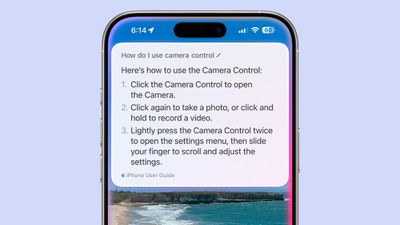
Apple taught Siri about all of its products, so if you want to know how to use a feature or how to complete a task, you can ask Siri for help. Siri can provide step-by-step directions on using iPhone, iPad, and Mac features.
ChatGPT Integration (iOS 18.2)
In iOS 18.2, ChatGPT integration is available with Siri. If a user asks something that Siri is not capable of handling, ChatGPT can provide a response instead, so long as the user gives permission.
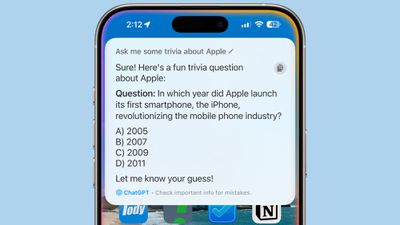
Siri can tap into ChatGPT, and then relay ChatGPT's response with no need to switch apps or use other tools.
The Siri ChatGPT integration can essentially be used to do anything you can do with the ChatGPT app or ChatGPT on the web, it's simply an easier way to get to ChatGPT.
Object Identification
For anything on your screen, such as an image, you can ask Siri a question about it. If you have a photo of a plant, for example, asking "What is this?" will prompt Siri to send a screenshot over to ChatGPT, and ChatGPT will attempt to provide context.
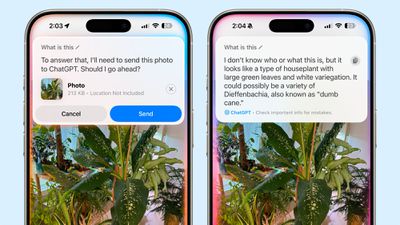
This works with images on the web, your photos, the something you're viewing through the Camera app, text, and more.
ChatGPT can be used to describe a scene, which is useful for people who might have issues with sight. Opening the Camera app, activating Siri, and asking "What is this?" will provide a detailed description of whatever is in front of you.
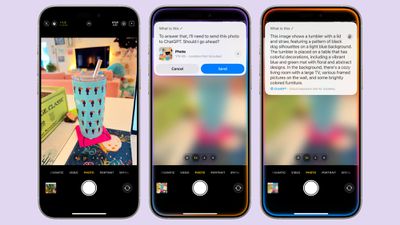
The option to send images to ChatGPT from screenshots is distinct from the Siri onscreen awareness feature that Apple plans to implement in the future.
Info From Documents
For emails, documents, PDFs, and more, ChatGPT can provide a summary. When you ask "Can you summarize this?" Siri will send a screenshot or the entire document, which includes full PDFs. It's a useful feature for getting a quick overview of the content of a long document.
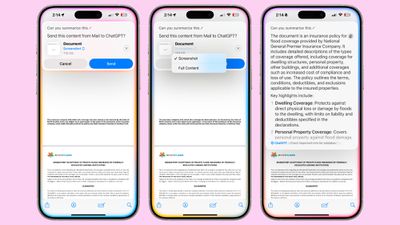
For long PDFs or documents, you'll want to tap on the arrows to make sure the full document is sent to ChatGPT rather than just a screenshot.
Rather than asking for a summary, you can instead ask a specific question about a document. If you're looking at an insurance policy, you can ask "What are the limits of this policy?" or "What are the exclusions?" to get more tailored information.
Checking Spelling and Grammar
If you've written an email, rather than selecting it and using Writing Tools to check it for spelling and grammar errors, you can ask Siri to take a look, and Siri will send a screenshot to ChatGPT. "Can you look this over for errors?" works as a command for this feature.
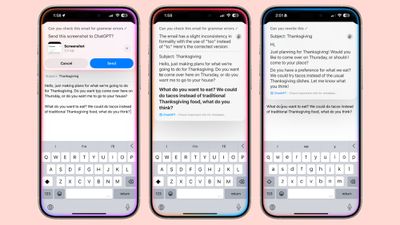
ChatGPT can also be used for rewriting and refining what you've written, but note that this is not the same as Apple's own Writing Tools.
Generating Text and Images
ChatGPT can generate text from scratch based on prompts that it is given. You can, for example, ask Siri to ask ChatGPT to write a poem or compose a polite letter to a friend, and ChatGPT will create something from scratch.
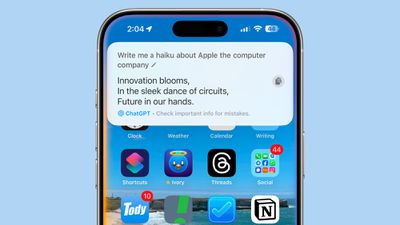
Some sample requests you can use:
- Write me a poem about Apple
- Create a song about Google
- Help me write a letter to my friend
- Write three paragraphs about orange cats
- Write me a social media post about Thanksgiving
- Rewrite this to be more concise
- Create a bedtime story about a dragon
If you have ChatGPT write something for you, you can tap on the copy icon to copy it to the clipboard to paste it into Notes, Messages, a document, or an email.
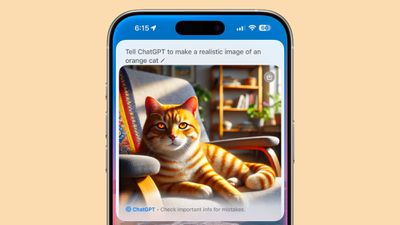
You can also create images. Using the Dall-E 3 engine, ChatGPT can make realistic AI-generated images, something that can't be done with Apple Intelligence. For image requests, it's easiest to tell Siri to "Tell ChatGPT to make an image of [thing you want an image of]," because if you just ask Siri to make an image or generate an image, it will often bring up web images.
Answering Questions
One of the best use cases for ChatGPT through Siri is getting answers for queries that are just a bit too complex for Siri. Questions that Siri can't handle will be handed over to ChatGPT with your permission, but you can also force Siri to use ChatGPT instead of the internal Siri engine by amending questions with "Ask ChatGPT."
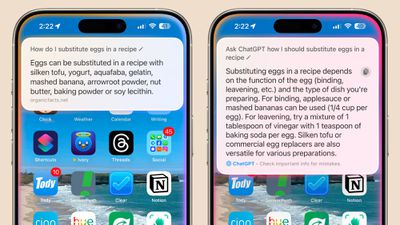
For example, a question about what battery an Xbox controller uses will source Wikipedia and not ChatGPT, but specifically "Ask ChatGPT what battery an Xbox controller uses" will prompt Siri to present the question to ChatGPT.
ChatGPT's answers can sometimes be more informative. Asking Siri how to replace eggs in a recipe just gives you alternatives, but ChatGPT's answer for the same question provides the amount of an ingredient you might want to add to equate to an egg.
Some example queries that Siri will automatically consult ChatGPT on:
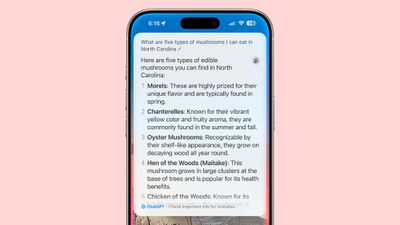
- What are five types of edible mushrooms in North Carolina?
- What should I pack for a beach trip in winter?
- What are must see places in Paris?
- What should I do this weekend?
- I want a recipe for banana bread
- Give me instructions on cutting a mango
- When is avocado season?
- Suggest good songs for a quiet Friday night
- What's a good indoor activity to do when it's raining?
Other Things You Can Ask ChatGPT To Do
- Write code
- Debug code
- Get help with homework
- Do calculations, translations, conversions, and more
- Generate gift ideas
- Come up with names for businesses, pets, characters, and more
- Create trivia questions or riddles
- Plan trips
- Create meal plans
- Get recipes for ingredients you have
- Generate jokes
- Suggest movies, TV shows, and books based on specific parameters
- Summarize TV shows and movies
- Generate drawing/writing prompts
While Siri can do all of these things with ChatGPT's help, the lack of continuity with the Siri version of ChatGPT makes it difficult to complete tasks that are not one-off requests. Creating a meal plan, for example, works better with the actual ChatGPT interface because you can have more of a conversation rather than relying on a single request.
ChatGPT Settings and Privacy
ChatGPT integration has to be turned on, and after that, each request requires user permission. There is an option to turn off the extra permission by toggling off the "Confirm ChatGPT Requests" option.
The toggle can be accessed by opening up the Settings app, choosing Apple Intelligence, and then tapping on ChatGPT. With the feature disabled, Siri will not ask each time before sending information to ChatGPT.
Siri will, however, always ask permission before sending a file to ChatGPT even with the confirm requests feature turned off.
As for privacy, no login is required to use ChatGPT, and neither Apple nor OpenAI log your requests. But if you sign in with a paid account, ChatGPT can keep a copy of requests.
ChatGPT - Free vs. Paid
ChatGPT integration includes a limited number of requests that use ChatGPT-4o, the latest version of ChatGPT, for free. After those are used up, ChatGPT integration uses 4o Mini, which is less advanced and takes up less resources.
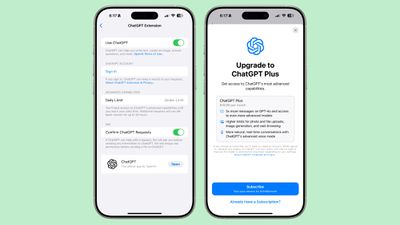
ChatGPT Plus subscribers get more ChatGPT-4o requests. ChatGPT Plus is priced at $20 per month, and iPhone users who don't already have ChatGPT Plus can sign up right from the Apple Intelligence section of the Settings app.
Apple users essentially have access to ChatGPT's basic plan, so requests that use advanced capabilities reset every 24 hours. With this plan, two images per day can be generated.
ChatGPT vs. Apple Intelligence
There is overlap between what's possible with Apple Intelligence and what you can do with ChatGPT integration, but there are some distinctions. Apple Intelligence has Writing Tools for rewriting and editing what you've already written, but ChatGPT can write content from scratch.
Image Playground, Image Wand, and Genmoji allow you to generate images, but Apple Intelligence won't generate realistic looking images. Instead, styles are limited to those that look animated or sketched. ChatGPT will generate lifelike images, though.
Apple Intelligence can be used to summarize documents, but only when you select text and select the Summarize option from Writing Tools. Apple Intelligence can't answer more specific questions about PDFs and documents, so ChatGPT does have an edge for that kind of query.
ChatGPT Limitations
When you ask ChatGPT a question through Siri, you need to make sure to read the answer right away because it doesn't stay on the screen long. Apple does not keep a record of it, either.
If you're logged into ChatGPT, there is a history in your OpenAI account, but if you're not logged in, there's no way to save information that you've received from ChatGPT, and there's no log.
Other Chatbots
Apple has only added ChatGPT integration right now, but support for Google Gemini is planned in the future.
Siri Apple Intelligence Features Coming in 2025
There are several Siri features that are still in development, with Apple planning to add these capabilities to Siri. Timing isn't concrete yet, but rumors suggest we'll see them in the iOS 18.5 update around May.
Personal Context
Siri will be able to keep track of your emails, messages, files, photos, and more, learning more about you to help you complete tasks and keep track of what you've been sent.
- Show me the files Eric sent me last week.
- Find the email where Eric mentioned ice skating.
- Find the books that Eric recommended to me.
- Where's the recipe that Eric sent me?
- What's my passport number?
Onscreen Awareness
Siri will be able to tell what's on your screen and complete actions involving whatever you're looking at. If someone texts you an address, for example, you can tell Siri to add it to their contact card. Or if you're looking at a photo and want to send it to someone, you can ask Siri to do it for you.
Deeper App Integration
Siri will be able to do more in and across apps, performing actions and completing tasks that are just not possible with the personal assistant right now. We don't have a full picture of what Siri will be capable of, but Apple has provided a few examples of what to expect.
- Moving files from one app to another.
- Editing a photo and then sending it to someone.
- Get directions home and share the ETA with Eric.
- Send the email I drafted to Eric.
The Next Siri Phase
After all of the Siri Apple Intelligence features have been implemented in iOS 18, Apple plans to unveil the next-generation Siri, which will rely on large language models. An LLM version of Siri is already in development, and it will be able to better compete with chatbots like ChatGPT.
LLM Siri will be able to hold ongoing conversations, and it will be more like speaking with a human. Large language model integration will let Siri perform more complex tasks, and in the future, Siri likely won't need to rely on ChatGPT.
The updated version of Siri will replace the current version of Siri in the future. Apple is expected to announce LLM Siri in 2025 alongside the introduction of iOS 19, but the update likely won't launch until spring 2026.
Apple Intelligence Privacy
Apple Intelligence was designed with privacy in mind, and many requests are handled on-device. All personal context learning, for example, is done with on-device intelligence and nothing leaves your iPhone or iPad.
For requests that need the processing power of a cloud server, Apple is using Private Cloud Compute on Apple silicon machines to handle complex tasks while preserving user privacy. Apple promises that data is not stored and is used only for user requests.
Apple Intelligence Compatible Devices
Apple Intelligence is available on the iPhone 15 Pro, the iPhone 15 Pro Max, all iPhone 16 models, the iPad mini with A17 Pro chip, all iPads with an Apple silicon chip, and all Macs with an Apple silicon chip.
Read More
We've shared detailed guides on Genmoji and Image Playground already, plus we have an overall guide on the full set of Apple Intelligence features.
- Genmoji in iOS 18.2
- Image Playground in iOS 18.2
- Apple Intelligence Image Wand: All the New Features in iOS 18.2
- Everything You Need to Know About Apple Intelligence
- Everything New in iOS 18.2
Release Date
iOS 18.2 and iPadOS 18.2 with Image Wand integration will be coming in December, with Apple likely planning for a December 9 software release.