Tim Hardwick

Tim is a Senior Editor at MacRumors and has been writing for the site since 2016. Formerly a magazine journalist, his work has appeared in over 30 newsstand print publications and online brands covering a range of topics, from the latest trends in technology to the mysteries of ancient history.
Based in the UK, Tim's current role at MacRumors involves editorial oversight and how tos, in addition to covering daily news and contributing occasional reviews. Tim can be reached at tim@macrumors.com, Telegram (@waxeditorial) or Twitter.
Based in the UK, Tim's current role at MacRumors involves editorial oversight and how tos, in addition to covering daily news and contributing occasional reviews. Tim can be reached at tim@macrumors.com, Telegram (@waxeditorial) or Twitter.
Tim Hardwick's Articles
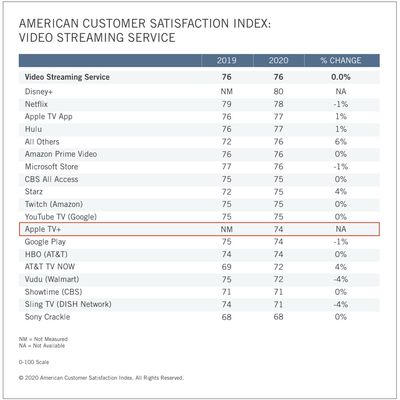
Apple TV+ Ranked 12th in Customer Satisfaction Index for Video Streaming Services
Apple TV+ is considered to be "below average" for both value and original programming when it comes to customer satisfaction, according to new data shared today by the American Customer Satisfaction Index (ACSI).
Apple debuted in the 2019-20 U.S. annual index in 12th position, with a customer satisfaction rating of 74 out of 100, tying both Google Play and HBO.
Topping the index was...
Read Full Article • 74 comments

Google Maps Rolls Out COVID-19 Transit and Driving Route Alerts
Google has rolled out several new transit features to Google Maps on iOS and Android that aim to help users travel safely as lockdown measures gradually ease in some countries following the coronavirus pandemic.
The latest version of Google Maps alerts users whose travel will be impacted by COVID-19 restrictions, including requirements like wearing a mask on public transport and whether a...

Apple Webpage Promotes Unique Benefits of iPhone and Apple Watch Integration
Apple has launched a new webpage showcasing the tight integration between iPhone and Apple Watch. "Add them together. Multiply their power," reads the minisite, which highlights the benefits that come with using the two devices in tandem.
Get directions on iPhone and a tap on your wrist when you need to turn. Check your heart rate on Apple Watch and track it over the last hour, day, month,...

When Will iOS 14 Be Released?
Apple typically previews its next-generation operating system for iPhones and iPads during its annual Worldwide Developers Conference in San Jose, California in early June, and then officially releases it to the public sometime in September. Apple won't be following its usual formula this year for obvious reasons.
Three months into 2020, the global health crisis had caused governments...

How to Use Your iPhone or iPad Camera on Your Mac
Apple's Continuity Camera feature in macOS Mojave and later allows you to use your iPhone or iPad like a camera extension for your Mac. In other words, you can use your iOS device to scan documents or take a photo of something nearby, and it will appear instantly on your Mac.
Continuity Camera works in many Mac apps, including Finder, Preview, Notes, Mail, Messages, TextEdit, Keynote,...

How to Transfer Files Between Your Mac and Your iPhone and iPad
This article shows you how to share files between your Mac and your iPhone and iPad using the new route in Catalina.
How to Transfer Files From Mac to iPhone/iPad
How to Transfer Files From iPhone/iPad to Mac
How to Delete Files on Your iPhone and iPadWith the release of macOS Catalina, Apple said goodbye to iTunes and broke it up into separate Mac apps for Music, Podcasts, and Apple TV,...

How to Mirror Your iPhone or iPad Screen on Apple TV or a Smart TV
Did you know that you can use the AirPlay feature on an iPhone or iPad to mirror its display on an Apple TV or AirPlay 2-compatible smart TV? This article shows you how.
Before following the steps below, make sure that your iOS device is connected to the same Wi-Fi network as your Apple TV or AirPlay 2-compatible smart TV.
Not sure if your smart TV supports AirPlay 2? You can find the...

How to Change Your Mac's Computer Name
When you set up a new Mac, macOS gives the computer a generic name that includes the first name of the owner – "Tim's MacBook Pro," for example. This default name is used for identifying the device when someone wants to AirDrop a file to you, when you're connected to a local network, when you're using the Find My app, and more. But there are good reasons why you might want to change it.
...

How to Schedule Sleep and Wake Times for Your Mac
If you frequently forget to turn off your Mac at night, you may find its built-in sleep scheduling feature useful.
Using this Energy Saver option, you can set your Mac to automatically go to sleep at a particular time each day, on weekdays, weekends, or only on specific days.
You can also set your Mac to start up, so it's ready and waiting for you to get to work in the morning. To...

How to Enable LED Flash Notifications on iPhone and iPad Pro
Unlike some Android phones, Apple's iPhones don't have a dedicated notification LED that lights up when you get a call, text, or other alert. What iPhones do include is an optional Accessibility feature for the deaf and hard of hearing that blinks the rear camera flash and provides a visual cue for incoming notifications.
Even if your hearing is fine, having a visual cue for incoming alerts...

Apple Watch ECG Feature Likely Coming Soon to Japan and Brazil
Apple has included an ECG function in new Apple Watch models since 2018, providing users in select territories with the ability to measure the electrical activity of their heart. Apple now appears to be ready to extend the ECG feature to Brazil and Japan, based on recent government filings.
According to MacOtakara, Japan's Pharmaceuticals and Medical Devices Agency (PMDA) recently updated...

Gmail App's Dark Mode Finally Completes Rollout on iPhone and iPad
After months of delay and inconsistent functionality, the rollout of Google's long-awaited dark mode for Gmail appears to have finally completed on iPhone and iPad.
Version 6.0.200519 of Gmail, which propagated through the App Store overnight, includes the following release notes:
Pro Tip (if you haven't noticed): You can now switch between dark or light theme after upgrading to iOS 13. Or...

How to Choose When Safari Clears the Downloaded File List on Your Mac
In Apple's Safari browser in macOS, the Downloads pane is where you can find information on things you've downloaded from the web to your Mac's hard drive.
You can access it from the Safari toolbar by clicking the Show Downloads button, or by selecting View -> Show Downloads from the menu bar. Once it's open, you can click and drag it to a more convenient location on your screen.
The...

Sony's Unreleased WH-1000XM4 Headphones Show Up in Walmart Listing
When it comes to wireless over-ear Bluetooth audio, Sony's flagship WH-1000MX3 headphones are among the best on the market, and the launch of the fourth-generation model appears to be right around the corner.
A new listing (since removed) on Walmart's website, spotted on Thursday by Android Police, reveals pretty much all there is to know about Sony's upcoming WH-1000MX4 noise canceling...

How to Change Where Screenshots Are Saved on Your Mac
When you take a screenshot on your Mac – using the Shift-Command-3 shortcut to capture the whole screen, or Shift-Command-4 to capture a portion of it – the image files are saved straight to your desktop. This can result in this:
If you'd like to change that default save location to somewhere different, simply follow the steps below.
If you're running macOS Mojave or later, you can press ...

Apple Releases 'Dear...' Documentary Series Inspired by Apple Watch Ad
Apple today released its new "Dear..." biographical documentary series, which profiles famous figures through letters sent to them by people whose lives have been impacted and changed through their work.
The series features stars including Oprah Winfrey, Gloria Steinem, Spike Lee, Lin-Manuel Miranda, Yara Shahidi, Stevie Wonder, Aly Raisman, Misty Copeland, Big Bird, and more.
"Dear..."...

How to Transfer All Your Photos and Videos From Facebook to Google Photos
Facebook has just made a photo transfer tool globally available that lets account holders easily download all their pictures and videos from the social network to Google Photos.
Previously, the majority of Facebook users wanting to download their media from the site had to do it manually. From today, however, users with a Google Photos account can automate the job, and Facebook says more...

Google Search Starts Highlighting Results Directly on Webpages
Google has added a new content highlighting feature to its search engine that aims to make it easier to find key information on webpages, reports SearchEngineLand (via The Verge).
The feature works with Google's Featured Snippets, which appear at the top of search results. Clicking a snippet takes the user to the source webpage, but now the browser automatically scrolls down the page to...

Signal Encrypted Messenger Rolling Out New Face-Blurring Tool for Shared Images
Encrypted messaging app Signal is rolling out a new face-blurring feature that automatically locates and blurs faces in images shared over the platform.
In a blog post announcing the update, Signal co-founder Moxie Marlinspike explained that the tool was a response to a surge in traffic, spurred by ongoing protests around the world against racism and poice brutality.
Many of the people and ...

Apple Hires Amazon Video Executive to Lead Apple TV+ Sports Division
Apple has reportedly hired Amazon Video sports content executive James DeLorenzo to work on its Apple TV+ on-demand video service.
DeLorenzo has led Amazon Video's sports division since 2016 and has also been senior vice president of the company's Audible subscription audiobook service, according to his LinkedIn profile. DeLorenzo will head the sports division for Apple TV+, according to Reco...