

We've been seeing signs of an upcoming chatbot-based support feature in the Apple Support app, and it turns out it's already in testing. Some iPhone users have access to an early preview of the feature.

In the Apple Support app, the Support Assistant early preview can be accessed by tapping on a dedicated "Chat" button that's been added to the navigation bar. Only a select number of iPhone users will see the chat option at this time.
Tapping on the Chat button launches the new Support Assistant. It opens with a splash screen that gives you insight into how to use it. The Support Assistant is able to answer questions about your Apple products and services, providing troubleshooting information, answering questions about device features, and more.
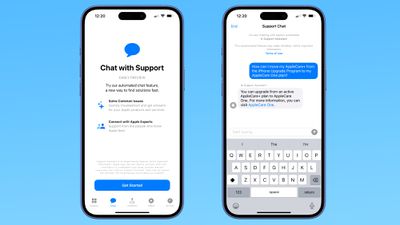
The chatbot will not answer questions that are not related to Apple support, so you can't ask it details about upcoming products.
If the AI can't solve your issue, there is an option to escalate a chat to one of Apple's support staff for additional help.
Apple warns that the Support Assistant is an experimental feature that "may make mistakes." The company recommends that users verify important information.
It is not clear how long the early preview will last, and Apple hasn't provided details on when the Support Assistant will launch for all users.
Thursday January 15, 2026 10:56 am PST by Joe Rossignol
While the iPhone 18 Pro and iPhone 18 Pro Max are not expected to launch for another eight months, there are already plenty of rumors about the devices.
Below, we have recapped 12 features rumored for the iPhone 18 Pro models, as of January 2026:
The same overall design is expected, with 6.3-inch and 6.9-inch display sizes, and a "plateau" housing three rear cameras
Under-screen Face ID...
Friday January 16, 2026 7:07 pm PST by Joe Rossignol
Apple plans to upgrade the iPad mini, MacBook Pro, iPad Air, iMac, and MacBook Air with OLED displays between 2026 and 2028, according to DigiTimes.
Bloomberg's Mark Gurman previously reported that the iPad mini and MacBook Pro will receive an OLED display as early as this year, but he does not expect the MacBook Air to adopt the technology until 2028 at the earliest.
A new iPad Air is...
Thursday January 15, 2026 11:19 am PST by Joe Rossignol
Apple today updated its trade-in values for select iPhone, iPad, Mac, and Apple Watch models. Trade-ins can be completed on Apple's website, or at an Apple Store.
The charts below provide an overview of Apple's current and previous trade-in values in the United States, according to the company's website. Most of the values declined slightly, but some of the Mac values increased.
iPhone
...
Friday January 16, 2026 12:12 pm PST by Joe Rossignol
In select U.S. states, residents can add their driver's license or state ID to the Apple Wallet app on the iPhone and Apple Watch, and then use it to display proof of identity or age at select airports and businesses, and in select apps.
The feature is currently available in 13 U.S. states and Puerto Rico, and it is expected to launch in at least seven more in the future.
To set up the...
Sunday January 18, 2026 3:51 pm PST by Joe Rossignol
iOS 27 is still many months away, but there are already plenty of rumors about new features that will be included in the software update.
The first beta of iOS 27 will be released during WWDC 2026 in June, and the update should be released to all users with a compatible iPhone in September.
Bloomberg's Mark Gurman said that iOS 27 will be similar to Mac OS X Snow Leopard, in the sense...
I'm sure this will work as well as the other AI slop chat agents every company is trying to use instead of paying a human who can actually assist you with the matter at hand.
Wooo, it’s time to get stoked for the best-in-class Support app taking things to a whole new level with a game-changing integration with Apple Intelligence. Now customers can access the Apple Support Standard Operating Procedure without ever having to pick-up the phone:
1. Restart you device. 2. Force reboot your device. 3. Reset Network Settings. 4. Reset All Settings. 5. Erase and Set Up as New 6. Collect screen recordings and logs for an RTA to Engineering by a Senior Advisor 7. Senior Advisor submits RTA to Engineering 8. Within 48 hr, receive a response that Engineering is aware of the issue, keep your device up to date, and no further troubleshooting will be provided 9. Thank you for contacting Apple Support. Have a nice day.
Apple warns that the Support Assistant is an experimental feature that "may make mistakes." The company recommends that users verify important information.
What exactly qualifies as “important information”? And how is this information supposed to be verified by the user?















