Beats Launches iPhone 16 Cases in New Sunrise Pink and Twilight Blue Colors
Back in September as part of the iPhone 16 launch, Apple's Beats brand surprisingly launched cases for new iPhone lineup, available in four colors and featuring MagSafe and Camera Control support.
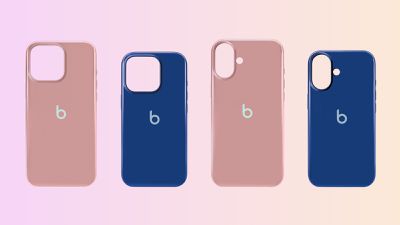
Beats today is expanding its case lineup with two additional colors, Sunrise Pink and Twilight Blue, with the new cases including the iconic Beats logo in the center of the rear rather than the MagSafe alignment guides seen on the original versions.
The cases are made of a polycarbonate back with flexible sidewalls for shock absorption, and they feature a glossy scratch-resistant exterior coating and a soft microfiber interior. Camera Control support is enabled via a sapphire crystal button coupled to a conductive layer to transmit finger movements to the button on the phone.
The two new colors of cases are available for all four models in the iPhone 16 lineup, and are priced at $49. They're available through Apple's online store starting today, and will be at Apple Store retail locations starting tomorrow.
Popular Stories
Apple is set to unveil new iPhone 18 Pro and iPhone 18 Pro Max models on Wednesday, September 9, and the devices are expected to feature a design that's largely similar to the iPhone 17 Pro models, with a peppering of enhancements inside. Major changes are not expected until next year, when Apple is expected to introduce a radically redesigned 20th-anniversary iPhone.
If you're thinking of...
Apple's biggest event of the year is almost here, and all eyes are on Cupertino. With the first foldable iPhone expected to headline Apple's "Surprise and Shine" event on Wednesday, September 9, at 10:00 a.m. Pacific Time, the rumor mill has been running full throttle, fuelled by the biggest single design change in the life of the iPhone.
To get you up to speed, here's a quick reference...
Ahead of the announcement of the Apple Watch Series 12 and Ultra 4 later this week, code in the watchOS 27 and iOS 27 betas points to a series of new features for the product line.
The information comes from a new post from MacRumors forums member "pdfu." The findings include:
New "Readiness" app: An all-new separate Watch app referred to in code as "Readiness," distinct from the...