Philips Hue App Gains Support for Widgets

The Philips Hue app was today updated to version 5.14, adding support for widgets. Hue widgets can be added to the Home Screen, Lock Screen, or Today View, and can be used for controlling lights and other accessories.
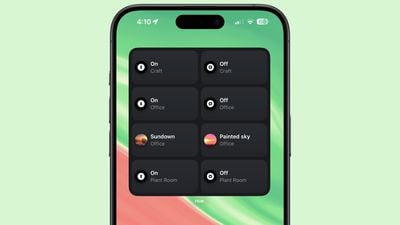
philips hue app widget
Widgets come in small, medium, and large sizes with the largest widget supporting eight actions or scenes. ‌Widgets‌ can be tailored to the entire Hue bridge or to lights that are located in specific rooms, so you can set up a widget for each of your rooms if desired.

Each of the actions can be customized, and you can choose a scene from the Hue app or opt to turn lights in certain rooms on or off. Dimming lights is not an option, nor is activating automations, but some of that can be done through scenes. Adding a widget is a useful way to control frequently accessed lights or scenes.

Along with widgets, the update also improves Friends of Hue switches like the Lutron Aurora Smart Bulb Dimmer Switch. Switches now support time-based light, the scene cycle mode, the natural light scene, and more.

The Philips Hue app can be downloaded from the App Store for free. It is designed to work with Philips Hue lights and accessories.

Popular Stories

airpods pro 3 purple

New, Higher End AirPods Pro Coming This Year

Tuesday January 20, 2026 9:05 am PST by
Apple is planning to debut a high-end secondary version of AirPods Pro 3 this year, sitting in the lineup alongside the current model, reports suggest. Back in September 2025, supply chain analyst Ming-Chi Kuo reported that Apple is planning to introduce a successor to the AirPods Pro 3 in 2026. This would be somewhat unusual since Apple normally waits around three years to make major...
smaller dynamic island iphone 18 pro Filip Vabrous%CC%8Cek

iPhone 18 Pro Leak: Smaller Dynamic Island, No Top-Left Camera Cutout

Tuesday January 20, 2026 2:34 am PST by
Over the last few months, rumors around the iPhone 18 Pro's front-panel design have been conflicted, with some supply-chain leaks pointing to under-display Face ID, reports suggesting a top-left hole-punch camera, and debate over whether the familiar Dynamic Island will shrink, shift, or disappear entirely. Today, Weibo-based leaker Instant Digital shared new details that appear to clarify the ...
iOS 27 Mock Quick

iOS 27 Will Add These 8 New Features to Your iPhone

Sunday January 18, 2026 3:51 pm PST by
iOS 27 is still many months away, but there are already plenty of rumors about new features that will be included in the software update. The first beta of iOS 27 will be released during WWDC 2026 in June, and the update should be released to all users with a compatible iPhone in September. Bloomberg's Mark Gurman said that iOS 27 will be similar to Mac OS X Snow Leopard, in the sense...

14 inch MacBook Pro Keyboard

MacBook Pro Buyers Now Facing Up to a Two-Month Wait Ahead of New Models

Sunday January 18, 2026 6:50 pm PST by
MacBook Pro availability is tightening on Apple's online store, with select configurations facing up to a two-month delivery timeframe in the United States. A few 14-inch and 16-inch MacBook Pro configurations with an M4 Pro chip are not facing any shipping delay, but estimated delivery dates for many configurations with an M4 Max chip range from February 6 to February 24 or even later. At...

Apple Logo Spotlight

Apple Expected to Unveil Five All-New Products This Year

Wednesday January 21, 2026 10:54 am PST by
In addition to updating many of its existing products, Apple is expected to unveil five all-new products this year, including a smart home hub, a Face ID doorbell, a MacBook with an A18 Pro chip, a foldable iPhone, and augmented reality glasses. Below, we have recapped rumored features for each product. Smart Home Hub Apple home hub (concept) Apple's long-rumored smart home hub should...

Top Rated Comments

alexandr Avatar
24 months ago
I run all my Hue lights through the Home app — can't stand the native Hue app, it's just blah. But good for them, I suppose.

Score: 8 Votes (Like | Disagree)
munpip214 Avatar
24 months ago
Why wouldn’t you just use the Home app/shortcuts for this? Seems like a waste of development effort
Score: 7 Votes (Like | Disagree)
coolfactor Avatar
24 months ago
That screenshot leaves me confused. It strikes me as a poor UX design. Very little distinction between "On" and "Off", and the themed scenes don't indicate their On/Off status at all. Am I confused?

Not a Hue user, so won't affect me, but seems like a missed opportunity to do a better job at the design.
Score: 6 Votes (Like | Disagree)
MacFan23 Avatar
24 months ago

Why wouldn’t you just use the Home app/shortcuts for this? Seems like a waste of development effort
People who have hue lights but not a HomeKit hub or any other smart home stuff?
Score: 5 Votes (Like | Disagree)
victorvictoria Avatar
24 months ago
At this point, I'm not buying any smart home devices or items that aren't HomeKit or Matter compatible. I'll stick with Meross lightbulbs for the time being.
Score: 4 Votes (Like | Disagree)
Neil Harrison Avatar
24 months ago
Widgets are blank. Can they improve the HomeKit integration
Score: 4 Votes (Like | Disagree)








































