New Apple ID Sign-In Options: Phone Number on File or Trusted Device
The upcoming iOS 17, iPadOS 17, and macOS Sonoma updates for the iPhone, iPad, and Mac include a couple of new sign-in methods for an Apple ID account.
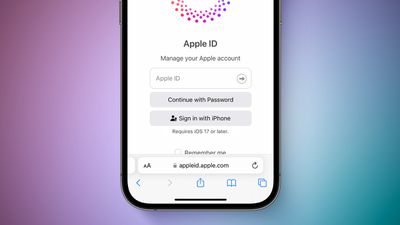
First, it is now possible to sign into an Apple ID with any phone number or secondary email address on file with the account. We were able to sign into an Apple ID with a phone number on the Apple ID website using a Mac running macOS Ventura, so it's unclear if this feature specifically requires the new software updates or is simply a backend change.
Second, starting with an iOS 17 update coming later this year, there will be a new Apple ID proximity sign-in feature. This will allow you to bring an existing signed-in and trusted iPhone or iPad into proximity with a new device being set up, pair the devices by scanning an on-screen "particle cloud," and complete sign-in automatically.
iOS 17, iPadOS 17, and macOS Sonoma also added passkey support to Apple IDs.
Apple announced that iOS 17 and iPadOS 17 will be released on Monday, September 18, while macOS Sonoma launches Tuesday, September 26.
Popular Stories
Update 10:04 a.m.: iOS 27 is rolling out now, though it may take a bit for all users to see it, so keep checking!
Apple is about to release iOS 27, which will finally deliver more advanced Siri AI capabilities as well as a variety of other refinements, improvements, and new features to iPhones. It's Apple's biggest software update of the year, and Apple announced at Wednesday's iPhone event...
Update — 10 a.m. Pacific Time: Apple has released iOS 27.
During its iPhone 18 Pro and iPhone Duo event last week, Apple announced that iOS 27 will be released widely on Monday, September 14.
iOS 27 should be available around 10 a.m. Pacific Time / 1 p.m. Eastern Time today via the Settings app, under General → Software Update.
Below, we have highlighted eight new features and...
As noted by Nicolas Lellouche, who writes for the French tech website Numerama, Apple has updated its tech specs pages for the iPhone 18 Pro and iPhone 18 Pro Max to clarify which models are equipped with its new C2 cellular modem and where.
Apple now says the iPhone 18 Pro has a C2 modem worldwide, while the iPhone 18 Pro Max uses the chip in every country except for the U.S.
According...























