

iOS 17 and macOS Sonoma Add Passkey Support to Your Apple ID - MacRumors
Skip to Content

iOS 17 and macOS Sonoma Add Passkey Support to Your Apple ID

Starting with iOS 17, iPadOS 17, and macOS Sonoma, users with an Apple ID will automatically be assigned a passkey, allowing them to sign into their Apple ID with Face ID or Touch ID instead of their password on various Apple sign-in pages, including icloud.com, appleid.apple.com, appstoreconnect.apple.com, and more.
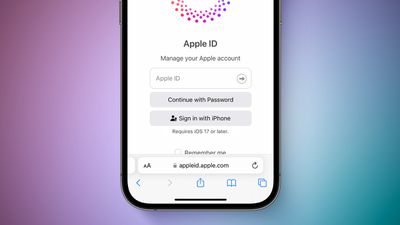
iOS 17 Passkey With Apple ID Feature 3

Passkeys are a more secure alternative to passwords. Apple explains:

A passkey is a cryptographic entity that's not visible to you, and it's used in place of a password. A passkey consists of a key pair, which—compared to a password—profoundly improves security. One key is public, registered with the website or app you're using. The other key is private, held only by your devices.

Passkey support for Apple IDs will also be available for third-party apps and websites that support the "Sign in with Apple" feature.

Users running beta versions of iOS 17, iPadOS 17, and macOS Sonoma can test this functionality on supported Apple sign-in pages starting today, but it does not yet appear to be available for everyone. All users with an Apple ID will be able to sign in with a passkey once the software updates are released to the public later this year.

Passkey support on the Apple ID page was spotted earlier by Twitter user @aaronp613.

Related Forums: iOS 17, iPadOS 17, macOS Sonoma

Popular Stories

iPhone Handoff iOS 27 Feature

T-Mobile to Charge $5 a Month for iOS 27 iPhone Handoff

Thursday September 10, 2026 3:58 pm PDT by
T-Mobile will charge customers $5 per month to use iPhone Handoff, an e-SIM feature that allows the same phone number to be used on two separate iPhones. iPhone Handoff requires carrier support, and at launch, only T-Mobile users in the U.S. and Deutsche Telekom users in Germany will be able to use it. T-Mobile says customers can use their number across two compatible iPhone models and...
iphone duo

IMAX Reacts to iPhone Duo's 1:1.4 Aspect Ratio Displays

Friday September 11, 2026 4:42 am PDT by
Production theater company IMAX has responded in a mixed way to Apple's embrace of a 1:1.4 aspect ratio on the iPhone Duo's inner and outer displays. The boxier ratio happens to be very close to the classic "full-frame" IMAX 1.43:1 aspect ratio, which comes from the geometry of the company's original 15-perforation/70mm film system. In response to an X post from someone wondering if we'll see...
iOS 27 Feature Dark

Apple Announces iOS 27 Release Date

Wednesday September 9, 2026 10:46 am PDT by
At its event today unveiling the iPhone 18 Pro, AirPods 5, Apple Watch Series 12, and more, Apple announced that iOS 27 will be released later this month. iOS 27 has already been available as a developer beta since June and as a public beta since July, and Apple today said that the update will be released for all users with a compatible iPhone model on Monday, September 14. iOS 27 is...

Top Rated Comments

Windoes Avatar
42 months ago

This is great for all people
Corrected
Score: 25 Votes (Like | Disagree)
42 months ago

Sounds like a very good idea, but what do you do to get support on a Windows machine?
You would scan the QR code displayed on the Windows device with your iPhone.
Score: 14 Votes (Like | Disagree)
42 months ago

Unfortunately on iOS, the backup to Face-ID for the iPhone's Keychain or PassKeys is the iPhone's passcode. So anyone that has access to your phone and knows the passcode, can use the phone's passcode to log-in to iCloud or Apple ID with this feature.
Anyone who has access to your phone and knows your passcode, can already view all your data on your device. They wouldn’t even need to log in to iCloud.
Score: 10 Votes (Like | Disagree)
42 months ago

“more secure alternative to passwords” that is… a pretty loaded claim

useful, necessary, probably the future: sure. more dummy-proof, quite likely. more secure… hmmmmmmm… wellllll…
Passkeys remove the biggest threat to passwords - phishing.
Score: 8 Votes (Like | Disagree)
ipedro Avatar
42 months ago

Unfortunately on iOS, the backup to Face-ID for the iPhone's Keychain or PassKeys is the iPhone's passcode. So anyone that has access to your phone and knows the passcode, can use the phone's passcode to log-in to iCloud or Apple ID with this feature.
This is a problem, I agree, but one that’s more of a cultural problem than a tech issue and is fairly easy to avoid.

People are so used to typing in their PIN every time they unlock their phone if they’re not using biometric unlock.

People need to be taught to never use their PIN in public and if they absolutely must, then guard it like you do your bank card PIN.

There could be some technology enabled backup solutions like adding a hierarchy of devices with more power over the others, whereas my home Mac can override my iPhone’s lock and revert security changes recently made by the iPhone.
Score: 8 Votes (Like | Disagree)
42 months ago
Unfortunately on iOS, the backup to Face-ID for the iPhone's Keychain or PassKeys is the iPhone's passcode. So anyone that has access to your phone and knows the passcode, can use the phone's passcode to log-in to iCloud or Apple ID with this feature.
Score: 8 Votes (Like | Disagree)











































