All iPhone 15 Models Support DisplayPort for Up to 4K HDR Video Output to External Display
The new iPhone 15, iPhone 15 Plus, iPhone 15 Pro, and iPhone 15 Pro Max all support DisplayPort for up to 4K HDR video mirroring and video output to an external display or TV, according to Apple's tech specs for the devices.
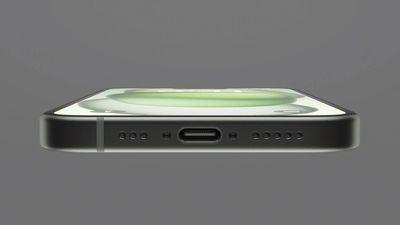
DisplayPort support is built into the USB-C port on all iPhone 15 models, meaning that the devices can output video at up to 4K/60Hz natively to a DisplayPort-equipped external display or TV with a supported USB-C to DisplayPort cable. Alternatively, you can use Apple's $69 USB-C Digital AV Multiport Adapter to mirror video from any iPhone 15 to an HDMI-equipped TV or display at up to 4K/60Hz, but HDR is not supported this way.
On previous iPhones with a Lightning port, video mirroring is limited to 1080p with Apple's Lightning-to-HDMI or Lightning-to-VGA adapters.
Unfortunately for fans of the Stage Manager feature on select iPad models, the iPhone does not yet offer an extended display mode.
Popular Stories
Apple today sent out invites for an experience in Los Angeles on Wednesday, October 28, and the "Pro and tell" tagline on the invitation likely means that the rumored MacBook models with touch-enabled OLED displays will stick with MacBook Pro branding instead of the once-rumored "MacBook Ultra" name.
The long-rumored "iPhone Ultra" ended up being named iPhone Duo, so speculation that Apple...
With just three days to go until the iPhone Duo is released, Apple is getting ready for the launch. Behind the scenes, the App Store now has screenshots of Apple's built-in apps running on the Duo. We've seen some apps in marketing materials, but images of the ones we haven't seen give us an idea of what it will be like using the iPhone Duo day to day.
Many apps are shown in landscape...
Some Apple retail employees have been told to warn customers against visiting to purchase an iPhone Duo without a pre-order on Friday, October 23.
Apple Store employees told MacRumors that they have been advised that there will likely be no iPhone Duo stock available for walk-in purchases on launch day. Staff have been instructed to discourage customers without pre-orders from coming in...







/https://forums.macrumors.com/proxy.php%3Fimage=https://www.allaboutcircuits.com/uploads/articles/Fig1m11292018.png&hash=fb2382316ebb59d0a99444eddd1586f4)










































![Apple Watch Ultra 3 Hits New Low Price With Amazon's $299 Discount [Updated]](https://images.macrumors.com/t/BXKI27vT0hWfumJQpYzf41rH3Mw=/112x112/article-new/2026/10/apple-watch-ultra-3-milanese.jpeg)



