Apple Releases New watchOS 10 Update for Public Beta Testers - MacRumors
Skip to Content

Apple Releases New watchOS 10 Update for Public Beta Testers

Apple today provided a new public beta of the upcoming watchOS 10 update, allowing the general public to test the Apple Watch software ahead of its launch. Today's beta corresponds with the seventh developer beta that Apple released yesterday.
Apple Watch Faces watchOS 10 Feature Iridescent
watchOS 10 can be downloaded after upgrading your iPhone to the public beta version of iOS 17 and after signing up on Apple's beta software website. With those criteria fulfilled, you can open up the Watch app on iPhone, go to General, select Software Update, and choose the watchOS 10 Public Beta option under Beta Updates. If you already have the beta, you can simply update.

With watchOS 10, Apple is making a major update to the Apple Watch interface with a focus on widgets. The Smart Stack, accessible with a turn of the Digital Crown, displays the information that you need most. What's available changes throughout the day and as the Apple Watch learns your usage habits.

Apple has updated almost all of the built-in apps with an information-forward design that allows for quicker interactions. Weather, Maps, Home, Messages, Activity, Heart Rate, Stocks, and more have all been overhauled.

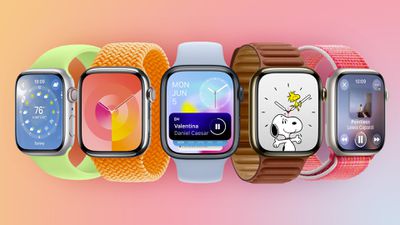
There are two new watch faces, including Palette and Snoopy. Snoopy features characters from the popular Peanuts cartoon, with the animations changing throughout the day. Palette shows the time in a variety of overlapping colors.

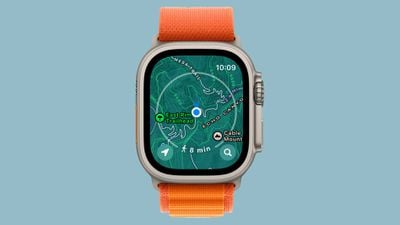
The Maps app has a topography view that shows elevation information, contour lines, hill shading, and points of interest to make it more useful on hikes and when out and about, and for cyclists, there are new advanced metrics, views, and experiences that work through a connection to Bluetooth-enabled cycling accessories.
watchos 10 maps app
The Mindfulness app has a new feature for logging moods and emotions, Group FaceTime audio calls are now supported, and NameDrop allows you to quickly exchange contact information with somebody just by holding your Apple Watch near someone's iPhone.

For more on everything new in the watchOS 10 update, we have a detailed watchOS 10 roundup.

Related Roundup: watchOS 26
Related Forum: Apple Watch

Popular Stories

watchos 26 gradient light

watchOS 26.4 Now Available With Workout Update and New Emoji

Tuesday March 24, 2026 10:02 am PDT by
Apple today released watchOS 26.4, the fourth major update to the watchOS 26 operating system that came out in September. watchOS 26.4 comes a month and a half after Apple released watchOS 26.3. watchOS 26.4 can be downloaded for free on an iPhone running iOS 26.4 by opening up the Apple Watch app and going to General > Software Update, or initiating an update in the Settings app on the...
apple watch se red

Apple Releases watchOS 5 and watchOS 8 Updates to Keep FaceTime and iMessage Running on Older Apple Watches

Tuesday March 24, 2026 3:30 pm PDT by
Apple today released watchOS 5.3.10 and watchOS 8.8.2 for older Apple Watch models that are not able to run the current watchOS 26 update. watchOS 5.3.10 is available for the Apple Watch Series 1, Series 2, Series 3, and Series 4, while watchOS 8.8.2 is available for the Apple Watch Series 3, Series 4, Series 5, Series 6, Series 7, and original Apple Watch SE. According to Apple's release...
General visionOS watchOS and tvOS Betas Feature Redux

Apple Releases First watchOS 26.5, tvOS 26.5 and visionOS 26.5 Betas

Monday March 30, 2026 10:38 am PDT by
Apple today provided developers with the first betas of upcoming watchOS 26.5, tvOS 26.5, and visionOS 26.5 betas for testing purposes. The software comes a week after Apple launched the 26.4 versions of each platform. The software updates are available through the Settings app on each device, and because these are developer betas, a free developer account is required. There's no word on...

Top Rated Comments

tobefirst ⚽️ Avatar
35 months ago
I assumed the Snoopy watch face would be pretty pedestrian like the Mickey/Minnie one or the Toy Story ones, but it is dope. There are so many different animations it does that it is a pleasure to use.

I wish it had complications, but with the new widget view, I can get by without them.
Score: 6 Votes (Like | Disagree)
O.N.Y.X Avatar
35 months ago
[S]The Maps app has a topography view that shows elevation information, contour lines, hill shading, and points of interest to make it more useful on hikes and when out and about, and for cyclists, there are new advanced metrics, views, and experiences that work through a connection to Bluetooth-enabled cycling accessories.[/S]

Unfortunately not. Works only in very few, selected-by-Apple areas, and is therefore another „show off“ feature for a minority of Apple users.
Score: 5 Votes (Like | Disagree)
Apple Fan 2008 Avatar
35 months ago
Snoopy watch faces are the best feature.
Score: 4 Votes (Like | Disagree)
MonkeySpank158 Avatar
35 months ago
Im loving the new Snoopy watch face, very tastefully done.
Score: 3 Votes (Like | Disagree)
johnmarki Avatar
35 months ago

“NameDrop allows you to quickly exchange contact information with somebody just by holding your Apple Watch near someone's iPhone.”

This phrasing makes it sound like NameDrop won’t work watch-to-watch. Is that the case? If so, major bummer …

b&
I noticed that veribiage as well, but I looked and NameDrop will work the following ways according to Apple:

iPhone to iPhone
iPhone to Apple Watch
Apple Watch to Apple Watch


https://www.apple.com/watchos/watchos-preview/

https://www.apple.com/ios/ios-17-preview/

Attachment Image

Attachment Image
Score: 3 Votes (Like | Disagree)
35 months ago

by design. Need to sell more watches with irrelevant improvements.
Eh … yes but no.

All modern software development goes through phases that start with high resource consumption (CPU and energy both) and end with minimized consumption. Part comes from logging types of things — recording what is and isn’t happening. And part comes from developers who know full well the dangers of premature optimization. In short, the first version is the one that’s easiest for you to write; then, you look to see where the worst performance is and update that with code that might not be quite as human-friendly but is more computer-friendly.

Though you get better with experience, it’s still not uncommon for somebody to be surprised with which parts are actually slow / battery-hungry and which parts aren’t. Nor is this surprising, as compliers are constantly being improved, so something that you needed to hand-massage a great deal last time might not need any optimization whatsoever this time.

b&
Score: 3 Votes (Like | Disagree)