Apple Highlights Vision Pro's Accessibility Features with Head, Wrist, and Index Finger Controls - MacRumors
Skip to Content

Apple Highlights Vision Pro's Accessibility Features with Head, Wrist, and Index Finger Controls

Apple's new Vision Pro headset is controlled with eye and hand movements by default. For those with accessibility needs, however, features like VoiceOver, Pointer Control, and Dwell Control will allow users to interact with visionOS in other ways. In a WWDC session for developers, Apple has provided more details about these features.
Vision Pro Pointer Control

Pointer Control

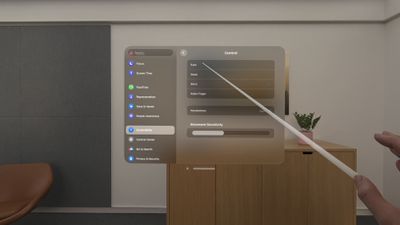
Pointer Control will allow the Vision Pro to be controlled based on head, wrist, or index finger position rather than eye tracking. Users will be able to adjust movement sensitivity to further fit their individual needs.

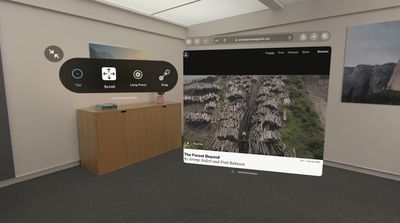
Dwell Control will provide on-screen options for Tap, Scroll, Long Press, and Drag, allowing for users to interact with the interface without using their hands.
Vision Pro Dwell Control

Dwell Control

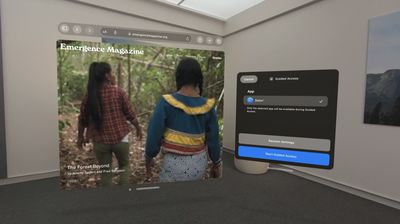
There's also Guided Access, an accessibility feature that will promote focus by restricting visionOS to a single app at one time. Apple says the feature aims to minimize distractions by backgrounding other apps, removing non-essential UI elements, and suppressing hardware button events that could be distracting.
Vision Pro Guided Access

Guided Access

Apple's screen reader VoiceOver will be available on the Vision Pro. Users will be able to set up a VoiceOver shortcut in the Settings app on visionOS that allows for the feature to be activated with a triple press of the Digital Crown.

Vision Pro is launching in early 2024 in the U.S. for $3,499, and more details about the headset are available in our Vision Pro roundup. For more details about the accessibility features, check out Apple's WWDC session.

Related Roundup: Apple Vision Pro
Buyer's Guide: Vision Pro (Neutral)
Related Forum: Apple Vision Pro


Popular Stories

M5 Vision Pro Thumb 2

Apple Has Given Up on the Vision Pro After M5 Refresh Flop
Wednesday April 29, 2026 11:31 am PDT by
Apple has all but given up on the Vision Pro after the M5 model failed to revitalize interest in the device, MacRumors has learned. Apple updated the Vision Pro with a faster M5 chip and a more comfortable band in October 2025, but there were no other hardware changes, and consumers still weren't interested. The Vision Pro has been criticized for its high price tag and its uncomfortable...



General visionOS watchOS and tvOS Betas Feature Redux

Apple Seeds watchOS 26.5, tvOS 26.5 and visionOS 26.5 Release Candidates

Monday May 4, 2026 10:11 am PDT by
Apple today provided developers with the release candidate versions of upcoming watchOS 26.5, tvOS 26.5, and visionOS 26.5 betas for testing purposes. The software comes a week after Apple released the fourth betas for each platform. The software updates are available through the Settings app on each device, and because these are developer betas, a free developer account is required....
visionOS 26 Feature

Apple Releases visionOS 26.5

Monday May 11, 2026 10:01 am PDT by
Apple today released visionOS 26.5, the fifth update to the visionOS 26 operating system that launched in September. visionOS 26.5 comes close to two months after Apple released visionOS 26.4. ‌visionOS 26‌.5 can be downloaded on all Vision Pro headsets by navigating to the Settings app, selecting the General section, and choosing the Software Update option. To install an update, the...


Top Rated Comments

TheYayAreaLiving 🎗️ Avatar
39 months ago
Check out the gestures in VisionOS. You can also create custom ones.

Score: 8 Votes (Like | Disagree)
39 months ago

I wonder how the device works with people who have strabismus/lazy eye.

For example, my right eye is my dominate eye. However, when I switch between my left and right eye my alignment changes a bit. Not too noticeable in public but I do not have binocular vision despite getting surgery to fix the cosmetic issue.
Apple should plan onto having a "pirate" edition (SE) to be sold for half price. Jokes aside, I am certain that they will find a way to address various issues of significance to a minority of their customer base. Eye asymmetries are quite frequent and their algorithms might already account for that.
Score: 5 Votes (Like | Disagree)
madebybela Avatar
39 months ago
so many possibilities with an AR interface and they choose to port over the awful iOS settings layout.
Score: 5 Votes (Like | Disagree)
klasma Avatar
39 months ago
Index finger light saber!
Score: 4 Votes (Like | Disagree)
39 months ago
Good to know about the various input options.
Score: 2 Votes (Like | Disagree)
39 months ago

I don't understand how DWELL controls work?
Dwell selects an item by looking at it for a couple of seconds, instead of a look and tap.
Score: 2 Votes (Like | Disagree)