Skip to Content

Google Announces Support for Account Passkeys

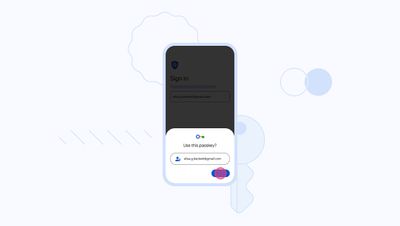
Google today announced that it is introducing support for passkeys, providing an easier and more secure login method for Google accounts. Apple integrated passkeys into iOS with the launch of iOS 16, and it is also available in iPadOS 16.1 and later as well as macOS Ventura.
passkeys google
Passkeys are an industry standard developed by the FIDO Alliance and the World Wide Web Consortium, so Google's passkey integration will work on Apple devices as well as on other devices that support the feature. As Google notes:

Last year — alongside FIDO Alliance, Apple and Microsoft — we announced we would begin work to support passkeys on our platform as an easier and more secure alternative to passwords. And today, ahead of World Password Day, we've begun rolling out support for passkeys across Google Accounts on all major platforms. They'll be an additional option that people can use to sign in, alongside passwords, 2-Step Verification (2SV), etc.

Passkeys are both easier to use and more secure than passwords because they let users sign in to apps and sites the same way they unlock their devices: With a fingerprint, a face scan or a screen lock PIN. Passkeys are also resistant to online attacks like phishing, making them more secure than things like SMS one-time codes.

To create a passkey, Google users can log in to their Google account and then choose the "Create a passkey" option. Passkeys on iOS and Mac devices sync with iCloud Keychain for security purposes, and logins are authenticated with Face ID or Touch ID. This protects you from being locked out of your account in case you lose your devices, and makes it easier for you to upgrade from one device to another.

Google says the switch to passkeys will take time, which is why traditional passwords and two-step verification will still work for Google Accounts.

Google is just one of several companies to implement support for passkeys in recent months, with other supporting apps and websites including PayPal, Best Buy, eBay, Dashlane, and Kayak.


Popular Stories

Apple Event Logo

Apple Released Seven New Products Today

Wednesday March 11, 2026 7:05 am PDT by
Starting today, the seven new Apple products that were announced last week are available at Apple Stores and beginning to arrive to customers. The colorful MacBook Neo and all of the other new products are on display at most Apple Store locations around the world starting today. Apple Stores have inventory of the new products for both walk-in customers and Apple Store pickup, but...
iOS 27 Mock Quick

10+ New Features Coming in iOS 27

Friday March 13, 2026 2:13 pm PDT by
We're only three months away from Apple's WWDC 2026 event, which will see the company unveil iOS 27. With the fully revamped version of Siri possibly delayed until September, iOS 27 is shaping up to be the update we wanted iOS 26 to be. There will be new Apple Intelligence features, updates for the iPhone Fold, and more, with the latest rumors summarized below. Foldable iPhone Features...
Apple 50 Years of Thinking Different

Apple Announces 50th Anniversary Plans

Thursday March 12, 2026 6:10 am PDT by
Apple today announced that it will celebrate the company's 50th anniversary over the coming weeks, but it has yet to reveal any specific plans. Apple was founded on April 1, 1976, so the company will turn 50 on April 1, 2026. "While Apple is known for looking forward, this milestone offers a special moment to reflect on the journey that has brought the company here, to celebrate the...

Top Rated Comments

38 months ago

So, with Passkeys tied to an already authenticated login on a device I control, how do I log in to my Google account on a device I do not control, like a work computer or a university lab computer? Do passwords still work for that?
You would scan the QR code displayed on the device you don’t control. It will authenticate using the passkey stored in your phone’s keychain.
Score: 16 Votes (Like | Disagree)
anshuvorty Avatar
38 months ago
Let’s go!!! Let’s get rid of these freakin passwords!!
Score: 14 Votes (Like | Disagree)
cocky jeremy Avatar
38 months ago
Macrumors going to add this option for themselves?
Score: 11 Votes (Like | Disagree)
38 months ago

It may be more convenient, but is Face ID access really more secure than a password+2FA? It’s easy to think of scenarios that defeat fingerprint or Face ID.
Face ID isn’t required. You can use a device passcode to authenticate with passkeys.

Face ID would be a better option as it would prevent someone seeing your passcode or it being captured by security cameras when you’re typing it in.

Passkeys are not just more convenient, they’re more secure also.
Score: 10 Votes (Like | Disagree)
38 months ago
I use 1Password for everything, and set up two-factor auth for any site I can do it for.

I haven't dipped my toe into any passkeys yet, but I'll start with something low stakes like Kayak or whatever before I start messing around with my Google account -- especially since it's sounding like there are some rough edges here.
Score: 8 Votes (Like | Disagree)
Will Co Avatar
38 months ago

Let’s go!!! Let’s get rid of these freakin passwords!!
Right? Why are so few websites supporting this stuff. Everyone should be all over this by now....
Score: 8 Votes (Like | Disagree)