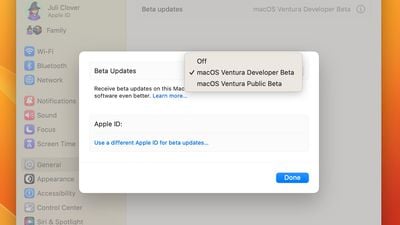
Apple today released the second beta of macOS Ventura 13.4 to its public beta testing group, allowing the general public to try out the software ahead of its official launch. The second macOS Ventura 13.4 public beta comes a week after Apple seeded the first public beta.
Public beta testers can download the macOS 13.3 Ventura update from the Software Update section of the System Preferences app after installing the proper profile from Apple's beta software website.
The latest macOS Ventura 13.4 beta adds a new beta installation method where developers and public beta testers can opt-in to receive beta updates without the need for a profile to be installed. For developers, an Apple ID needs to be associated with a developer account to get access to a developer beta, while public beta testers need to sign up on Apple's public beta website with their Apple ID and then elect to receive beta updates using the System Settings app.
Work on macOS Ventura is winding down as Apple prepares to shift its focus to macOS 14, the as-of-yet-unnamed next-generation version of macOS that we expect to see introduced this June at WWDC.
Sunday September 13, 2026 3:00 am PDT by Eric Slivka
Update 10:04 a.m.: iOS 27 is rolling out now, though it may take a bit for all users to see it, so keep checking!
Apple is about to release iOS 27, which will finally deliver more advanced Siri AI capabilities as well as a variety of other refinements, improvements, and new features to iPhones. It's Apple's biggest software update of the year, and Apple announced at Wednesday's iPhone event...
Monday September 14, 2026 9:00 am PDT by Joe Rossignol
Update — 10 a.m. Pacific Time: Apple has released iOS 27.
During its iPhone 18 Pro and iPhone Duo event last week, Apple announced that iOS 27 will be released widely on Monday, September 14.
iOS 27 should be available around 10 a.m. Pacific Time / 1 p.m. Eastern Time today via the Settings app, under General → Software Update.
Below, we have highlighted eight new features and...
Tuesday September 15, 2026 1:43 am PDT by Tim Hardwick
Apple today announced a new subscription initiative that turns paid iCloud+ subscriptions into a broader services bundle in more than 100 countries.
In select countries, Apple says every paid iCloud+ plan, including the cheapest 50GB tier, now includes Apple TV and Apple Arcade "at no additional cost," while family sharing extends the storage, TV and Arcade access to up to five people....
Personally I prefer a solid bug-free new OS every two or three years, I don't need a yearly upgrade. Although I have a fast computer (Mac Studio) and Ventura 13.3.1 I see too often beachballs.
[SPOILER="macOS Ventura 13.4 Beta 2 Release Notes"] Apple Studio Display ('https://developer.apple.com/documentation/macos-release-notes/macos-13_4-release-notes#Apple-Studio-Display') Known Issues ('https://developer.apple.com/documentation/macos-release-notes/macos-13_4-release-notes#Known-Issues')
* Apple Studio Display firmware update starts showing progress but never completes. (107287354) Workaround: To install other updates including future macOS Beta Updates, click “More info…” in Software Update Settings, uncheck Apple Studio Display firmware update, and click “Install Now.”
* Fixes a regression in macOS Ventura 13.3 where a security check causes bookmark resolution to fail when the path contains Unicode characters stored with composed normalization. As an example, this prevented files in Finder from opening when double-clicked. (107550080)
[/SPOILER]
MacOS 13.4 beta 2
* Safari Version 16.5 (18615.2.5.11.2) * System Firmware Version: 8422.120.55 (M1 based Macs) * Darwin Kernel Version 22.5.0: Sun Apr 2 19:24:16 PDT 2023; root:xnu-8796.120.31~10/RELEASE_ARM64_T8103 arm64
MacOS 13.4 beta 1
* Safari Version 16.5 (18615.2.1) * System Firmware Version: 8422.120.33 (M1 based Macs) * Darwin Kernel Version 22.5.0: Fri Mar 17 14:38:40 PDT 2023; root:xnu-8796.120.16~15/RELEASE_ARM64_T8103 arm64