Apple plans to release iOS 16.2 in December, according to Bloomberg's Mark Gurman and a report about the update enabling 5G support in India. The update remains in beta testing for now, with many new features and changes already uncovered.
iOS 16.2 introduces a number of new features, including Apple's new whiteboard app Freeform, two new Lock Screen widgets for Sleep and Medications, the ability to hide the wallpaper and notifications on the iPhone 14 Pro's always-on display, Live Activities enhancements, a rearchitected Home app, and more.
Freeform App
iOS 16.2 includes Apple's new digital whiteboard app Freeform on the iPhone. The app provides an infinite canvas for you to draw on and insert sticky notes, text boxes, shapes, photos, videos, links, PDFs, and more. The app is also available on the iPad and the Mac, and you can collaborate with others in real time via FaceTime and iMessage.
Freeform is more useful on the iPad given the device supports the Apple Pencil, but you can still use a capacitive stylus on the iPhone.
Two New Lock Screen Widgets
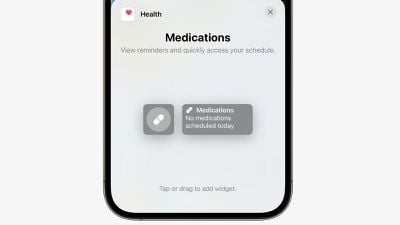
There are two new Lock Screen widgets for Sleep and Medications on iOS 16.2. With the Sleep widget, you can view your most recent sleep session and sleep stages, while the Medications widget can let you quickly access your medication schedule.
New Always-On Display Options
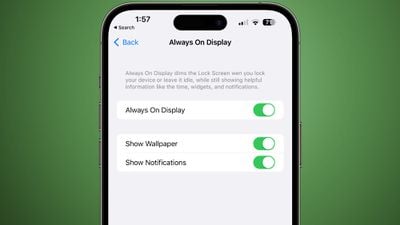
Starting with iOS 16.2, you can hide the wallpaper and notifications in always-on display mode on the iPhone 14 Pro and iPhone 14 Pro Max. This results in the Lock Screen having a solid black, minimal appearance in always-on mode, similar to Android.
The new "Show Wallpaper" and "Show Notifications" toggles are located in the Settings app under Display & Brightness → Always On Display.
Live Activities: Sports Scores via Apple TV App
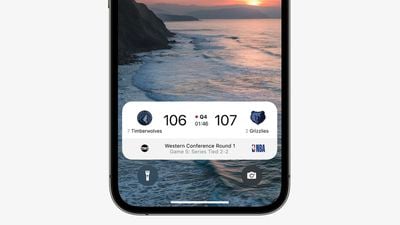
iOS 16.2 adds Live Activities support for sports scores via the Apple TV app. The feature allows iPhone users to view live scores of MLB, NBA, and Premier League games at a glance on the Lock Screen, and in the Dynamic Island on iPhone 14 Pro models.
During a Premier League match, for example, the Dynamic Island shows a live-updating scoreboard with the number of goals scored by each club. When long pressed, the Dynamic Island expands to show the time elapsed and play-by-play action. When an iPhone 14 Pro is locked, and on all other iPhone models, the score is shown in a Lock Screen banner.
To test the feature with an iPhone on the iOS 16.2 beta, open the TV app and tap on the "Follow" button for a supported game. Apple says the feature is available for NBA and Premier League games for users in the U.S. and Canada, and for MLB games for users in the U.S., Canada, Australia, U.K., Brazil, Mexico, Japan, and South Korea.
Live Activities: More Frequent Updates
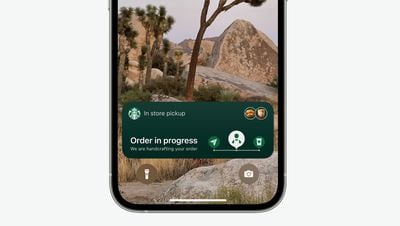
Live Activities will update more frequently on iOS 16.2 when a new "More Frequent Updates" option is enabled, allowing users to view more up-to-date information, but Apple warns this setting can drain your iPhone's battery faster.
It's unclear what the refresh interval is for Live Activities currently, but the new option will be even faster, which would be useful for tracking the arrival of an Uber vehicle or a Starbucks delivery order once those apps support the feature.
New Home App Architecture
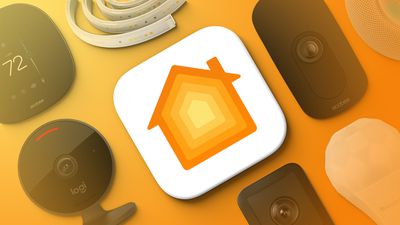
After updating to iOS 16.2 and opening the Home app, an update to the app is available with new underlying architecture. Apple says the new architecture improves the app's performance, efficiency, and reliability for controlling smart home accessories. This comes after the Home app gained support for Matter accessories in iOS 16.1.
Unintentional Emergency SOS Call Reporting
If you accidentally trigger an Emergency SOS phone call, iOS 16.2 lets you report the incident to Apple and share iPhone diagnostics.
5G in India
iOS 16.2 will enable support for 5G networks in India on the iPhone 12 and newer, starting with carriers Airtel and Reliance Jio.