iOS 16.1 to Feature iCloud Shared Photo Library, Key Sharing in Wallet App, and Apple Card Savings Account

Apple today seeded the iOS 16.1 Release Candidate to developers ahead of the update's expected release next week. The release notes for the update confirm that iOS 16.1 enables iCloud Shared Photo Library, the ability to share keys in the Wallet app via apps like Messages and WhatsApp, and the Apple Card's new savings account option.
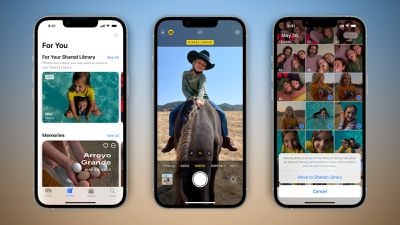
ios 16 icloud shared photo library feature
iCloud‌ Shared Photo Library will make it easier for you to share photos with your family members or friends in the Photos app. The feature will let you and up to five other people add, edit, or remove photos in a shared library accessible via iCloud.

Last week, Apple announced that Apple Card users will be able to open a new "high-yield" savings account from Goldman Sachs and have their Daily Cash cashback rewards automatically deposited into it, with no fees, no minimum deposits, and no minimum balance requirements. Users will be able to manage the savings account in the Wallet app.

iOS 16.1 also features Live Activities support in third-party apps, a Clean Energy Charging option in the United States, support for Matter accessories in the Home app, Apple Fitness+ workouts without an Apple Watch, Reachability support for the Dynamic Island, bug fixes for the Messages app and using a VPN with CarPlay, and more.

Apple's full release notes for iOS 16.1:

This update introduces iCloud Shared Photo Library making it easy to keep your family photos up to date. This release also adds support for third party apps in Live Activities, support for Apple Fitness+ on iPhone even if you don’t have an Apple Watch, and includes other features and bug fixes for your iPhone.

iCloud Shared Photo Library
- Separate library for seamlessly sharing photos and videos with up to five other people
- Setup rules allow you to easily contribute past photos based on start date or people in the photos when you set up or join a library
- Library filters for quickly switching between viewing the Shared Library, your Personal Library, or both libraries together
- Shared edits and permissions let everyone add, edit, favorite, caption, and delete photos
- Sharing toggle in Camera lets you choose to send photos you take straight to the Shared Library, or enable a setting to share automatically when other participants are detected nearby using Bluetooth

Live Activities
- Live Activities from third party apps are available in the Dynamic Island and on the Lock Screen for iPhone 14 Pro models

Fitness+
- Apple Fitness+ is supported on iPhone even if you don’t have an Apple Watch

Wallet
- Key sharing enables you to securely share car, hotel room, and other keys in Wallet using messaging apps such as Messages and WhatsApp
- Savings account enables Apple Card customers to grow their Daily Cash by depositing it in a high yield savings account

Home
- Matter, the new smart home connectivity standard, is supported enabling a wide variety of smart home accessories to work together across ecosystems

Clean Energy Charging
- New setting that can try to reduce your carbon footprint by selectively charging when lower carbon emission electricity is available

Books
- Reader controls are automatically hidden as you start reading

This update also includes bug fixes for your iPhone:
- Deleted conversations may appear in the conversations list in Messages
- Dynamic Island content is not available when using Reachability
- CarPlay may fail to connect when using a VPN app

iOS 16.1 is expected to be released on Monday, October 24 alongside iPadOS 16.1 and macOS Ventura.


Related Forum: iOS 16

Popular Stories

m5 macbook pro deal

Why You Shouldn't Buy the Next MacBook Pro

Tuesday February 10, 2026 4:27 pm PST by
Apple is planning to launch new MacBook Pro models as soon as early March, but if you can, this is one generation you should skip because there's something much better in the works. We're waiting on 14-inch and 16-inch MacBook Pro models with M5 Pro and M5 Max chips, with few changes other than the processor upgrade. There won't be any tweaks to the design or the display, but later this...

iOS 26

Apple Releases iOS 26.3 and iPadOS 26.3

Wednesday February 11, 2026 10:07 am PST by
Apple today released iOS 26.3 and iPadOS 26.3, the latest updates to the iOS 26 and iPadOS 26 operating systems that came out in September. The new software comes almost two months after Apple released iOS 26.2 and iPadOS 26.2. The new software can be downloaded on eligible iPhones and iPads over-the-air by going to Settings > General > Software Update. According to Apple's release notes, ...
Apple Logo Zoomed

Apple Expected to Launch These 10+ Products Over the Coming Months

Tuesday February 10, 2026 6:33 am PST by
It has been a slow start to 2026 for Apple product launches, with only a new AirTag and a special Apple Watch band released so far. We are still waiting for MacBook Pro models with M5 Pro and M5 Max chips, the iPhone 17e, a lower-cost MacBook with an iPhone chip, long-rumored updates to the Apple TV and HomePod mini, and much more. Apple is expected to release/update the following products...
iPhone 16e Bottom Crop

Apple Reportedly Unveiling a New iPhone Next Week

Tuesday February 10, 2026 1:51 pm PST by
Apple plans to announce the iPhone 17e on Thursday, February 19, according to Macwelt, the German equivalent of Macworld. The report said the iPhone 17e will be announced in a press release on the Apple Newsroom website, so do not expect an event for this device specifically. The iPhone 17e will be a spec-bumped successor to the iPhone 16e. Rumors claim the device will have four key...
Apple Logo Black

Apple Acquires New Database App

Wednesday February 11, 2026 6:44 am PST by
Apple acquired Canadian graph database company Kuzu last year, it has emerged. The acquisition, spotted by AppleInsider, was completed in October 2025 for an undisclosed sum. The company's website was subsequently taken down and its Github repository was archived, as is commonplace for Apple acquisitions. Kuzu was "an embedded graph database built for query speed, scalability, and easy of ...

Top Rated Comments

macsplusmacs Avatar
43 months ago
I'm looking forward to this:

iOS 16.1 enables iCloud Shared Photo Library

Because when I take a photo of our cat.
And my girlfriend takes a photo of our cat.

We will have all our cat photos in one place.

????
Score: 16 Votes (Like | Disagree)
TheYayAreaLiving ?️ Avatar
43 months ago
Can't wait for the Apple Card Savings Account option. This will come in very handy!
Score: 16 Votes (Like | Disagree)
thatJohann Avatar
43 months ago
They removed the dynamic island outline when on dark backgrounds, amen!
Score: 7 Votes (Like | Disagree)
silver25u Avatar
43 months ago

I hope they add albums to the iCloud Shared Photo Library soon. As it is right now, it is more of a stream than a library. (and Shared Albums don't give you the original resolution photos)
Or just stop reducing resolution on shared albums. I mean you're selling phones that can record in 4K and you're going to reduce it to 720p? Come on
Score: 3 Votes (Like | Disagree)
43 months ago
For those of you on macs that cannot update don’t be surprised if all of your photos disappear because they were all moved to the shared folder, which your older photos app will not see. Only your newer iPhone or on the web could you see them. Unless they fixed that bug.
Score: 3 Votes (Like | Disagree)
43 months ago

I'm looking forward to this:

iOS 16.1 enables iCloud Shared Photo Library

Because when I take a photo of our cat.
And my girlfriend takes a photo of our cat.

We will have all our cat photos in one place.

????
I'm actually excited for the shared photo library. Currently the only reason I use Google photos on my phone is because it has "Partner Share" where every photo I take it automagically shared with my wife. Once this launches I can drop google photos... a program which is annoying because it gets killed in the background often then I end up with out of sync photo libraries till I launch it again.
Score: 3 Votes (Like | Disagree)