Satechi Launches New USB-C Hub for M1 iPads
Popular accessory maker Satechi today announced the launch of the upgraded USB-C Mobile Pro Hub SD that's been developed for the M1 iPad Pro and M1 iPad Air models.
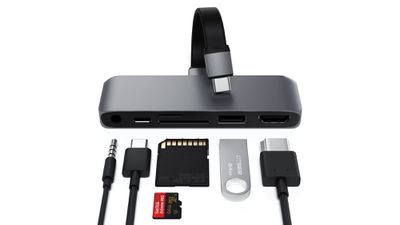
The hub includes a 60W USB-C port that can be used for charging an iPad or to charge USB-C devices that are connected to the iPad. It also comes with an HDMI port that supports up to a 4K 60Hz display, a USB A port, micro SD and SD card readers, and a 3.5mm headphone jack.
Satechi says that the SD and micro SD card slots are new to this version of the hub, as is an extension cable that allows for a more secure connection from the hub to the iPad as well as compatibility with iPad cases.
The USB-C Mobile Pro Hub SD can be purchased from the Satechi website for $70. Satechi is offering a 20 percent discount through 9/5 with the promo code SD20.
Note: MacRumors is an affiliate partner with Satechi. When you click a link and make a purchase, we may receive a small payment, which helps us keep the site running.
Popular Stories
Just two days before Apple's "Welcome home" experience in New York, Bloomberg's Mark Gurman has leaked several details about the new products set to be unveiled, including an all-new smart home hub, a HomePod mini 2, and a new Apple TV 4K.
Here is an all-in-one summary of the details shared by Gurman:Apple's home hub with a touch-enabled display will be named HomeView, seemingly confirming a ...
Apple may be planning to announce a new partnership with home security company ADT, alongside the introduction of its all-new smart home hub, according to several clues.
First and foremost, ADT has been posting "Low Voltage Technician" job listings in various U.S. cities since around July, but those hired for the position so far have been provided with very few details about their specific...
Apple today announced an upcoming product launch that will take place on Tuesday, October 13. We are expecting Apple's announcement to focus on new smart home products, including the long-rumored smart home hub, a new Apple TV 4K, and a refreshed HomePod mini.
Subscribe to the MacRumors YouTube channel for more videos.
The home hub is an all-new device that's like a cross between an iPad and...